There are a couple of different mode of WLAN operation. Following is the protocol sequence for the case we commonly use where we have an AP(Access Point) and the Device(client PC or Smart phone WLAN) gets connected to the access point.
The page follows one device from the moment it finds an AP to the moment it exchanges user data. The first section walks through scanning, authentication, association and the 4-way handshake, using a real capture. The second section looks at the timing of one data exchange, with and without fragmentation. The last section shows how a device in power save mode still receives the data that arrives for it while it sleeps.
- Overall Procedure
- Detailed Sequence of Initial Attach
- Data Transmission in Detail
- Sleeping Mode and Data Transmission
- Reference :
Overall Procedure
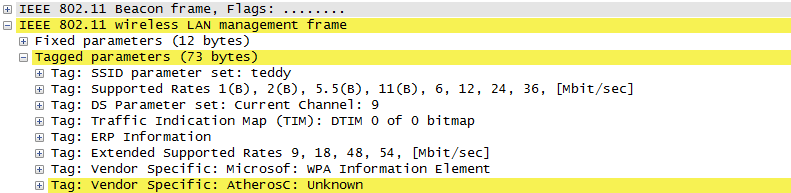
The AP is periodically transmitting (broadcasting) a special signal called Beacon signal saying "I am here.. I am here .. I am capable of this and that .. etc)". Basically this Beacon is like MIB/SIB + Physical Layer Sync channel in mobile communication (e.g, WCDMA/LTE etc). AP broadcast this Beacon several times per seconds. Beacon transmission interval is contained in one of Beacon information fields. (See Beacon data field)
When you turn on WLAN on your PC or Smart phone, the device first detect and decode this beacon signal and establish physical synchronization.
After the physical Sync get established, the device and WLAN network goes through the authentication process and then association process which is similar concept to the registration process in mobile phone communication.
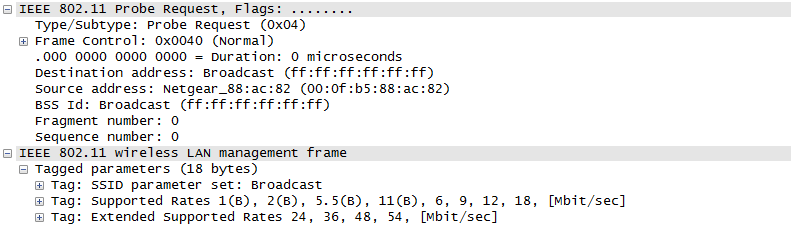
Speaking of scanning, there are two types of scanning. One is called Passive Scan and the other one is called Active Scan. As shown below, in Passive Scan the device scans and detect Beacon signal from AP and establish the sync based on the Beacon signal. In Active Scan mode, device broadcast Probe Request to all the APs (or any specific AP), if there is any AP that detect the probe request, it sends Probe Response to the device.
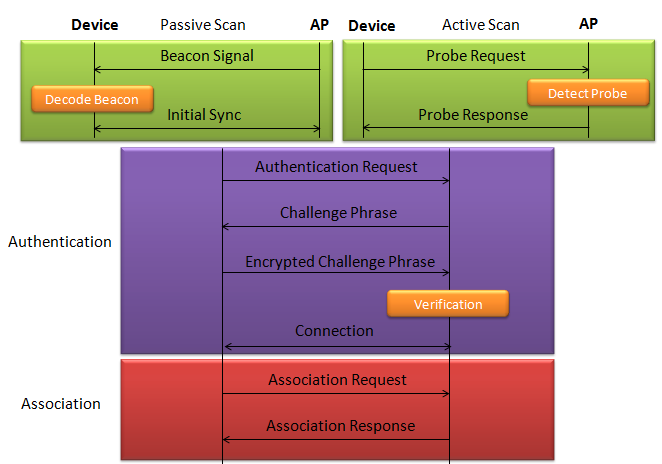
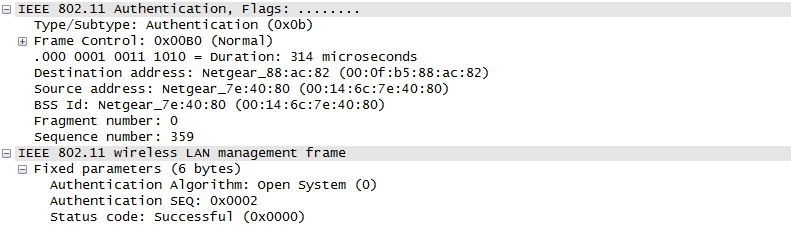
In the diagram above, the two boxes at the top are the two ways to find an AP. In Passive Scan, the device only listens for Beacon frames. In Active Scan, the device sends a Probe Request, and the AP answers with a Probe Response. The Authentication box shows the four-frame challenge exchange of Shared Key authentication, which belongs to the old WEP security. The capture further down shows a different case. Its Authentication step has only two frames, and the Authentication Algorithm field in them reads Open System. With WPA and WPA2, authentication is Open System, and the real security check happens later in the EAPOL 4-way handshake.
Once they went through Authentication and Association process, now the device can send and receive user data. Here comes a tricky issues for packet transaction especially when a party tries to transmit something. WLAN does not have concept of dedicated channel (e.g, as in UMTS mobile communication) and it does not have any well designed physical/MAC layer scheduing for each separate user. Basically they are allowed to transmit anytime they like, but in reality a device cannot transmit any time. If it transmit some data while another device is sending data, the data may get lost in the air or it would cause the data for other device get lost since the transmission from the two device would interfer each other. We need some special technique to prevent this problem happening. In Wired LAN, we use a techniq called CSMA/CD and in WLAN we use another technique called CSMA/CA. For the details of these technique, i will write a separate section.. but the goal/purpose of the technique is to make it sure that a device transmit the data when no other device is transmitting anything.
The trace log shown here came from Aircrack-NG Tutorial: WPA Packet Capture Explained. In general, Step (1)~(7) is common to most of WLAN attach process, but the steps after this would be different depending on the security option you set on the device and access point. (Refer to ePDG protocol sequence if you want to see an examples that is different from the step (8) and later)
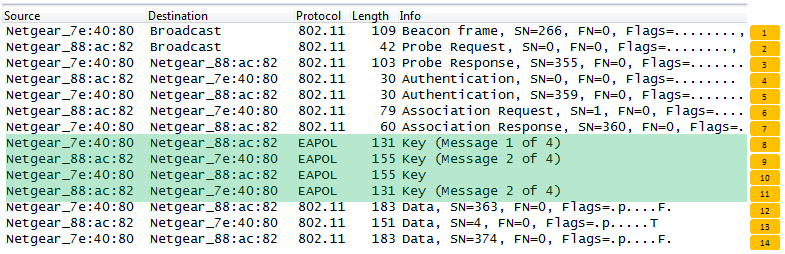
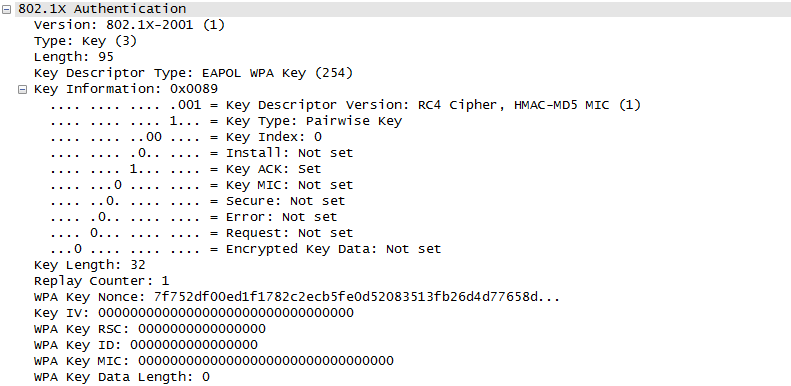
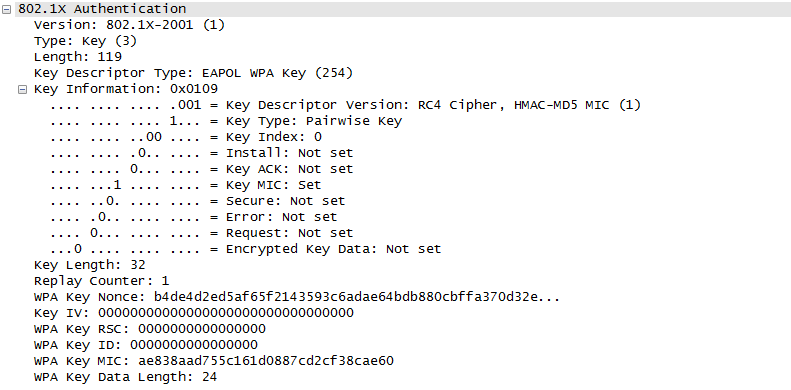
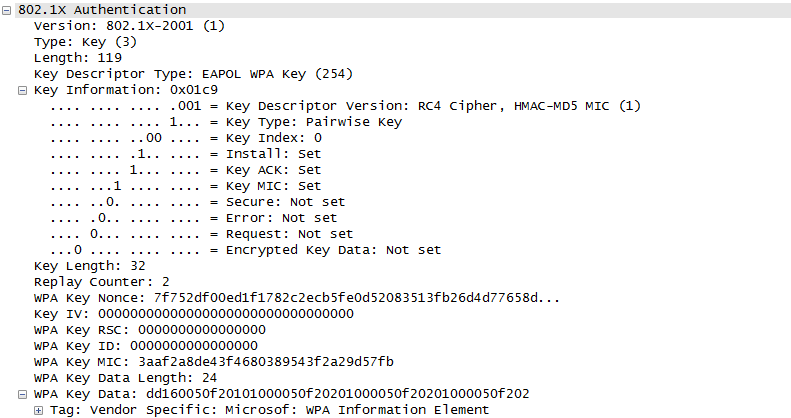
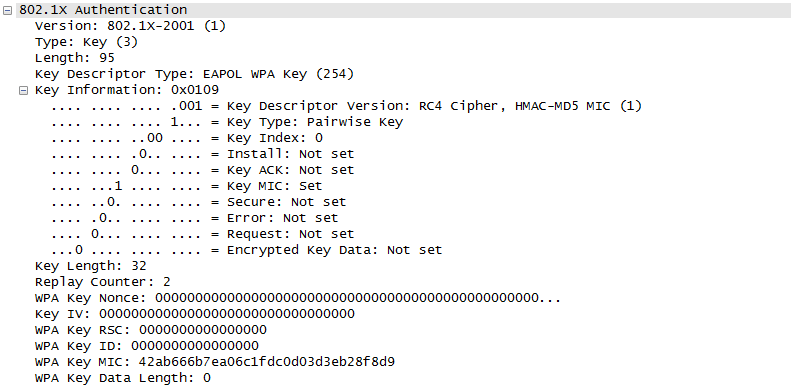
The capture above has 14 rows, and the number on the right of each row is the step number used below. Rows 1 to 7 are management frames with 802.11 in the Protocol column. Rows 8 to 11, highlighted in green, are EAPOL frames. Rows 12 to 14 are Data frames.
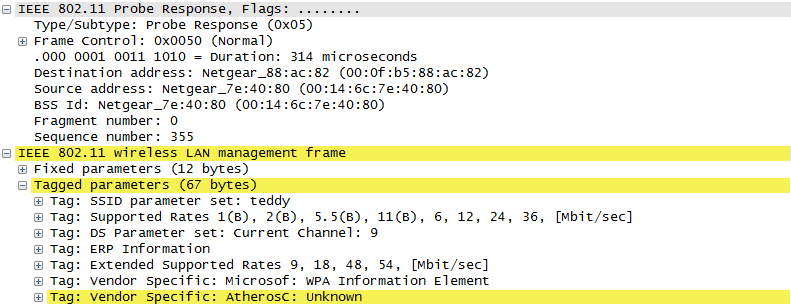
- Rows 1 to 3 : the Beacon from the AP, then the Probe Request from the device and the Probe Response from the AP. The Beacon and the Probe Request go to Broadcast, and the Probe Response goes to the device only.
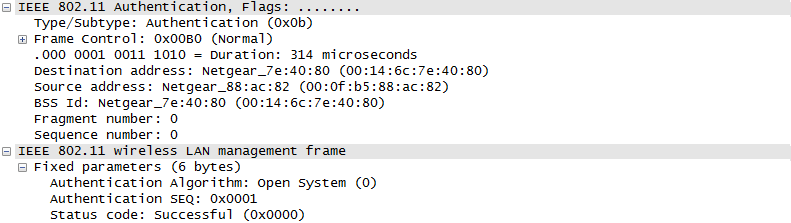
- Rows 4 and 5 : two Authentication frames, one in each direction. Step 4 shows Authentication Algorithm Open System and Authentication SEQ 0x0001.
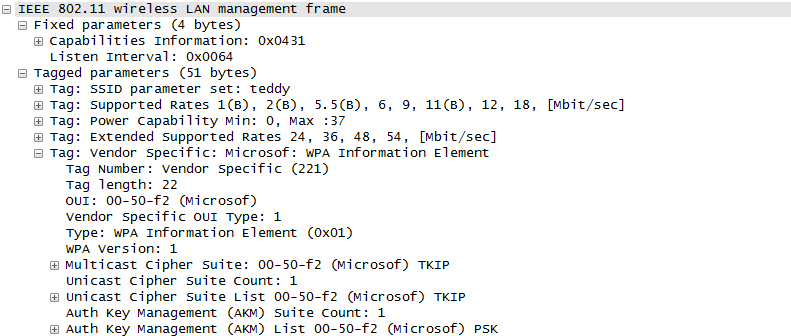
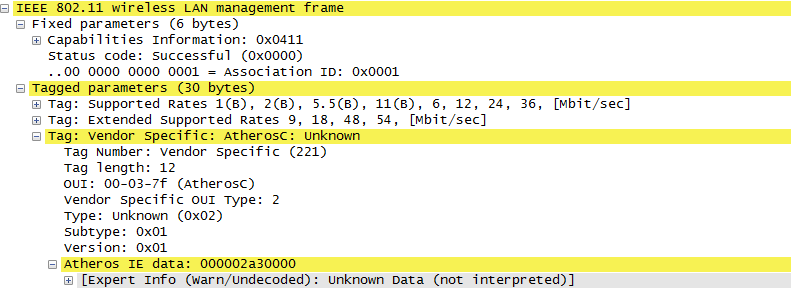
- Rows 6 and 7 : the Association Request from the device and the Association Response from the AP. After row 7, the device is associated with the AP.
- Rows 8 to 11 : the 4-way handshake that derives the encryption keys. Wireshark labels rows 10 and 11 as "Key" and "Message 2 of 4". By their order and direction, they are messages 3 and 4 of the handshake. Step 8 shows Key Descriptor Version 1, RC4 Cipher with HMAC-MD5 MIC, which means WPA with TKIP.
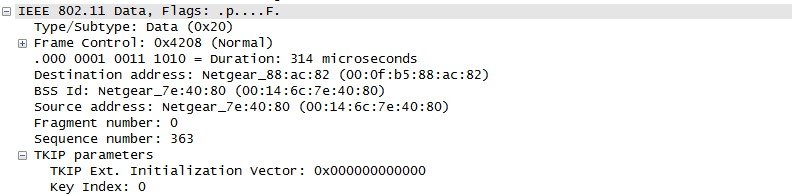
- Rows 12 to 14 : encrypted Data frames. Step 12 shows TKIP parameters in the frame, so the data uses the keys from the handshake.


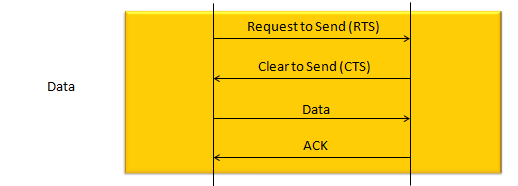
The techniqu that WLAN is using to transmit data without interfering other's is as shown below. The concept is simple. a device (let's call this a source device) send a short signal called RTS to another device (let's call this a destination device). If destination device successfully got the RTS, it is supposed to send CTS. If the source device successfully detect/decode the CTS, it transmit the main data. if the data is successfully recieved/decoded by the destication device, the destination device send 'ACK'. When RTS/CTS is used, this process repeats for each packet transmission. RTS/CTS is optional, and many devices use it only for frames longer than a configured RTS threshold. Without it, the exchange is only Data and ACK.
Detailed Sequence of Initial Attach
The short attach sequence hides several exchanges that matter when debugging a radio. Every acknowledged unicast frame needs its own MAC ACK. That ACK confirms reception, while a later management response or EAPOL message advances the connection procedure.
This example uses
Figures 1 and 2 show the successful path. Time runs downward, but vertical spacing is not proportional to airtime. Each arrow includes a PHY preamble/header and the complete MAC frame, including FCS. Dashed green arrows are immediate MAC ACKs.
Figure 1. A successful Authentication Response and its preceding MAC ACK are separate AP transmissions.
A selected SSID inside a Probe Request does not make its receiver address unicast. Figure 1 uses a broadcast receiver address, so there is no ACK. An individually addressed Probe Request follows the applicable unicast acknowledgment rules. Passive scanning can omit the entire probe exchange.
Figure 2. Four EAPOL-Key messages require four additional MAC ACKs in this Normal ACK example.
The MAC can acknowledge an EAPOL frame before the security state machine accepts its MIC or replay counter. Likewise, an ACK to Message 4 does not independently prove that the AP authorized the controlled port. Check the handshake state as well as the radio trace. See references [3] and [4].
Timing of the immediate response
The receiver measures SIFS from the end of the received PPDU to the start of its response PPDU. A host callback happens later, so its timestamp cannot replace the actual radio timing.
Figure 4 applies to successfully received unicast frames that require an immediate Normal ACK, including Authentication, Association, unicast Probe Response and ordinary unicast Data frames. EAPOL messages carried in those Data frames follow the same MAC acknowledgment rule. Either the AP or the station can be the receiver. Broadcast frames, No ACK policy and Block ACK exchanges are outside this example.
Figure 3 places SIFS outside the received frame and the ACK frame. The receiver finishes receiving the complete PPDU, waits SIFS, then transmits a new PPDU beginning with the ACK preamble.
Figure 3. SIFS separates complete PHY frames; it is not a field inside either frame.
For example, let t = 0 be the end of an Authentication Request at the AP. With 5 GHz legacy OFDM, the AP nominally starts its ACK at t = 16 us. A 14-byte ACK sent at 6 Mbps lasts 44 us, so its nominal end is t = 60 us. These values exclude propagation delay and assume that 6 Mbps is the selected control response rate.
Figure 4. An immediate Normal ACK starts after SIFS. The nominal ACK spans 16 to 60 us. Its start may vary from 15.1 to 16.9 us for this PHY.
The airtime calculation is 20 + 4 x ceil((16 + 8 x 14 + 6) / 24) = 44 us. The terms are the 20 us preamble/SIGNAL, 4 us OFDM symbol, SERVICE bits, ACK bytes including FCS, tail bits and 24 data bits per symbol. ACK rate selection follows the basic-rate/control-response rules; it is not always 6 Mbps. See [2].
Interval or timer | Requirement and interpretation |
SIFS | 16 us nominal, with +/-0.9 us tolerance (15.1 to 16.9 us) for the illustrated 5 GHz, 20 MHz legacy OFDM PHY. Applies before immediate ACK/CTS. See [8]. It includes receiver processing and RX-to-TX turnaround; those delays are not added afterward. |
Slot / DIFS | For the illustrated PHY, slot = 9 us and DIFS = SIFS + 2 slots = 34 us. Slot time depends on the PHY and operating mode; it is not universally 9 us. With a selected backoff of N slots and continuously idle medium, contention adds N x 9 us. |
EDCA / AIFS | AIFS[AC] = SIFS + AIFSN[AC] x slot. Use the access category and advertised parameters. Do not assume that every management or EAPOL frame uses DIFS or the same access category. |
Backoff and NAV | The counter advances only in eligible idle slots and freezes when the medium becomes busy. Retry contention can increase CW. Busy time makes total access delay variable, not a fixed 34 us. |
ACK timeout | The legacy receive-start timeout uses aSIFSTime + aSlotTime + aRxPHYStartDelay. It waits for the PHY receive-start indication; subsequent reception must still yield a valid ACK. It is neither SIFS alone nor a universal deadline for the entire ACK frame. See Reference [5]. |
Authentication / association response | Processing and channel access follow the request ACK. These responses have separate management transaction timers; there is no universal SIFS response deadline. |
EAPOL retransmission | Authenticator/supplicant timers govern handshake progress. A missing next EAPOL message is a different event from a missing MAC ACK. Timer settings and retry limits depend on the implementation. |
Beacon / scan dwell | A common Beacon interval is 100 TU = 102.4 ms, not a mandatory value. Channel occupancy can delay a Beacon. Scan dwell and channel selection are separate from immediate ACK timing. |
The SIFS tolerance must therefore use the applicable PHY's slot time. In this diagram, ±10% of 9 us gives ±0.9 us around the nominal 16 us SIFS. For HR/DSSS, ±10% of 20 us gives ±2 us around its nominal 10 us SIFS. The corresponding ranges are 15.1 to 16.9 us and 8 to 12 us, respectively. These are PHY-specific examples, not interchangeable timing settings.
The numeric SIFS and slot values are PHY-specific. For example, HR/DSSS uses 10 us SIFS and 20 us slots. Do not apply the 5 GHz values blindly to 2.4 GHz ERP, mixed-mode protection or other channel widths. References [2] and [6] cover the PHY and channel-access distinctions.
PHY / operating mode | Slot time | Nominal SIFS | SIFS tolerance / range |
|---|---|---|---|
5 GHz, 20 MHz legacy OFDM | 9 us | 16 us | ±0.9 us / 15.1–16.9 us |
802.11b HR/DSSS | 20 us | 10 us | ±2 us / 8–12 us |
Each category has its own channel-access parameters. AIFSN determines the idle waiting interval before contention. CWmin and CWmax control the range used to select random backoff. The TXOP limit restricts how long a transmission opportunity may last. Higher-priority traffic generally waits less and uses a smaller backoff range, giving it a better chance to transmit sooner. This is preferential access, not guaranteed access.
EDCA governs obtaining the medium. An immediate ACK still follows SIFS without a new EDCA contention process. See RFC 8325, section 6.2.
Parameter | Role | What it does not guarantee |
|---|---|---|
AIFSN[AC] | Sets the fixed idle interval: AIFS = SIFS + AIFSN x slot. | Immediate transmission when AIFS ends; backoff still applies. |
CWmin / CWmax | Bound the contention window used to choose random backoff. | Collision-free or deterministic access. |
TXOP limit | Limits the duration of a transmission opportunity. | That the station wins access or always uses the full opportunity. |
Access category | Usual priority: voice (AC_VO), video (AC_VI), best effort (AC_BE), background (AC_BK). | Absolute priority; EDCA gives a statistical advantage. |
For example, with SIFS = 16 us and slot time = 9 us, AIFSN = 2 gives AIFS = 34 us, AIFSN = 3 gives 43 us, and AIFSN = 7 gives 79 us. Common non-AP station defaults are 2 for voice/video, 3 for best effort, and 7 for background. Use the applicable EDCA parameters rather than assuming these defaults always apply. See RFC 8325, section 6.2.3.
A smaller AIFSN lets that category become eligible to contend sooner after the medium becomes idle. Random backoff and contention-window parameters still affect when it actually transmits. AIFSN is not the randomly selected backoff count, and it does not change the SIFS used for an immediate ACK.
Access category | AIFSN | AIFS calculation | Nominal AIFS |
|---|---|---|---|
AC_VO — voice | 2 | 16 + 2 x 9 | 34 us |
AC_VI — video | 2 | 16 + 2 x 9 | 34 us |
AC_BE — best effort | 3 | 16 + 3 x 9 | 43 us |
AC_BK — background | 7 | 16 + 7 x 9 | 79 us |
These are example defaults, not universal settings. Random backoff is additional; immediate ACKs still use SIFS.
With WPA2-Personal, the four-way handshake uses four EAPOL-Key messages; no EAP authentication exchange is required. With WPA2-Enterprise, EAPOL carries EAP authentication messages between the station and the authenticator, followed by the EAPOL-Key handshake. See 802.11 Network Security Fundamentals.
For example, the AP sends EAPOL-Key Message 1 inside a unicast Data frame. Under the Normal ACK policy shown here, the station acknowledges that frame after SIFS. EAPOL-Key Message 2 is a separate protocol response, sent later after processing and channel access. It is not the immediate MAC ACK.
Item | Purpose / exchange | Timing or distinction |
|---|---|---|
WPA2-Personal | Four EAPOL-Key messages establish session keys. | No EAP authentication exchange is required. |
WPA2-Enterprise | EAP authentication over EAPOL, then the EAPOL-Key handshake. | Authentication precedes the four-way handshake. |
MAC ACK for EAPOL-Key Message 1 | STA acknowledges the received unicast Data MPDU. | Immediate Normal ACK after SIFS; does not prove MIC or security acceptance. |
EAPOL-Key Message 2 | STA sends the next handshake message to the AP. | Separate Data MPDU after processing and channel access; receives its own MAC ACK. |
Optional protection and failed exchanges
RTS/CTS can reserve the medium before a unicast frame. It is optional in this example and is not an extra authentication stage. Figure 5 expands the protected exchange without repeating it before every attach message.
Figure 5. After RTS wins the medium, SIFS separates CTS, the protected frame and its ACK.
No ACK received: after the applicable timeout, the sender retries subject to its retry limit and contention rules. A retransmitted MPDU retains its sequence/fragment identity and sets Retry. If only the ACK was lost, the receiver can recognize the duplicate and acknowledge it again.ACK received, but no management response: the immediate exchange succeeded. Investigate the management state machine, response status, response loss and transaction timer separately.Invalid reception: a failed PHY decode or bad FCS does not receive a normal ACK. A frame addressed to another receiver does not qualify either. Conversely, a valid addressed MAC frame can be ACKed even when its authentication contents are subsequently rejected.ACKs are not acknowledged: there is no ACK-of-ACK. Ordinary broadcast/multicast receiver-addressed frames also have no individual ACK in this model. Group traffic mechanisms outside this model can differ.
For an SDR, scheduling an Authentication Request 2 ms into the future does not itself violate its ACK timing. The AP responds relative to the frame that actually arrives. But a late or incomplete transmission can prevent reception, and the STA must recover its RX path in time to detect the ACK. When the AP later sends an Authentication Response, the STA must itself generate an ACK after SIFS. A millisecond host processing loop cannot satisfy that turnaround.
WPA2-Enterprise adds 802.1X/EAP exchanges after association and before the four-way handshake. Each acknowledged unicast EAPOL MPDU still needs its MAC ACK. WPA3-Personal replaces Open System authentication with SAE, then continues through association and key establishment. An unencrypted open network omits the WPA handshake. These are alternative paths, not extra mandatory steps in Figures 1 and 2. See [3] and [7].
DHCP, ARP or IPv6 configuration follows link security when needed. An uplink IP broadcast can still use a unicast 802.11 receiver address identifying the AP, and receive a MAC ACK. Downlink group-addressed WLAN traffic normally does not. DHCP ACK is a DHCP message and must not be confused with the short 802.11 ACK control frame.
Data Transmission in Detail
Once the initial connection setup is completed by the procedure that is explained in previous section, usually the procedure for user data flow starts. In this section, I will go over how the user data flow goes on.
First case is where a chunk of user data is transmitted in single transmission as illustrated below.
More detailed process of this data tranmission in terms of timing can be illustrated as shown below.
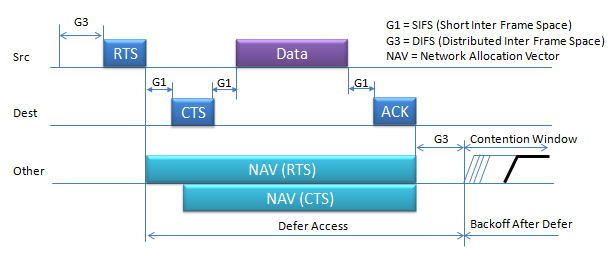
- i) Source transmit the short RTS burst which carries source, destination and duration of following transaction.
- ii) All other devices around the source may receive the RTS burst. They are all checking if the RTS is for itself or not.
- iii) If it is for itself and the medium is free, the destination device transmit the CTS which also carries the duration of following transaction.
- iv) Now all the other device (the neighbouring device other than 'Destination' device) also knows that the medium will be occupied for a certain time from now, they would set their NAV(Network Allocation Vector) accordingly so that it would not try sensing and try to transmit anything during that period.
The G1 and G3 gaps in the diagram above have fixed lengths, and the lengths depend on the PHY. For the OFDM PHY in the 5 GHz band, SIFS is 16 us and one slot is 9 us. DIFS is SIFS + 2 x slot, so it is 16 + 2 x 9 = 34 us. For 802.11b in the 2.4 GHz band, SIFS is 10 us and one slot is 20 us, so DIFS is 10 + 2 x 20 = 50 us. SIFS is always the shortest gap. This is why CTS, Data and ACK in one exchange always get the medium before a new device, which must wait at least DIFS.
The two NAV bars also have different lengths, and the reason is in the Duration field. The RTS is sent first, so its Duration covers CTS, Data, ACK and three SIFS gaps. The CTS Duration is the RTS Duration minus one SIFS and the CTS itself. Both bars therefore end at the same point, at the end of the ACK.
SIFS protects an exchange that has already started : a responder waits only SIFS, while every new transmission waits DIFS and a random backoff.The NAV is virtual carrier sense : a device that hears only the CTS still sets its NAV, so it stays quiet even when it cannot hear the source.RTS/CTS costs airtime : two extra frames and two extra SIFS gaps are added to every exchange, so it pays off mainly for long frames.
When data packets are larger than the fragmentation threshold configured on the device or when the network conditions are such that sending smaller packets is more reliable.Fragmentation in Wi-Fi networks happens. In case of Fragmented Frame, the sequence goes as follows :
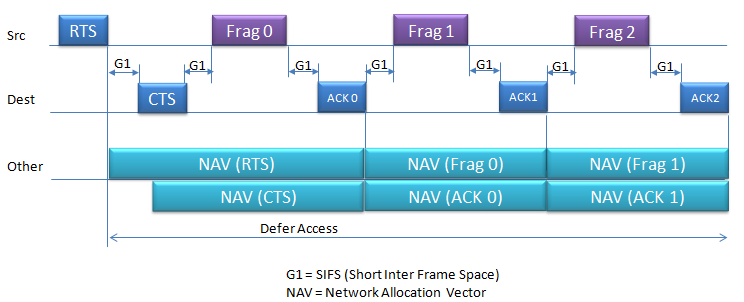
- i) Source (Src) Initiates Transmission:
- The source device begins by sending a Request to Send (RTS) frame, which includes the source, destination, and the duration of the transmission.
- ii) Destination (Dest) Responds:
- If the medium is free, the destination device responds with a Clear to Send (CTS) frame, which also contains the duration of the transaction, indicating that it is ready to receive the data.
- iii) Fragmented Data Transmission:
- The source then sends the first fragment of the data (Frag 0).
- After the destination device successfully receives Frag 0, it sends an acknowledgment (ACK 0).
- iv) Continued Data Exchange:
- This process continues with the source sending the next fragment (Frag 1), followed by another acknowledgment from the destination (ACK 1).
- The sequence repeats for all subsequent fragments (e.g., Frag 2 followed by ACK 2, and so on) until the entire message is transmitted.
- v)Other Devices Set NAV:
- Other devices in the network (labeled as "Other") listen to these exchanges and set their Network Allocation Vector (NAV) for the duration indicated in the RTS and CTS frames.
- The NAV informs these other devices not to attempt transmission and to wait for the medium to become free.
- vi) Contention Window and Backoff:
- If any device wants to access the medium, it must wait for a Distributed Inter Frame Space (DIFS) and then proceed to a contention window.
- During the contention window, each device waits for a random backoff time before attempting to transmit. This helps prevent collisions by randomizing transmission attempts.
It is a short inter frame space that usually happens in some situation as below.
- Large Packets (G1 Consideration):
- When dealing with large packets that exceed the fragmentation threshold, the network must fragment these packets. Between the transmission of each fragment and its corresponding acknowledgment (ACK), the devices observe a short wait time known as a Short Interframe Space (SIFS), labeled as G1 in the diagram. This is the shortest wait time and ensures rapid exchange of frames related to the same data transmission.
- Poor Network Conditions (G1 Application):
- In difficult network conditions, such as interference or low signal quality, sending smaller fragments becomes necessary. After sending a fragment, the sending device waits for the duration of G1 (SIFS) before expecting an ACK. If the ACK is received, the next fragment can be sent. This short wait time defined by G1 is crucial for maintaining a quick and orderly flow of the fragmented transmission, allowing for immediate response from the receiving device.
Fragmentation in Wi-Fi networks happens when data packets are larger than the fragmentation threshold configured on the device or when the network conditions are such that sending smaller packets is more reliable. The decision to fragment is typically made by the device's network stack, which takes into account the current network conditions, the capabilities and settings of the network devices, and the size of the data being sent.
- Large Packets:
- If a data packet is larger than the fragmentation threshold, which is the largest frame size the device sends without fragmenting it, the packet needs to be broken down into smaller fragments.
- Poor Network Conditions:
- In an environment with a lot of interference, high error rates, or low signal strength, larger packets are more likely to be corrupted. It is often more reliable to send smaller fragments because they have a higher chance of being received correctly.
- Distance Between Devices:
- The further the distance between the communicating devices, the higher the likelihood of signal degradation. Smaller packets can be more successfully transmitted over longer distances without error.
- Regulatory Requirements:
- Some regulatory bodies may set specific limits on the duration of transmission to ensure fair medium sharing. In such cases, large packets might be fragmented to comply with these "airtime fairness" regulations.
- Retry Strategy:
- With fragmentation, if a single fragment is lost or corrupted, only that fragment needs to be retransmitted, not the entire packet. This can reduce the amount of data that needs to be resent and can be more efficient in terms of network bandwidth usage.
- Dynamic Fragmentation:
- Some protocols dynamically adjust the packet size based on current transmission acknowledgments (ACKs). If packets are frequently not acknowledged, indicating a high loss rate, the protocol might choose to fragment subsequent packets to improve reliability.
Sleeping Mode and Data Transmission
The sequence diagram shown bellow illustrate how a Wi-Fi-enabled device (Station) in power-saving mode communicates with an Access Point (AP) to receive data. This process ensures that devices on a Wi-Fi network can conserve power by sleeping and only waking when necessary to receive data.
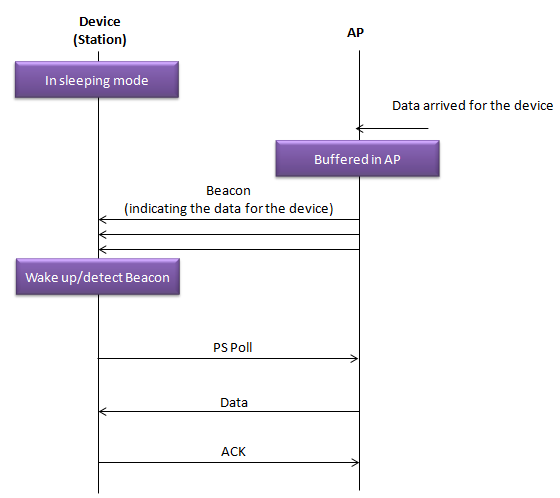
Here’s a step-by-step explanation of what’s happening:
In Sleeping Mode: The device is in a low-power state, commonly known as sleeping mode, to conserve battery.Data Arrived for the Device: While the device is asleep, data intended for it arrives at the AP.Buffered in AP: Since the device is in sleeping mode, the AP holds onto (buffers) the data instead of immediately sending it.Beacon: The AP regularly sends out beacon frames, which are like lighthouses for Wi-Fi, signaling its presence. These beacons contain a TIM (Traffic Indication Map), which has a bit set if there's data buffered for specific devices.Wake up/detect Beacon: The device periodically wakes up to listen for these beacon frames. When it detects a beacon with a TIM indicating there is data for it, it knows it needs to take action to receive this data.PS Poll: The device sends a Power-Save Poll (PS-Poll) frame to the AP to request the delivery of the buffered data. This is a signal to the AP that the device is awake and ready to receive the data.Data: Upon receiving the PS-Poll frame from the device, the AP sends the buffered data to the device.ACK: After the device successfully receives the data, it sends an acknowledgment (ACK) back to the AP, confirming that the data was received.
The device does not need to wake for every Beacon. The Beacon interval is counted in TU, where 1 TU = 1.024 ms, and the common value of 100 TU gives one Beacon every 102.4 ms. A device that wakes for every third Beacon, for example, listens once every 307.2 ms. The TIM tells the device whether data is waiting, so the device can go back to sleep at once when its bit is not set. In the diagram above, the AP sends three Beacons with the TIM bit set before the device wakes up. The data waits in the AP buffer for that whole time.
The AP carries the cost of power save : it buffers the data and signals it in the TIM, so the device can sleep between Beacons.Power save adds delay : buffered data waits until the device wakes, reads the TIM and sends a PS-Poll.
Reference :
[1] IEEE 802.11 - Part 11: Wireless LAN Medium Access Control (MAC) and Physical Layer (PHY) Specifications
[2] IEEE Std 802.11a-1999 : Clauses 17.3.2, 17.4.3 and 17.4.4: legacy OFDM airtime and PHY timing.
[3] 802.11 Network Security Fundamentals : Cisco, Four-Way Handshake and EAP sections.
[4] 200527 : Cisco, Analyze and Troubleshoot 802.11 Wireless Sniffing; management, control and security exchanges.
[5] CID 229 discussion : IEEE 802.11 TGm, 2013: ACKTimeout and PHY receive-start delay. Explanatory working-group discussion, not normative standard text.
[6] Cisco Unified Wireless QoS : DCF and EDCA channel-access sections; its 10/20 us example uses a different PHY from the 5 GHz example here.
[7] WPA3 Deployment Guide : Cisco, WPA3-Personal and SAE sections.
[8] IEEE Std 802.11-2007 : Clause 9.2.3.1, SIFS definition and implementation tolerance measured on the medium.