This page will show you he overall procedure of UE getting access to a Service or application via Untruted Non-3GPP network (mostly WiFi). The steps described at step (5), (6) is well defined in 3GPP, but you may see some variations at other steps.. but I think the procedure shown in this page would be common in most cases. It would be helpful to get more meanins out of this if you read WiFi Offload CheckList part before you start reading this page. If you are working on the development or testing on WiFi Offloading or VoWiFi (Voice Over WiFi), the detailed understanding of this procedure greatly help you to troubleshoot various issues you would come accross during the test. I personally checks each and every steps of the procedure described here when I am troubleshooting WiFi Offload/VoWiFi. Also, recommend other engineers to check every steps... but in reality, most of them just say "Something does not work. Just help me fix it" :)
The procedure has two halves. Steps 1 to 4 belong to the WLAN and the IP network, and the UE needs them before it can talk to the ePDG at all. Steps 5 and 6 are the 3GPP part, where the UE builds the IPsec tunnel on SWu and gets its IMS configuration. I'll go through the steps in the same order as the sequence diagram.
- Overall Sequence
- 1. 802.11
- 2. SSID Selection
- 3. IP Allocaion for UE WiFi
- 4. ePDG Discovery
- 5. IKEv2
- 6. CSCF Discovery
- Reference
Overall Sequence
Following is overall sequence diagram of ePDG Discovery and IKE procedure. This is the case where WiFi AP and UE WiFi module is based on IPv4 (It doesn't matter whether UE is using IPv4 or IPv6 for application layer in this diagram). I will post another section later for the case when UE and AP is using IPv6). Actually the only difference is whether they use DHCP or DHCPv6, but there would be something I need to add in detail for IPv6 case).
The diagram below has six nodes: the UE, the WiFi AP, a Proxy, the ePDG, the PDN-GW and the IMS Application. The upper half covers WLAN association, IP allocation and ePDG discovery. The lower half covers IKEv2 and CSCF discovery, and it ends with user traffic through the IPsec tunnel.
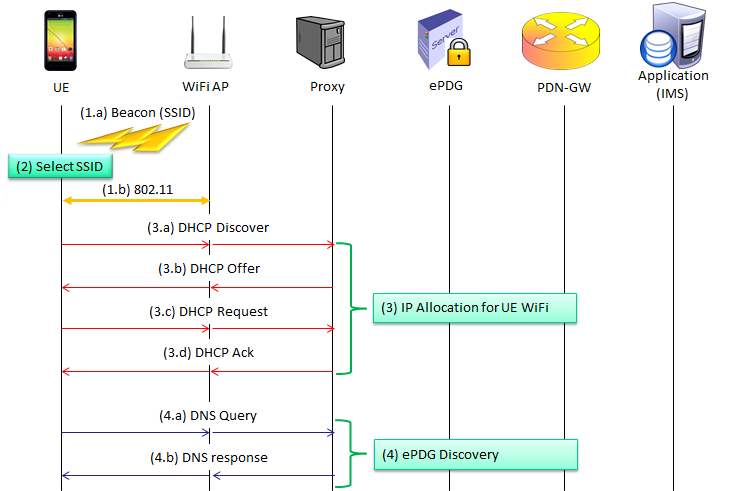
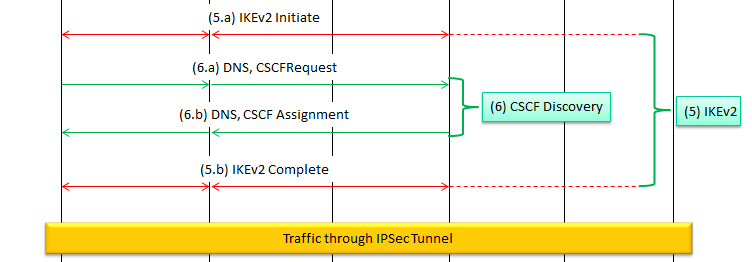
1.a and 1.b : the AP broadcasts the Beacon with its SSID, and the UE and the AP run the 802.11 exchange.2 : the UE selects an SSID. The drawing places this between the Beacon and the 802.11 exchange, because the UE associates only with the SSID it selected.3.a to 3.d : DHCP Discover, Offer, Request and Ack between the UE and the Proxy. This gives the UE its local IP address on the WLAN.4.a and 4.b : a DNS Query and a DNS response that return the ePDG address.5.a and 5.b : the IKEv2 exchange between the UE and the ePDG. The dashed red extension beyond the ePDG shows that the exchange also involves the network side.6.a and 6.b : the CSCF request and the CSCF assignment. They sit inside the IKEv2 exchange, between 5.a and 5.b.
The Proxy in the drawing stands for the IP services of the test network, the DHCP server and the DNS server. In the DHCP captures below, the DHCP server and the DNS server both use 192.168.0.254. The ePDG Discovery page shows that the ePDG also answers on 192.168.0.254 in the same setup. So in this test setup a single box plays several network roles, and a live network would spread them over separate nodes.
Steps 1 to 4 are not 3GPP procedures : they are plain 802.11, DHCP and DNS, and a failure there never reaches the ePDG.Step 6 is part of step 5 : the CSCF information travels inside the IKEv2 messages, not as a separate exchange.
1. 802.11
(1.a) and (1.b) belongs to 802.11 protocol. Details of this step is out of the scope of this page. If you want to know the details of this step, refer to step (1)~(7) in WLAN Protocol page.
Even so, one point matters for the ePDG procedure. This WLAN is an untrusted non-3GPP access, so the operator does not rely on the security of this link. Whatever security the SSID uses, for example open, WPA2 or 802.1X, only protects the radio hop between the UE and the AP. The protection that the EPC relies on comes later, from the IPsec tunnel between the UE and the ePDG.
That is also why the 802.11 step can be very simple in a test setup. An open SSID is enough to reach the ePDG, and the UE still runs the full EAP-AKA authentication inside IKEv2 in step 5. TS 23.402 treats the access authentication with the WLAN itself as an optional step before the tunnel.
In a log, check two things here. The first is that the association really completes, with the UE connected to the SSID you expect. The second is that the UE keeps the association while the rest of the procedure runs. If the WLAN drops, the UE may have to repeat DHCP, DNS and the whole IPsec tunnel setup.
WLAN security and ePDG security are independent : the SSID security covers the air link, and IPsec on SWu covers the path to the EPC.An open SSID is a valid test setup : the UE still authenticates to the 3GPP AAA Server through the ePDG.
2. SSID Selection
Once UE (WiFi device) decode Beacon, it will show all the SSID it detected. Then you can select a specific SSID manually or the device automatically select the SSID in a certain order you have configured.
The automatic case is where the operator can take part. TS 23.402 defines the WLAN Selection Policy, WLANSP, which ANDSF can deliver to the UE. A WLANSP rule has validity conditions, such as time of day and location, and one or more groups of selection criteria in priority order. The criteria use WLAN attributes, for example from the Hotspot 2.0 specification, such as the preferred roaming partner list, a minimum backhaul threshold and a maximum BSS load.
The home operator can also give the UE preferences for the WLAN and for the service provider through the HomeNetworkPreference node of the ANDSF MO. Alternatively, the RAN rules of Release 12 can decide the move to WLAN, using the WLAN identifiers that E-UTRAN provides. TS 24.302 clause 6.10 defines which of the two rule sets controls WLAN selection for a given UE.
For testing, the practical question is simpler. Is the UE allowed to connect to your test SSID automatically, or does someone have to select it by hand? If the UE has operator rules that do not list your SSID, automatic selection may never pick it, even with a strong signal.
Manual selection skips the policies : it is the quickest way to get past step 2 in the lab.Automatic selection follows operator rules : WLANSP from ANDSF, or the RAN rules, decide which SSID is eligible.
3. IP Allocaion for UE WiFi
The UE needs a local IP address on the WLAN before it can send a single packet to the ePDG. In this example the WLAN is IPv4, so the UE gets the address with the four DHCP messages below. The captures come from one exchange, and they all share the Transaction ID 0xff18ecc3.
(3.a) DHCP Discover
Decoded message capture,
Bootstrap Protocol (Discover)
    Message type: Boot Request (1)
    Hardware type: Ethernet (0x01)
    Hardware address length: 6
    Hops: 0
    Transaction ID: 0xff18ecc3
    Seconds elapsed: 1
    Bootp flags: 0x0000 (Unicast)
        0... .... .... .... = Broadcast flag: Unicast
        .000 0000 0000 0000 = Reserved flags: 0x0000
    Client IP address: 0.0.0.0 (0.0.0.0)
    Your (client) IP address: 0.0.0.0 (0.0.0.0)
    Next server IP address: 0.0.0.0 (0.0.0.0)
    Relay agent IP address: 0.0.0.0 (0.0.0.0)
    Client MAC address: aa:bb:cc:dd:ee:ff
    Client hardware address padding: 00000000000000000000
    Server host name not given
    Boot file name not given
    Magic cookie: DHCP
    Option: (53) DHCP Message Type (Discover)
        Length: 1
        DHCP: Discover (1)
    Option: (61) Client identifier
        Length: 7
        Hardware type: Ethernet (0x01)
        Client MAC address: aa:bb:cc:dd:ee:ff
    Option: (57) Maximum DHCP Message Size
        Length: 2
        Maximum DHCP Message Size: 1500
    Option: (60) Vendor class identifier
        Length: 12
        Vendor class identifier: dhcpcd-5.5.6
    Option: (12) Host Name
        Length: 24
        Host Name: android-21b08ec0480ae8b6
    Option: (55) Parameter Request List
        Length: 10
        Parameter Request List Item: (1) Subnet Mask
        Parameter Request List Item: (33) Static Route
        Parameter Request List Item: (3) Router
        Parameter Request List Item: (6) Domain Name Server
        Parameter Request List Item: (15) Domain Name
        Parameter Request List Item: (26) Interface MTU
        Parameter Request List Item: (28) Broadcast Address
        Parameter Request List Item: (51) IP Address Lease Time
        Parameter Request List Item: (58) Renewal Time Value
        Parameter Request List Item: (59) Rebinding Time Value
    Option: (255) End
        Option End: 255
(3.b) DHCP Offer
Decoded message capture,
Bootstrap Protocol (Offer)
    Message type: Boot Reply (2)
    Hardware type: Ethernet (0x01)
    Hardware address length: 6
    Hops: 0
    Transaction ID: 0xff18ecc3
    Seconds elapsed: 1
    Bootp flags: 0x0000 (Unicast)
        0... .... .... .... = Broadcast flag: Unicast
        .000 0000 0000 0000 = Reserved flags: 0x0000
    Client IP address: 0.0.0.0 (0.0.0.0)
    Your (client) IP address: 192.168.0.1 (192.168.0.1)
    Next server IP address: 192.168.0.254 (192.168.0.254)
    Relay agent IP address: 0.0.0.0 (0.0.0.0)
    Client MAC address: aa:bb:cc:dd:ee:ff
    Client hardware address padding: 00000000000000000000
    Server host name not given
    Boot file name not given
    Magic cookie: DHCP
    Option: (53) DHCP Message Type (Offer)
        Length: 1
        DHCP: Offer (2)
    Option: (54) DHCP Server Identifier
        Length: 4
        DHCP Server Identifier: 192.168.0.254 (192.168.0.254)
    Option: (51) IP Address Lease Time
        Length: 4
        IP Address Lease Time: (3600s) 1 hour
    Option: (58) Renewal Time Value
        Length: 4
        Renewal Time Value: (1800s) 30 minutes
    Option: (59) Rebinding Time Value
        Length: 4
        Rebinding Time Value: (3200s) 53 minutes, 20 seconds
    Option: (1) Subnet Mask
        Length: 4
        Subnet Mask: 255.255.255.0 (255.255.255.0)
    Option: (28) Broadcast Address
        Length: 4
        Broadcast Address: 192.168.0.255 (192.168.0.255)
    Option: (6) Domain Name Server
        Length: 4
        Domain Name Server: 192.168.0.254 (192.168.0.254)
    Option: (255) End
        Option End: 255
    Padding
(3.c) DHCP Request
Decoded message capture,
Bootstrap Protocol (Request)
    Message type: Boot Request (1)
    Hardware type: Ethernet (0x01)
    Hardware address length: 6
    Hops: 0
    Transaction ID: 0xff18ecc3
    Seconds elapsed: 1
    Bootp flags: 0x0000 (Unicast)
        0... .... .... .... = Broadcast flag: Unicast
        .000 0000 0000 0000 = Reserved flags: 0x0000
    Client IP address: 0.0.0.0 (0.0.0.0)
    Your (client) IP address: 0.0.0.0 (0.0.0.0)
    Next server IP address: 0.0.0.0 (0.0.0.0)
    Relay agent IP address: 0.0.0.0 (0.0.0.0)
    Client MAC address: aa:bb:cc:dd:ee:ff
    Client hardware address padding: 00000000000000000000
    Server host name not given
    Boot file name not given
    Magic cookie: DHCP
    Option: (53) DHCP Message Type (Request)
        Length: 1
        DHCP: Request (3)
    Option: (61) Client identifier
        Length: 7
        Hardware type: Ethernet (0x01)
        Client MAC address: aa:bb:cc:dd:ee:ff
    Option: (50) Requested IP Address
        Length: 4
        Requested IP Address: 192.168.0.1 (192.168.0.1)
    Option: (54) DHCP Server Identifier
        Length: 4
        DHCP Server Identifier: 192.168.0.254 (192.168.0.254)
    Option: (57) Maximum DHCP Message Size
        Length: 2
        Maximum DHCP Message Size: 1500
    Option: (60) Vendor class identifier
        Length: 12
        Vendor class identifier: dhcpcd-5.5.6
    Option: (12) Host Name
        Length: 24
        Host Name: android-21b08ec0480ae8b6
    Option: (55) Parameter Request List
        Length: 10
        Parameter Request List Item: (1) Subnet Mask
        Parameter Request List Item: (33) Static Route
        Parameter Request List Item: (3) Router
        Parameter Request List Item: (6) Domain Name Server
        Parameter Request List Item: (15) Domain Name
        Parameter Request List Item: (26) Interface MTU
        Parameter Request List Item: (28) Broadcast Address
        Parameter Request List Item: (51) IP Address Lease Time
        Parameter Request List Item: (58) Renewal Time Value
        Parameter Request List Item: (59) Rebinding Time Value
    Option: (255) End
        Option End: 255
(3.d) DHCP Ack
Decoded message capture,
Bootstrap Protocol (ACK)
    Message type: Boot Reply (2)
    Hardware type: Ethernet (0x01)
    Hardware address length: 6
    Hops: 0
    Transaction ID: 0xff18ecc3
    Seconds elapsed: 1
    Bootp flags: 0x0000 (Unicast)
        0... .... .... .... = Broadcast flag: Unicast
        .000 0000 0000 0000 = Reserved flags: 0x0000
    Client IP address: 0.0.0.0 (0.0.0.0)
    Your (client) IP address: 192.168.0.1 (192.168.0.1)
    Next server IP address: 192.168.0.254 (192.168.0.254)
    Relay agent IP address: 0.0.0.0 (0.0.0.0)
    Client MAC address: aa:bb:cc:dd:ee:ff
    Client hardware address padding: 00000000000000000000
    Server host name not given
    Boot file name not given
    Magic cookie: DHCP
    Option: (53) DHCP Message Type (ACK)
        Length: 1
        DHCP: ACK (5)
    Option: (54) DHCP Server Identifier
        Length: 4
        DHCP Server Identifier: 192.168.0.254 (192.168.0.254)
    Option: (51) IP Address Lease Time
        Length: 4
        IP Address Lease Time: (3600s) 1 hour
    Option: (58) Renewal Time Value
        Length: 4
        Renewal Time Value: (1800s) 30 minutes
    Option: (59) Rebinding Time Value
        Length: 4
        Rebinding Time Value: (3200s) 53 minutes, 20 seconds
    Option: (1) Subnet Mask
        Length: 4
        Subnet Mask: 255.255.255.0 (255.255.255.0)
    Option: (28) Broadcast Address
        Length: 4
        Broadcast Address: 192.168.0.255 (192.168.0.255)
    Option: (6) Domain Name Server
        Length: 4
        Domain Name Server: 192.168.0.254 (192.168.0.254)
    Option: (255) End
        Option End: 255
    Padding
Let's read the four captures together. In the Discover, the UE has no address yet, so every address field is 0.0.0.0. The UE identifies itself by its MAC address, which appears as aa:bb:cc:dd:ee:ff in the capture. Option 55 lists what the UE wants to learn, and item 6, Domain Name Server, is the one that matters for the next step.
In the Offer, the server at 192.168.0.254 offers 192.168.0.1 with a lease of 3600 seconds. It also returns the subnet mask 255.255.255.0, the broadcast address 192.168.0.255 and the DNS server 192.168.0.254. The Request then asks for the same 192.168.0.1 and names the server in option 54. Finally, the Ack confirms the address with the same lease values.
Two more details are worth a look. The Renewal Time Value is 1800 seconds, half of the lease, and the Rebinding Time Value is 3200 seconds. So after 30 minutes the UE renews the lease with the same server. Also note that this Offer and this Ack carry no Router option, option 3, although the UE asked for it. That is acceptable here because the test network puts the DNS server and the ePDG on the same subnet as the UE.
The DNS server comes from DHCP : without option 6 in the Offer and the Ack, the UE cannot resolve the ePDG FQDN in step 4.The MAC address must be known to the server : a DHCP server that filters on MAC address rejects the Discover, and the procedure stops here.This is the outer address : 192.168.0.1 is the local address for the IPsec tunnel, not the address that IMS uses.
4. ePDG Discovery
Refer to ePDG Discovery Page for the details. This step turns a name into an address. Without it the UE does not know where to send IKE_SA_INIT, so a DNS failure here stops the whole procedure.
In the diagram, this step is one DNS Query and one DNS response. The UE builds an ePDG FQDN, or uses one that the home operator configured, and asks the DNS server from step 3 for its address. In the example on the ePDG Discovery page, the UE sends an A query, because its local address is IPv4. The answer is 192.168.0.254.
TS 24.302 adds two rules that are easy to miss in a test. First, the UE selects an ePDG address with the same IP version as its local IP address. So an IPv4 WLAN needs an A record, and an IPv6 WLAN needs an AAAA record. Second, if the UE gets no response to IKE_SA_INIT from the selected address, it repeats the ePDG selection without that ePDG. So a DNS answer that points to a dead address shows up as repeated DNS queries, not as an IKE error.
The FQDN itself follows TS 23.003. The default Operator Identifier format is epdg.epc.mnc<MNC>.mcc<MCC>.pub.3gppnetwork.org. A home operator can configure an FQDN in a different format, so the name in a live log may not match the default.
The record type follows the local address : A for an IPv4 WLAN, AAAA for an IPv6 WLAN.A dead ePDG address causes a new selection : the UE retries without that ePDG when IKE_SA_INIT gets no response.
5. IKEv2
This is very long/complicated process and described in a separate page. Refer to Overall Sequence Flow - 3GPP 33.402 of IKE page. The UE starts it as soon as it has the ePDG address, and it ends when the UE holds an IPsec tunnel and an inner IP address.
Here is the outline, so you know what to look for in the log. TS 33.402 clause 8.2.2 describes the full authentication in 15 steps, and TS 24.302 clause 7.2.2 describes what the UE puts in each message. The diagram compresses all of it into 5.a, IKEv2 Initiate, and 5.b, IKEv2 Complete.
First, the UE and the ePDG exchange IKE_SA_INIT. They negotiate the algorithms, exchange nonces and run a Diffie-Hellman exchange. Next, the UE sends the first IKE_AUTH request. It carries the NAI in IDi, the APN in IDr and a CFG_REQUEST, and it has no AUTH payload. The missing AUTH payload tells the ePDG that the UE wants EAP.
The ePDG then relays EAP-AKA between the UE and the 3GPP AAA Server. The AAA Server fetches authentication vectors from the HSS, and the UE answers the AKA challenge with its USIM. After EAP-Success, the AAA Server gives the ePDG the MSK. Both sides use it to compute the AUTH payloads. In the last IKE_AUTH response, the ePDG sends CFG_REPLY with the inner IP address. With PMIP-based S2b, the ePDG first completes the binding update with the PDN GW.
No AUTH in the first IKE_AUTH request means EAP : this is how the UE asks for EAP-AKA instead of certificates.The ePDG waits for the PDN GW : the tunnel completes only after the S2b leg is set up, so a PDN GW problem can appear as an IKE timeout on the UE.The inner address arrives last : the CFG_REPLY in the final IKE_AUTH response carries the address that IMS uses.
6. CSCF Discovery
Actually this is not an independen procedure. This is a part of IKEv2 procedure and described in detail in CSCF Descovery page. Without this step the UE has a working tunnel but no P-CSCF, so IMS registration cannot start.
In the diagram, 6.a is labelled DNS, CSCFRequest and 6.b is labelled DNS, CSCF Assignment. In IKEv2 terms, these are attributes of the configuration payload. The UE adds them to the CFG_REQUEST in its IKE_AUTH request, next to the address request.
TS 24.302 lists the attributes. For the DNS server, the UE can include INTERNAL_IP4_DNS or INTERNAL_IP6_DNS. For the P-CSCF, it can include P_CSCF_IP4_ADDRESS, P_CSCF_IP6_ADDRESS or both, as defined in IETF RFC 7651. The ePDG returns zero or more addresses of each kind in the CFG_REPLY of the IKE_AUTH response. So 6.b arrives in the same message as the inner IP address of step 5.
After 6.b, the UE has everything it needs for IMS. It has an inner address, a DNS server and a P-CSCF address, and it can send SIP REGISTER to the P-CSCF through the IPsec tunnel. That is the Traffic through IPSec Tunnel bar at the bottom of the diagram.
CSCF discovery is carried in CFG_REQUEST and CFG_REPLY : there is no separate DNS exchange for it in this procedure.Check the request before the reply : if the UE does not ask for a P-CSCF attribute, the ePDG has no reason to return one.
Reference
- TS 23.003 v20.0.0 : Numbering, addressing and identification
- TS 23.402 v19.0.0 : Architecture enhancements for non-3GPP accesses
- TS 24.302 v19.0.0 : Access to the 3GPP Evolved Packet Core via non-3GPP access networks, Stage 3
- TS 33.402 v19.0.0 : 3GPP System Architecture Evolution, Security aspects of non-3GPP accesses