WiFi 802.11ax is also called as WiFi 6. It has features as summarized below. Some of them are the evolutionary features comparing to previous version and some of them are brand new features introduced in 802.11ax.
Increased Throughput : As always, there is a part to increase the throughput and it is done by Higher modulation like almost always.==> Even though throughput increase would attract the attention of many users, this is not the most important aspect of 802.11ax. The major focus of 802.11ax is increase the efficiency rather than the increased throughput. Narrow Subcarrier Spacing/Long OFDM Symbol length : Subcarrier spacing get narrower, implying that frequency domain capacity would get increased. But the decreased subcarrier spacing cause increlased OFDM symbol length. The increased OFDM symbol length would offset the effect of decreased subcarrier in terms of throughput, but it would result in the increased robustness in long distance communication by allowing wider delay spreading.Support multiple users at the same time and Frequency . This is done by Multiuser mimo and spatial multiplexing. These were supported to some degree in previous release in downlink, but it would expand to uplink in this release.OFDMA : The most important technical component for simultaneous multi-user support in this release would OFDMA, implying that it would get the flexibility of multi-user scheduling similar to LTE or NR cellular network. This implies that one user does not wait until all other user finish their communication. Multiple user can transmit/recieve simultaneously using differect sections of frequency spectrum (Simultaneous transmission/reception in both time and frequency domain is still not allowed). OFDMA would help to shorten the latency of the communication. (See this note for the details)Low Power Consumption by the mechanism of Target Wakeup Time. Understandably the main use case for this feature would be targeted for IoT application.
The diagram below groups the same features by the goal they serve. 802.11ax sits in the triangle, with three goals around it: Higher Throughput, Multiple Users at the same time, and Shorter Latency with Lower Power Consumption. A box next to each goal lists the techniques behind it. OFDMA appears in two boxes, because it serves both multi-user access and latency.
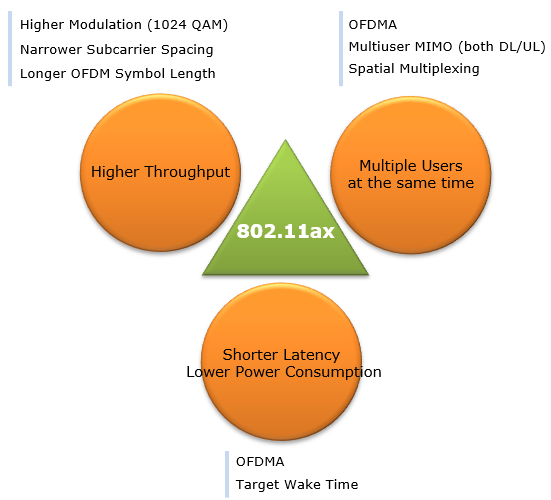
Figure 1. 802.11ax features grouped by goal. Only one of the three goals is peak throughput, and the other two are about sharing the channel efficiently.
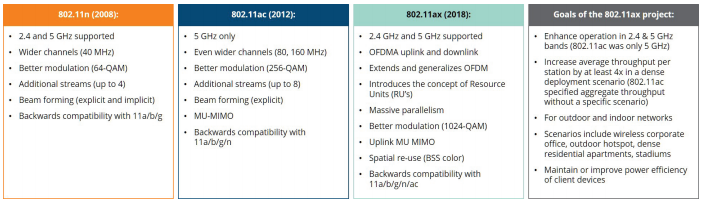
main features of 802.11ax in comparison with previous release is well summarized by the following table which is quoted from Aruba White Paper. I would stronly recommend you to read through this whitepaper if you are interested in the further technical details.
Source : Aruba Whitepaer
Figure 2. Three Wi-Fi generations and the 802.11ax goals. The goal column asks for 4x throughput per station in dense deployments, not for a higher peak rate.
802.11n, 2008 : 2.4 and 5 GHz, 40 MHz channels, 64-QAM and up to 4 streams.802.11ac, 2012 : 5 GHz only, 80 and 160 MHz channels, 256-QAM, up to 8 streams and downlink MU-MIMO.802.11ax, 2018 : back to 2.4 and 5 GHz, OFDMA in both directions, Resource Units, 1024-QAM, uplink MU-MIMO and spatial re-use with BSS color. The year 2018 in the table is an early date. The IEEE approved the final standard later, in 2020 and 2021.Goals column : at least 4x average throughput per station in a dense deployment, outdoor as well as indoor use, and better power efficiency for client devices.
The table lists 2.4 and 5 GHz only. The 6 GHz band came later under the name Wi-Fi 6E, which is 802.11ax operating in 6 GHz. That band has room for 160 MHz channels without the Dynamic Frequency Selection limits of the 5 GHz band.
- How does 802.11ax reach a higher rate ?
- How does OFDMA share a channel with Resource Units ?
- Similarity to 4G/5G Cellular Technology
- References :
- YouTube
How does 802.11ax reach a higher rate ?
Let's check the throughput claim with numbers, because the answer is smaller than most people expect. A PHY rate is the number of data subcarriers, times the bits per subcarrier, times the coding rate, divided by the OFDM symbol duration including the guard interval. 802.11ax changes three of those four terms at once, so we look at them one by one.
The first change is the numerology. 802.11ax uses four times as many subcarriers as 802.11ac in the same channel, 256 instead of 64 in 20 MHz. So the subcarrier spacing drops from 312.5 kHz to 20 MHz / 256 = 78.125 kHz. The useful symbol grows by the same factor, from 3.2 microseconds to 1 / 78.125 kHz = 12.8 microseconds. The second change is the guard interval. 802.11ax offers 0.8, 1.6 or 3.2 microseconds. The third change is 1024-QAM, which carries 10 bits per subcarrier instead of 8.
The table below applies the formula to one spatial stream in an 80 MHz channel. 802.11ac uses 234 data subcarriers and a 3.6 microseconds symbol with the short guard interval. 802.11ax uses 980 data subcarriers and a 13.6 microseconds symbol with the 0.8 microseconds guard interval.
Case |
Data subcarriers |
Symbol with GI |
Modulation, rate |
Rate per stream |
802.11ac, 80 MHz | 234 | 3.6 microseconds | 256-QAM, 5/6 | 433.3 Mbps |
802.11ax, 80 MHz | 980 | 13.6 microseconds | 256-QAM, 5/6 | 480.4 Mbps |
802.11ax, 80 MHz | 980 | 13.6 microseconds | 1024-QAM, 5/6 | 600.5 Mbps |
So the peak gain per stream is 600.5 / 433.3 = 1.39, or about 39 percent. Two factors make it up. 1024-QAM gives 10 / 8 = 1.25. The denser subcarriers and the smaller guard interval overhead give (980 / 13.6) / (234 / 3.6) = 1.11. With 8 streams in 160 MHz, the peak is 1960 x 10 x 5/6 / 13.6 microseconds x 8 = 9.6 Gbps, against 6.93 Gbps for 802.11ac.
The longer symbol also changes the guard interval trade-off. With 0.8 microseconds of guard in a 13.6 microseconds symbol, only 5.9 percent of the air time is overhead, while 802.11ac spends 0.4 / 3.6 = 11.1 percent. With the longest 3.2 microseconds guard interval, 802.11ax still spends only 20 percent. That longer guard is what makes outdoor use with a long delay spread practical. Keep one limit in mind, though. 1024-QAM needs a very high SNR, so the peak rates in the table are only reached close to the AP.
The peak rate grows by only about 39 percent per stream : 1.25 comes from 1024-QAM and 1.11 comes from the new numerology.A four times longer symbol makes the guard interval cheap : 0.8 microseconds costs 5.9 percent of the symbol, and even 3.2 microseconds costs only 20 percent.The real gain is elsewhere : the goal of 4x throughput per station comes from OFDMA, MU-MIMO and spatial reuse, as the next section shows.
How does OFDMA share a channel with Resource Units ?
Before 802.11ax, one transmission used the whole channel, even when the frame was a short acknowledgement or a small IoT packet. In a busy network, a large share of the air time then goes to contention and to preambles rather than to data. OFDMA fixes this by splitting the channel into Resource Units, so the AP can serve several stations in one transmission.
An RU is a group of tones, and one tone is one subcarrier of 78.125 kHz. The RU sizes are 26, 52, 106, 242, 484 and 996 tones. So the smallest RU, 26 tones, is 26 x 78.125 kHz = 2.03 MHz wide. The largest single RU, 996 tones, covers an 80 MHz channel. Compare this with the cellular RB that the NOTE above mentions. An LTE RB is 12 x 15 kHz = 180 kHz, so the smallest 802.11ax RU is more than ten times wider than one LTE RB.
In the downlink, the AP simply puts the data of several stations into different RUs of one PPDU. The uplink is harder, because several stations must transmit at the same moment, with the same timing. So the AP first sends a Trigger frame. The Trigger frame tells each station its RU and its MCS, and every station starts its uplink transmission one SIFS after the end of the Trigger frame. The Trigger frame therefore does the job of an uplink grant in LTE.
The AP can also leave some RUs in a Trigger frame open for random access. A station without an assigned RU can then send in one of those RUs, after an OFDMA back-off to reduce collisions. This is how a station reports its buffer status when the AP does not yet know that the station has data to send.
An RU is the unit of scheduling : the AP gives each station a number of tones, from 26 tones or 2.03 MHz up to a whole channel.The Trigger frame is the uplink grant : it carries the RU and MCS of each station and fixes the start time at SIFS after its own end.Random access RUs carry buffer status : a station can tell the AP about pending data without a separate contention for the whole channel.
Similarity to 4G/5G Cellular Technology
Many experts say that the main focus of WiFi 6 is to increase the efficiency. Even though WiFi 6 includes the technical components to increase the throughput comparing to previous specification, the efficiency improvement is higher priority than the throughput boost. It seems to me that many of the technical features introduced in WiFi 6 to improve the efficiency are very similar to the technologies that have been used in 4G(LTE)/5G(NR) cellular technology. Of course, the details on how to implement these features is not exactly same as those in cellular technology, but the fundamental concept is very similar. Followings are the list of these features.
- OFDMA- Obviously it is hard to deny that this idea came from 4G/5G cellular technology.
- The concept of RU (Resource Unit) - this is similar to RB (Resource Block) in 4G/5G cellular technology.
- Target Wake Time - To me, this seems to be similar to PSM(Power Saving Mode) in 4G/5G cellular technology,
- BSR (Buffer Status Report) - Same concept as BSR in 4G/5G cellular technology
The similarity has limits, and they are worth knowing before you apply cellular intuition to WiFi. The first limit is medium access. An eNB or gNB owns its licensed carrier, so it can schedule every subframe. An 802.11ax AP still has to win the unlicensed channel with CSMA/CA before it can send a Trigger frame. So OFDMA scheduling works inside a transmission opportunity that the AP has won, not on a fixed grid of subframes.
The second limit is interference between neighbours. A cellular network plans its cells, while neighbouring WiFi networks often use the same channel without any coordination. 802.11ax adds two tools for this, and neither has a direct cellular equivalent. BSS coloring marks each transmission with the color of its network at the very beginning of the frame. A station that sees a frame from another network can then treat the medium as idle and transmit with lower power. 802.11ax stations also keep two NAVs, one for their own network and one for overlapping networks, so a frame from a neighbour cannot reset the NAV of their own network.
Target Wake Time also differs from PSM in one detail. TWT came from 802.11ah. With TWT, a station and the AP agree on wake times that do not have to line up with the beacon interval. The AP can also spread different stations over different TWT periods, so fewer stations contend for the channel at the same time.
The AP still contends for the channel : OFDMA scheduling happens only after CSMA/CA gives the AP the medium.BSS coloring and dual NAV are WiFi-specific : they exist because neighbouring WiFi networks are not planned together.TWT is a negotiated schedule : the wake times are agreed per station and can spread stations apart in time.
References :
- 802.11AX (Aruba Whitepaper)
- High Efficiency Wi-Fi:802.11ax (Aruba)
- IEEE 802.11ax TECHNOLOGY INTRODUCTION (Rhode & Schwarz Whitepaper)
- Gjermund Raaen-WIFI
- Wi-Fi 6 (802.11ax): A cheat sheet
- IEEE 802.11ax: The Sixth Generation of Wi-Fi White Paper (Cisco)
- What is 802.11ax (Wi-Fi 6)?
- The MU-RTS/CTS process in the HE (802.11ax) - standard
- Designing for Wi-Fi 6 (802.11ax): Common Challenges and Tips to Overcome Them (Dec 2017)
- AP-initiated Multi-User Transmissions in IEEE 802.11ax WLANs (Jun 2018)
- New Wireless LAN Technology: 802.11ax (Mar 2019)
- UL OFDMA, basic Trigger Frame and Multi-STA BlockAck (Aug 2019)
- WLAN BY GERMAN ENGINEERING - All about Wireless LAN (IEEE 802.11) ... (Jan 2020)
- 802.11ax Frame Aggregation, a case study (Feb 2020)
- Introduction to 802.11ax High-Efficiency Wireless (Aug 2020)
- Wi-Fi 6 (Wikipedia) , rate table, numerology and feature list
YouTube
- Webinar: 802.11ax Sneak Peek The Next Generation Wi-Fi (Mar 2017)
- High Efficiency Wi-Fi- 802.11ax | Dr. Eldad Perahia | WLPC US Phoenix 2017 (Jun 2017)
- Rohde & Schwarz webinar: Five things to know about WLAN 802.11ax and why testing is important (Aug 2017)
- IEEE 802.11ax: Physical Layer Overview (Oct 2017)
- 802.11ax - What's New Webinar (May 2018)
- 802 11ax - Aerohive Guest Webinar with David Coleman (Aug 2018)
- 802.11ax and OFDMA | Perry Correll | WLPC Prague 2018 (Oct 2018)
- Ruckus Tutorial: 802.11ax OFDMA Detail Overview (WiFi 6) (Jan 2019)
- What is 802.11ax? And why (Feb 2019)
- OFDMA: The Key Technology of 802.11ax (Feb 2019)
- Fundamentals of Wi-Fi 6: Capacity Is the New Metric (Apr 2019)
- Wi-Fi 5 vs Wi-Fi 6 Comparison Demo (Sep 2019)
- 802.11ax Lessons Learned | Wes Purvis | WLPC Phoenix 2020 (Mar 2020)
- WiFi 6 And OFDMA Telecommunication Technology Training (Mar 2020)
- Wi Fi 6 for High Density Networks (Jun 2020)
- Webinar: Enterprise Wi-Fi 6 for WISPs (Nov 2020)