In this note, I will briefly explore the progression of WLAN technology with our comprehensive overview table. From the earliest standards to the latest advancements, this chart encapsulates the significant milestones in the development of wireless networking protocols. Each iteration brings with it increased speeds, improved modulation techniques, and expanded frequency bands, reflecting the continuous evolution of connecting devices wirelessly. Delve into the details that have shaped the way we access the internet today.
Let's read the page in four steps. The table comes first, with the band, channel width, modulation and rate per stream of each standard. The Intel slide then adds the Wi-Fi Alliance view, with launch dates and total data rates. After that, we work out the rates from the OFDM parameters, and we look at what comes after Wi-Fi 6.
- How do the WLAN standards compare in one table ?
- What does the Intel snapshot add ?
- Where do the rates per stream come from ?
- What comes after Wi-Fi 6 ?
- YouTube
How do the WLAN standards compare in one table ?
Following is all the different WLAN technology in single table. Of course, a lot of details are hidden in the background for you to dig into.
Read each row from left to right. The Freq column is the band in GHz, and the BW column is the channel width in MHz. The last column is the peak PHY rate of one spatial stream. So you multiply it by the number of streams to get the rate of the whole link. Where a row is split into several lines, each line is one channel width.
|
Standard |
Version |
Freq(Ghz) |
BW(Mhz) |
Modulation |
Constellation(QAM) |
MIMO Stream |
Throughput/stream(Mbps) |
802.11 |
|
2.4 |
20 |
DSSS/FHSS |
- |
1 |
1,2 |
802.11b |
WiFi 1 |
2.4 |
20 |
DSSS |
- |
1 |
1, 2, 5.5, 11 |
802.11a |
WiFi 2 |
5 |
20 |
OFDM |
64 |
1 |
6, 9, 12, 18, 24, 36, 48, 54 |
802.11g |
WiFi 3 |
2.4 |
20 |
OFDM/DSSS |
64 |
1 |
6, 9, 12, 18, 24, 36, 48, 54 |
802.11n |
WiFi 4 |
2.4/5 |
20 |
OFDM |
64 |
1 |
|
|
40 |
2,3,4 |
||||||
|
WiFi 5 |
5 |
20 |
OFDM |
256 |
1 |
||
|
40 |
1,2 |
||||||
|
80 |
1,2,3,8 |
||||||
|
160 |
1,2,3,4,8 |
||||||
|
|
2.4/5/60 |
2160 |
OFDM |
64 |
|
up to 7,000 (7 Gbps) |
|
|
WiFi 6 |
2.4/5 |
20,40,80,160 |
OFDMA |
1024 |
up to 1,201 (9.6 Gbps with 8 streams) |
A few cells need care. The 802.11n and 802.11ac rates assume the short guard interval of 0.4 microseconds. With the normal guard interval of 0.8 microseconds, the same MCS gives 10 percent less, so 72.2 Mbps becomes 65 Mbps. The 802.11ad radio itself works at 60 GHz. 802.11ad also defines fast session transfer, so a tri-band device can move a session between 60 GHz and the 2.4 or 5 GHz band. Finally, the Version column uses the Wi-Fi Alliance generation names. The Wi-Fi Alliance introduced Wi-Fi 4, 5 and 6 in 2018, and Wi-Fi 1 to 3 are informal labels for the older standards.
Each generation turns a different knob : wider channels, a denser constellation or more streams. The rate of one stream grows from 2 Mbps in 802.11 to about 1.2 Gbps in 802.11ax.Per stream and per link are different numbers : multiply the last column by the number of spatial streams to get the link rate.The guard interval changes the number : the 802.11n and 802.11ac values use the short guard interval.
What does the Intel snapshot add ?
Here is a nice snapshot that shows the latest evolution of WiFi in a single slide from an Intel Presentation. Read it next to the table, because the slide counts the data rates and the dates in a different way.
The slide stacks three generations as nested boxes. Wi-Fi 4 sits inside Wi-Fi 5, and Wi-Fi 5 sits inside Wi-Fi 6, because each generation keeps the capabilities of the one before it. A column of blue tiles under each name gives the IEEE standard, the bands, the main PHY features, the maximum data rate and the launch date. One more tile at the lower right adds Wi-Fi 6E.
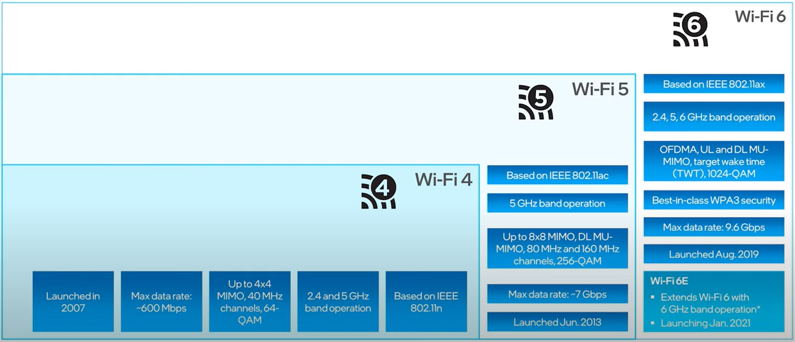
Source : Future of Wireless Connectivity Wi-Fi 7 and beyond | Intel Technology (Jul 2021)
Wi-Fi 4 : based on IEEE 802.11n, 2.4 and 5 GHz band operation, up to 4x4 MIMO, 40 MHz channels and 64-QAM. The maximum data rate is about 600 Mbps, and the launch was in 2007.Wi-Fi 5 : based on IEEE 802.11ac, 5 GHz band operation, up to 8x8 MIMO, DL MU-MIMO, 80 MHz and 160 MHz channels and 256-QAM. The maximum data rate is about 7 Gbps, and the launch was in Jun. 2013.Wi-Fi 6 : based on IEEE 802.11ax, 2.4, 5 and 6 GHz band operation, OFDMA, UL and DL MU-MIMO, target wake time or TWT, 1024-QAM and WPA3 security. The maximum data rate is 9.6 Gbps, and the launch was in Aug. 2019.Wi-Fi 6E : extends Wi-Fi 6 with 6 GHz band operation, launching in Jan. 2021.
The table and diagram encapsulates the significant technological enhancements in WLAN standards, highlighting the evolution in frequency usage, modulation techniques, and throughput capabilities that have contributed to the fast, reliable, and efficient Wi-Fi technology we use today. It can be described as follows:
802.11 : Introduced in 1997, this was the first Wi-Fi standard operating at 2.4 GHz with a bandwidth of 20 MHz. It used DSSS/FHSS modulation techniques but did not specify the MIMO streams, providing a throughput of up to 2 Mbps.802.11b (Wi-Fi 1) : Appearing in 1999, this standard also operated at 2.4 GHz with a 20 MHz bandwidth. It used DSSS modulation and offered a single MIMO stream, with throughput options of 1, 2, 5.5, and 11 Mbps.802.11a (Wi-Fi 2) : Released in 1999 as well, 802.11a operated on a higher frequency of 5 GHz. It utilized a 20 MHz bandwidth and OFDM modulation with a 64-QAM constellation. Like its predecessors, it had a single MIMO stream, but it offered higher throughputs ranging from 6 to 54 Mbps.802.11g (Wi-Fi 3) : In 2003, this standard combined the best of both 802.11b and 802.11a. Operating at 2.4 GHz with 20 MHz bandwidth and using OFDM/DSSS modulation (64-QAM), it also supported a single MIMO stream with throughputs between 6 and 54 Mbps.802.11n (Wi-Fi 4) : This was a significant advancement introduced in 2009. It could operate over both 2.4 GHz and 5 GHz frequencies with bandwidth options of 20 or 40 MHz. 802.11n used OFDM modulation (64-QAM) and introduced multiple MIMO streams (up to 4), allowing for much higher throughputs ranging from 7.2 to 150 Mbps per stream.802.11ac (Wi-Fi 5) : Released in 2013, this standard exclusively used the 5 GHz band with bandwidths of 40, 80, or even 160 MHz. It improved modulation to 256-QAM with OFDM and offered up to 8 MIMO streams. Throughput capabilities were significantly increased, with the potential of up to 866.7 Mbps per stream.802.11ad : This brought another jump in frequency to 60 GHz, introduced in 2012. It continued to use OFDM modulation (64-QAM) but over a much wider 2160 MHz bandwidth, which significantly increased the potential throughput up to 7 Gbps.802.11ax (Wi-Fi 6) : The latest standard mentioned in your table, introduced in 2019, further expands capabilities. It operates over 2.4, 5, and even 6 GHz bands with bandwidths scaling from 20 to 160 MHz. It introduces OFDMA modulation with a 1024-QAM constellation, supporting multiple MIMO streams and offering throughputs of up to 10 Gbps.
The slide and the table count some things differently, so let's line them up. First, the maximum data rates on the slide are link rates with all streams added. Four streams of 150 Mbps give the 600 Mbps of Wi-Fi 4. Eight streams of 866.7 Mbps give about 6.9 Gbps for Wi-Fi 5, and eight streams of 1,201 Mbps give the 9.6 Gbps of Wi-Fi 6. Second, the dates on the slide follow the Wi-Fi Alliance programme rather than IEEE approval. The Wi-Fi Alliance started certifying 802.11n products from a draft of the amendment in 2007, while the bullets above give 2009 for the approved 802.11n. Third, the slide lists 6 GHz under Wi-Fi 6, while the table gives 2.4/5 for 802.11ax. The 6 GHz band belongs to the Wi-Fi 6E extension in the lower right tile.
Slide rates are link rates : 9.6 Gbps for Wi-Fi 6 is eight streams of about 1.2 Gbps at 160 MHz.A generation name is a certification programme : its launch date can differ from the approval date of the IEEE amendment behind it.Wi-Fi 6E is the 6 GHz part of Wi-Fi 6 : the PHY is still 802.11ax.
Where do the rates per stream come from ?
Every OFDM rate in the tables above comes from one formula. Once you know it, you can check any cell yourself. You can also see which knob each generation turned: channel width, constellation, coding rate or symbol time.
The rate of one spatial stream is the number of data bits in one OFDM symbol, divided by the duration of that symbol. The data bits per symbol are the number of data subcarriers x the bits per subcarrier x the coding rate. The symbol duration includes the guard interval. For 802.11a with 64-QAM and rate 3/4, one symbol carries 48 x 6 x 3/4 = 216 bits. The symbol lasts 4 microseconds, so the rate is 54 Mbps.
Rate per stream = NSD x NBPSCS x R / TSYM
Here NSD is the number of data subcarriers, NBPSCS is the number of bits per subcarrier, R is the coding rate and TSYM is the symbol duration with the guard interval. The table below applies the formula to the top MCS of each channel width. The subcarrier counts are the values that reproduce the rates on this page, and each rate was recomputed from them.
Standard |
BW, MHz |
Data subcarriers |
Modulation and coding rate |
Symbol with GI, microseconds |
Rate per stream, Mbps |
802.11a |
20 |
48 |
64-QAM, 3/4 |
4.0 |
54.0 |
802.11n |
20 |
52 |
64-QAM, 5/6 |
3.6 |
72.2 |
802.11n |
40 |
108 |
64-QAM, 5/6 |
3.6 |
150.0 |
802.11ac |
20 |
52 |
256-QAM, 3/4 |
3.6 |
86.7 |
802.11ac |
80 |
234 |
256-QAM, 5/6 |
3.6 |
433.3 |
802.11ac |
160 |
468 |
256-QAM, 5/6 |
3.6 |
866.7 |
802.11ax |
80 |
980 |
1024-QAM, 5/6 |
13.6 |
600.5 |
802.11ax |
160 |
1960 |
1024-QAM, 5/6 |
13.6 |
1201.0 |
802.11be |
320 |
3920 |
4096-QAM, 5/6 |
13.6 |
2882.4 |
Three rows deserve a closer look. First, 802.11ac at 20 MHz stops at 256-QAM with rate 3/4, which gives 86.7 Mbps. Rate 5/6 would need 52 x 8 x 5/6 = 346.67 bits per symbol. That is not a whole number, so this MCS is not used at 20 MHz with one stream.
Second, 802.11ax changes the symbol, not only the constellation. The subcarrier spacing drops to one quarter, so the useful symbol grows from 3.2 to 12.8 microseconds. With a 0.8 microsecond guard interval, the whole symbol lasts 13.6 microseconds. More subcarriers fit into the same width, 980 instead of 234 at 80 MHz. The guard interval also takes a smaller share of the time, 5.9 percent instead of 11 percent with the short guard interval of 802.11ac.
Third, the constellation step gives less than it seems. 1024-QAM carries 10 bits per subcarrier against 8 for 256-QAM, which is only 25 percent more. It also needs a much cleaner channel, so a real link reaches it only at short range. The rest of the 802.11ax gain at 80 MHz, from 433.3 to 600.5 Mbps, comes from the longer symbol and the denser subcarriers.
One formula covers every OFDM row : data subcarriers x bits per subcarrier x coding rate, divided by the symbol time.802.11ax gains from the symbol as well as 1024-QAM : four times longer symbols pack the subcarriers closer and reduce the guard interval overhead.A cell that the formula cannot reproduce needs checking : it is either a typo or a different MCS or guard interval.
What comes after Wi-Fi 6 ?
The table stops at 802.11ax, but the evolution continued in two steps. Wi-Fi 6E keeps the 802.11ax PHY and adds a new band. Wi-Fi 7, based on IEEE 802.11be, changes the PHY and the MAC again.
Let's start with Wi-Fi 6E. It is the 6 GHz band opened for 802.11ax, so nothing in the rate formula changes. What changes is the room for wide channels. A region that opens the whole band from 5925 to 7125 MHz gives 1200 MHz of spectrum, which holds seven 160 MHz channels side by side. That is why wide channels become practical in 6 GHz, while 2.4 GHz cannot hold even one 160 MHz channel.
Wi-Fi 7 turns three knobs further. Channels can be 320 MHz wide in the 6 GHz band, and 4096-QAM carries 12 bits per subcarrier. The symbol stays at 13.6 microseconds. With the formula above, 320 MHz gives 3920 data subcarriers x 12 x 5/6 / 13.6 microseconds, or about 2882 Mbps per stream. You will often see 46 Gbps quoted for Wi-Fi 7. The 46 Gbps value assumes 16 spatial streams, and with 8 streams the same arithmetic gives about 23 Gbps.
The fourth change is in the MAC. Multi-Link Operation, or MLO, lets one device use links in two or three bands at the same time. The device can add the rates of the links, or it can move traffic at once when one band is busy. The 802.11be page covers these features in more detail.
Wi-Fi 6E is a new band, not a new PHY : its gain is room for many wide channels.Wi-Fi 7 reaches about 2.9 Gbps per stream : 320 MHz and 4096-QAM with the same 13.6 microsecond symbol.Check the stream count behind a headline rate : 46 Gbps and 23 Gbps describe the same PHY with 16 and 8 streams.
YouTube
- 802.11ac Frames - What's Changed? (Sep 2015)
- High Efficiency Wi-Fi- 802.11ax | Dr. Eldad Perahia | WLPC US Phoenix 2017 (Jun 2017)
- The Evolution of IEEE 802 11 standards - BAG NAC (Sep 2018)
- 802.11ax - What's New Webinar (May 2018)
- Explained: WiFi 1, 2, 3, 4, 5 and 6 (May 2019)
- Future of Wireless Connectivity Wi-Fi 7 and beyond | Intel Technology (Jul 2021)