Most of my carrier about wireless area was about the wireless communication between UE (Mobile phone) and eNB/BTS, I tend to assume that all other readers has the same interest/focus as mine. I know this is not the case and there are wide varieties of readers who is working in a little different area with different focus. But so often I found myself forgetting this fact.
Pretty often when I am talking to other people, I often mis-interpret what I am told and found that it is mainly because of different focus. The most frequent difference that I noticed were the different point of observation in overall network architecture and different level of the details.
So I decided to write a post which can be visuallize the details of overal LTE networks with various different angle so that we can explicitely point of the points on which both parties focus.
Even when you are not directly talking to me, it would be good for you to keep these snapshots in your mind and associate these visualization to whatever you are reading/studying about LTE protocol.
The page shows the same LTE network three times. Figure 1 shows the nodes and the interfaces between them. Figure 2 shows the protocol layers that each interface carries. Figure 3 shows how a test setup replaces the network with a single box.
Followings are the topics to be covered in this page.
- Figure 1 : Network Architecture with the focus on connecting interface
- Figure 2 : Network Architecture with the focus on Protocol Stack
- Figure 3 : Example of Network Architecture with Test Equipment
- Reference
I will keep adding the snapshots/illustrations as I found it usefual.
Figure 1 : Network Architecture with the focus on connecting interface
Which node talks to which node, and over which interface? The figure below answers that for the E-UTRAN and the MME and S-GW above it. Every line carries a number, so a discussion can name one link rather than a whole interface type.
Main structure of this illustration is based on 3GPP 36.300, but I added a couple of new components and labeled each connection as a number. You may use this number (label) when you are communicating with others... like 'I am talking about the protocol sequence flowing through (1)' or 'I want to talk about the signaling message flow along UE <--> (1) <--> (11) <--> MME/S-GW'.
The figure below shows eNBs, HeNBs, a HeNB GW and three MME / S-GW boxes. Blue labels mark the radio links, red labels the X2 links and green labels the S1 links. The inset at the top opens one MME / S-GW box and shows the S11 interface between the MME and the SGW.
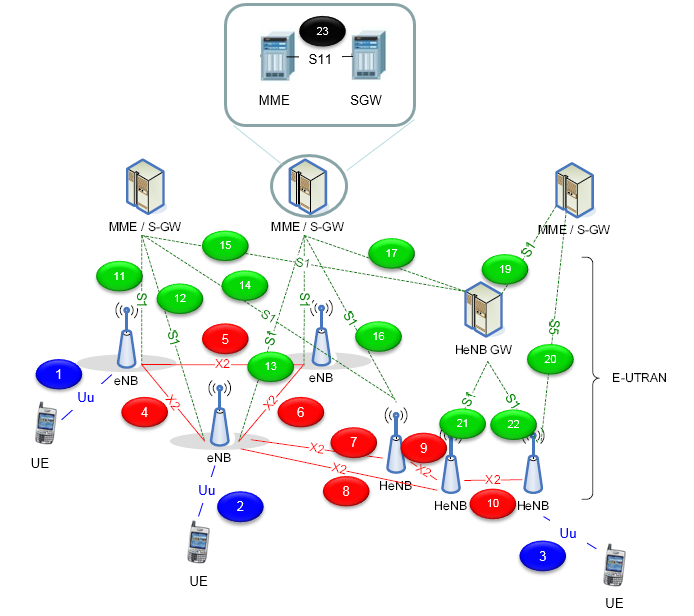
Numbered interfaces of the E-UTRAN. Labels 1 to 3 are Uu, 4 to 10 are X2, 11 to 19, 21 and 22 are S1, 20 is S5, and 23 is S11.
The layout follows 36.300 v19.2.0 Figure 4.6.1-2, which adds the HeNB GW and the X2 GW to the overall architecture. The HeNB GW concentrates the S1 interface of many HeNBs. It appears to the MME as an eNB and to the HeNB as an MME, so the S1 interface is the same with or without it. Label 21 and label 22 are this HeNB to HeNB GW leg, and label 19 is the leg from the HeNB GW to the core network.
Label 20 is the only S5 link in the figure, and it connects a HeNB directly to an MME / S-GW box. That is correct for a HeNB with LIPA. 36.300 clause 4.6.1 states that such a HeNB supports an S5 interface towards the S-GW through its collocated L-GW, and that this S5 interface does not go via the HeNB GW. The X2 links between an eNB and a HeNB, labels 7 and 8, are also allowed: Table 4.6.1-1 permits X2 handover from an eNB or any HeNB to an open access HeNB.
Labels | Interface | Between | Carries |
1, 2, 3 | Uu | UE and eNB or HeNB | RRC, user data, and NAS inside RRC |
4 to 10 | X2 | eNB and eNB, eNB and HeNB, HeNB and HeNB | X2AP over SCTP, and forwarded user data over GTP-U |
11 to 18 | S1 | eNB or HeNB and MME / S-GW | S1AP over SCTP to the MME, and GTP-U to the S-GW |
19, 21, 22 | S1 | HeNB and HeNB GW, HeNB GW and core network | the same S1 protocols, concentrated by the HeNB GW |
20 | S5 | HeNB with collocated L-GW and S-GW | the LIPA bearer path |
23 | S11 | MME and SGW | GTPv2-C bearer control |
The S1 lines hide a split that matters in practice. Each S1 line is really two interfaces: S1-MME for control to the MME, and S1-U for user data to the S-GW. The figure draws the MME and the S-GW as one box, so a single line stands for both. The SAE page shows the same nodes from the core network side.
Uu, X2 and S1 : the three E-UTRAN interfaces, labels 1 to 22.HeNB GW : an MME to the HeNB and an eNB to the MME.S5 at label 20 : a HeNB with LIPA and a collocated L-GW.S11 in the inset : control between the MME and the SGW.
Figure 2 : Network Architecture with the focus on Protocol Stack
An interface name says little about what actually crosses it. The figure below opens each node into its protocol layers, so the path of one IP packet can be followed from the UE application to the server behind the PGW, layer by layer.
Main structure of this illustration is based on 3GPP 36.300, but I combined the multiple figures from the document into single picture to let you follow from the UE to the other end point within single figure. You may use this number (label) when you are communicating with others... like 'I want to talk about the data flow along (4) <--> (5) <--> (3) <--> (6) <--> (7) <--> (8) <--> (9) <--> (14) <--> (13) <--> (12) <--> (11) <--> (10) <--> (33) <--> (34) <--> (35) <--> (36) <--> (37) <--> (42) <--> (41) <--> (40) <--> (39) <--> (38) <--> (43) <--> (44) <--> (45) <--> (46) <--> (47)<--> (48) <--> (49)'.
I know the order of numbers seems confusing.. but it would be helpful to be 'stay awake' if you follow through these numbers one by one :)
The figure below draws the UE on the left, the eNB three times in the shaded column, and the MME, SGW, PGW and a server on the right. Dashed lines mark the LTE-Uu, X2, S1-MME, S1-U and S1/S8 boundaries. Every protocol box has a number from 1 to 64, and the server is 49.
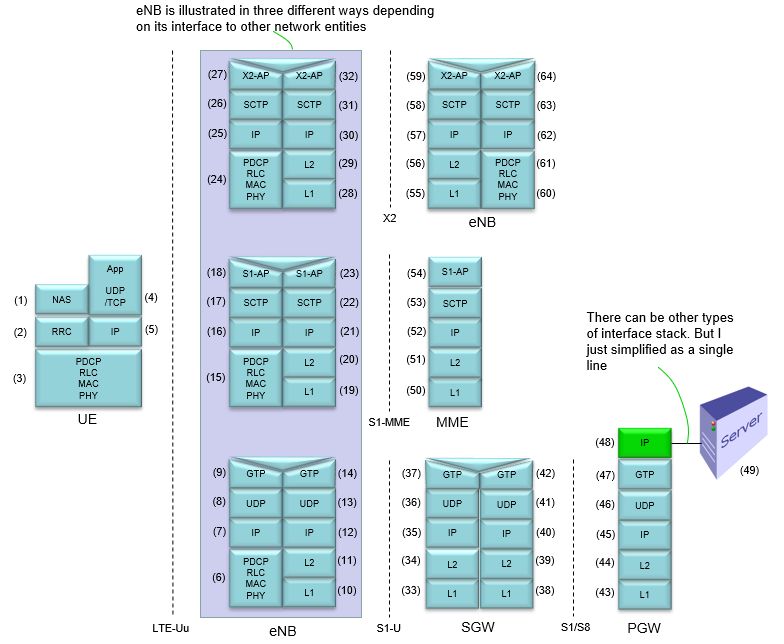
Protocol stacks along the LTE network. The eNB appears three times: towards the SGW over S1-U, towards the MME over S1-MME, and towards another eNB over X2.
The user plane path runs from the UE application through GTP-U tunnels. The eNB carries the packet from PDCP, RLC, MAC and PHY on the radio side into GTP-U, UDP and IP on the S1-U side. The SGW receives it at L1 (33), passes it up to GTP (37), and sends it out through the tunnel on its other side, from GTP (42) down to L1 (38). The PGW removes the last GTP header and forwards the plain IP packet (48) to the server (49). The example path above follows this route.
Two details of the figure differ from 36.300 v19.2.0 Figures 4.3.1-1 and 4.3.2-1. First, the eNB does not run IP, UDP and GTP above PDCP on its radio side. It terminates PDCP, RLC, MAC and PHY towards the UE, and it relays the payload to GTP-U on the S1-U side. On the control plane, RRC sits above PDCP, and NAS passes through the eNB to the MME inside S1AP. The figure stacks the boxes so that one column can be followed from top to bottom. Second, the boundary between SGW and PGW is labelled S1/S8 in the figure. 23.401 v20.0.0 clause 4.2.3 names it S5 within one network and S8 between networks, so the label should read S5/S8.
Interface | Control plane | User plane |
LTE-Uu | RRC over PDCP, RLC, MAC, PHY | IP over PDCP, RLC, MAC, PHY |
S1-MME | S1AP over SCTP over IP | not used |
S1-U | not used | GTP-U over UDP over IP |
X2 | X2AP over SCTP over IP | GTP-U over UDP over IP for forwarding |
S5/S8 | GTPv2-C over UDP over IP | GTP-U over UDP over IP |
One user packet, two GTP-U tunnels : eNB to SGW, then SGW to PGW.eNB relays : PDCP on the radio side to GTP-U on S1-U.SCTP for control : S1AP and X2AP both run over SCTP.S1/S8 in the figure : the spec name is S5/S8.
Figure 3 : Example of Network Architecture with Test Equipment
A test lab rarely has a real core network. A network simulator plays the eNB and, in most setups, the core network as well, so a test result depends on how much of the network the box really implements.
Pretty often I am getting questions from people like 'Can you do this or that with the test equipment ?'. In most case they are doable, but in some case test equipment can only mimic the behavior but not exactly as in real network. In many cases, these difference between test equipment and real network does not matter (especially for testing about radio protocol over Uu interface meaning 'between UE and eNB', but there are some cases that these difference make huge difference in terms of test result. So it would be good if you can get the detailed information from your equipment vendor and draw this kind of diagram for the specific test equipment you are currently using.
This is just one example. This may not be same as the equipment that you are currently using.
The figure below shows a UE connected by RF cable to an LTE network simulator, and the simulator connected by Ethernet to a server PC. The simulator runs RRC and NAS, PDCP, RLC, MAC and PHY under one state machine. The lower half gives the protocol stacks with numbers 1 to 13.
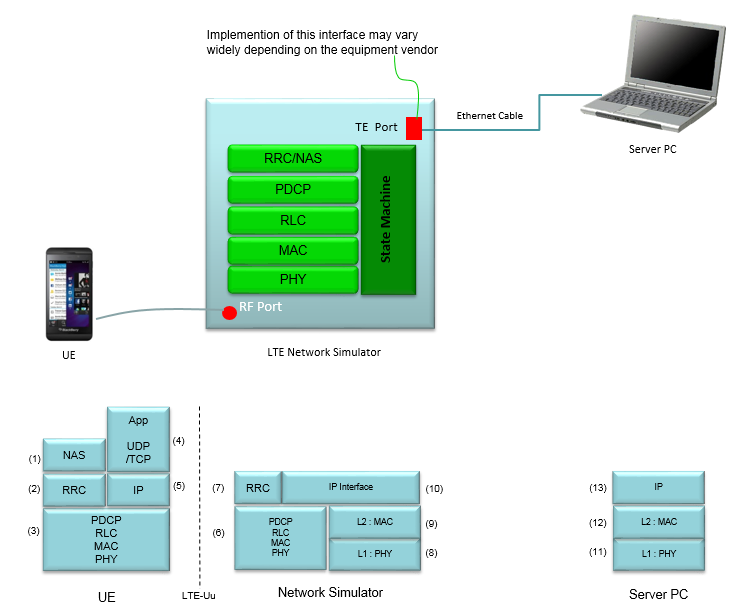
Example test setup. The network simulator replaces the eNB, MME, SGW and PGW, and exposes an IP interface towards a server PC.
The simulator collapses the whole network of the figures above into one box. It has no S1 or S5 interface, so the GTP-U tunnels of the protocol stack figure disappear. The IP interface (10) hands user packets straight to the server PC. The UE side stays unchanged: the radio protocols and NAS must behave as they would towards a real network.
This is why some tests match the field and others do not. Tests over the Uu interface, such as RRC procedures, scheduling and radio measurements, usually do. Tests that depend on the core network, such as handover between MMEs, bearer timers in the SGW or policy from the PCRF, depend on how the vendor implemented the state machine. The note at the TE port in the figure makes the same point: that interface varies widely between vendors.
One box replaces eNB and EPC : no S1, S5 or GTP-U tunnel.Uu behaviour is real : radio protocols run as in a network.Core behaviour is emulated : it depends on the vendor.
Reference
[1] 3GPP TS 36.300 v19.2.0 - clause 4, Overall architecture, with Figures 4.3.1-1, 4.3.2-1 and 4.6.1-2
[2] 3GPP TS 23.401 v20.0.0 - clause 4.2, Architecture reference model and reference points