When you first get into the area of any kind of communication technology, one of the words that you hear the most frequently would be the term 'Protocol'.
- What is Protocol ?
- What does a protocol have to specify ?
- Examples of Protocol
- Web related protocol/Internet Protocol : HTTP, HTTPS,TCP/IP, FTP,RTP etc
- WLAN Protocol : 802.11 a/b/g/n/ac/ad
- Celluar Protocol : LTE, WCDMA, GSM, CDMA
- Bluetooth
- GPIB
- What do these examples have in common ?
- Reference
What is Protocol ?
The word appears in every communication specification and is almost never defined inside one. That absence is why this section exists. Two definitions follow, and the second narrows the first to the case this page is about.
What is Protocol ? What does it mean ? The most generic defintion would be :
Protocol is a set of rules that are required to do something
Depending on what you mean by the 'something', the meaning of the Protocol would vary a little bit. If the 'something' is related to Communication Technology, I think a good definition can be the one from SearchNetworking as follows :
A protocol is the special set of rules that end points in a telecommunication connection use when they communicate. Protocols specify interactions between the communicating entities.
Even if you are not in communication technology, you might have been using this term in every day life. A couple of common example you are familiar with would be HTTP, TCP, FTP etc. The letter 'P' in these term refer to 'Protocol'. Following is an example set of rule for FTP (File Transfer Protocol). You don't have to understand all of the details shown here if you are not really interested. I just want you to get soome intuitive feeling .. like PC (A) sends a message to PC (B) and the PC (B) sends response to PC (A). These two PCs go through a lot of back-and-forth to perform the overall task called 'File Transfer'. This kind of 'set of back-and-forth' is called a 'Protocol'.
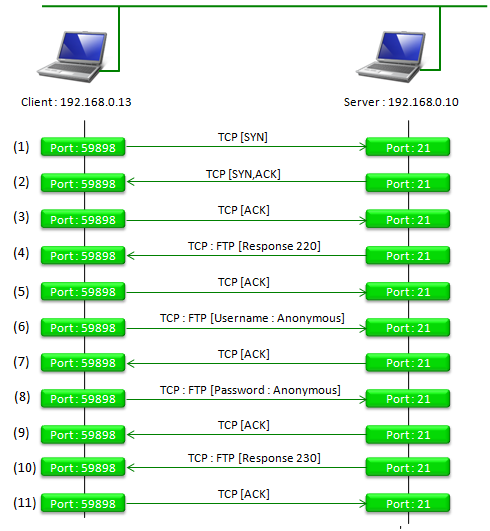
Figure 1. One FTP login, drawn exchange by exchange. Eleven messages pass before the connection is ready, and no file has moved yet. The set of rules that decides which message follows which is the protocol.
Read the port numbers first : the server listens on port 21, which is the number reserved for FTP, and the client picked 59898 for itself. Half of any protocol is an agreement about where to send things.Two protocols are visible at once : every line is labelled TCP, and four of them are labelled TCP : FTP. FTP is travelling inside TCP, which is the layering this page returns to at the end.Only four of the eleven carry FTP content : the 220 greeting, the username, the password and the 230 acceptance. The other seven are TCP setting up and acknowledging, and that ratio is normal rather than wasteful.The first three messages are TCP alone : SYN, then SYN and ACK together, then ACK. FTP cannot say anything until that handshake has finished.
The order in Figure 1 is the part worth a second look. A client cannot send its password before its username, and neither can arrive before the server has sent its 220 greeting. Nothing in the bytes enforces that, and both ends simply agree to follow the same sequence. An implementation that sends them in a different order is not slow or inefficient, it is broken.
Notice also what the figure does not contain. There is no file. All eleven exchanges are spent agreeing who is calling and whether they are allowed in. The transfer that gives FTP its name begins after the last line. Most of the effort in most protocols is spent reaching the point where useful data can start.
A protocol is an agreed order, not just an agreed format : knowing what a message looks like is useless on its own. You also need to know when it may be sent.Setup dominates short exchanges : eleven messages before a single byte of file content. Protocols designed for small transfers therefore work hard to shorten the opening.
What does a protocol have to specify ?
The definitions above say a protocol is a set of rules, which is true and leaves the obvious question unanswered. Rules about what ? Three answers cover every protocol on this page, and the sequence diagram above shows all three at once.
The rules cover |
Which means |
In the FTP figure above |
Format |
what a message looks like : which fields, in which order, how long each one is |
the shape of a TCP header, and the text form of an FTP command line |
Meaning |
what each value stands for, so that both ends read the same bytes the same way |
220 means the service is ready, and 230 means the login was accepted |
Order and timing |
which message may follow which, and how long to wait before giving up |
the handshake before anything else, then the greeting, then the username, then the password |
The third row is the one people underestimate, and it is where most interoperability problems live. Two implementations usually agree about formats, because a format is easy to write down and easy to test. They disagree about what to do when a message arrives early, arrives twice, or does not arrive at all.
That is why a protocol is usually described as a state machine rather than as a list of messages. Each end holds a state, an arriving message moves it to another state, and a message that does not fit the current state is rejected. The FTP server in Figure 1 has no state in which a password is acceptable before a username. It therefore never has to decide what such a password would mean.
Timers complete the picture, and they are the part a diagram never shows. Every protocol needs an answer to the question of what happens when the other end says nothing at all. The answer is always a timer and a retry count. Choosing those two numbers is a large part of making a protocol work over a link that loses messages.
Format, meaning, order : three kinds of rule, and a specification that gives only the first is not a protocol specification.The state machine is the real definition : it says what each end will accept next, which is exactly what a list of message formats cannot say.Silence needs a rule too : timers and retries are part of the protocol, and they are invisible in every sequence diagram including the one above.
Examples of Protocol
You don't have to blindly memorize the definition of the protocol. Just memorization would not give you real understanding. Just try to look through real examples of various protocols. You would gradually understand what the protocol is even when you may not clearly states the definition.
Web related protocol/Internet Protocol : HTTP, HTTPS,TCP/IP, FTP,RTP etc
Start with the one everybody uses without noticing. Opening a web page starts an exchange much like the FTP login above, and the five names in this heading are not alternatives to each other. They are different jobs carried over the same stack.
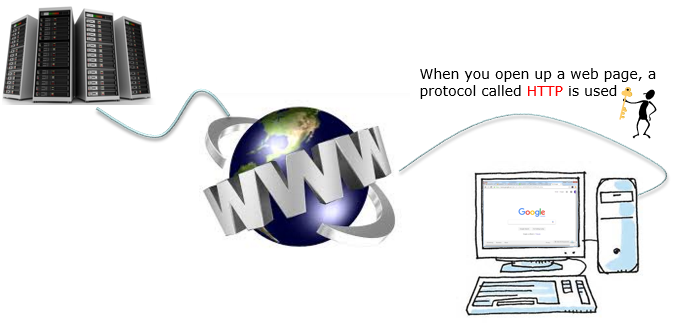
Figure 2. The everyday case, and the one where the protocol is hidden completely. A browser and a server exchange HTTP messages, and the globe between them stands for everything that carries those messages without reading them.
The picture names one protocol and the heading names five : HTTP is what the browser and the server speak to each other. TCP/IP carries it, HTTPS is the same conversation encrypted, and FTP and RTP are different jobs on the same foundation.The globe is deliberately vague : whatever sits between the two machines forwards the messages without understanding them. That indifference is what lets one protocol run over any route.Nobody using it knows it is there : the protocol succeeded until it became invisible. That is the usual outcome for a protocol that works.
WLAN Protocol : 802.11 a/b/g/n/ac/ad
Wi-Fi is the case where the protocol covers only part of the path, and the picture is drawn to show exactly that. Trace the line from the server on the left to any of the clients, and count how much of it carries the 802.11 label.
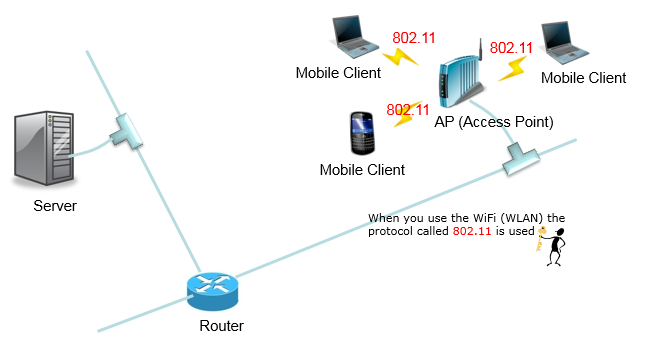
Figure 3. A protocol that replaces one link rather than the whole path. Only the three wireless hops carry the 802.11 label, and everything to the left of the access point is somebody else's protocol.
Three labels, and all three are wireless : the red 802.11 marks sit on the hops between the access point and the two laptops and the phone. Nothing else in the picture is labelled at all.The wired part is drawn plain on purpose : server to router to access point carries no protocol name, because 802.11 has nothing to say about it. It replaces the last cable and stops there.Three clients share one access point : a large part of the 802.11 rule set comes from that sharing. The three have to take turns with no wire to coordinate them.
Celluar Protocol : LTE, WCDMA, GSM, CDMA
One tower and four handsets, and the four handsets are not the same age. The generation of the phone decides which protocol it speaks, rather than the tower. That is why all four names in this heading coexist.
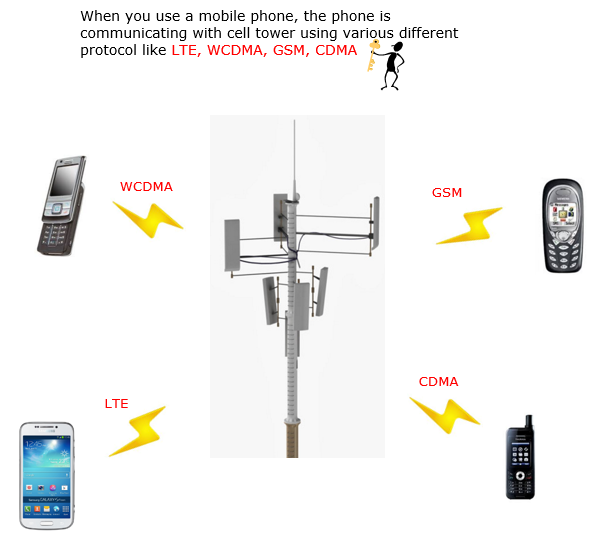
Figure 4. Four protocols reaching one tower. The handsets are drawn from four different eras, and that is the argument the picture makes. A network keeps the older air interfaces running so that older phones keep working.
Four labels, four handsets : WCDMA on the slider phone and GSM on the candy bar phone at the top. CDMA on the rugged handset and LTE on the smartphone below them.The ages of the handsets are the point : each one is contemporary with its protocol. The picture is a timeline arranged around a tower rather than four equivalent choices.Each bolt is a complete protocol, not a setting : every one of the four has its own formats, meanings and timing. Speaking a second one needs separate hardware and software.
Bluetooth
Short range changes the problem enough to justify a protocol of its own, and the picture shows that difference as a shape rather than as a specification. Count the links, and notice that every one of them ends at the same place.
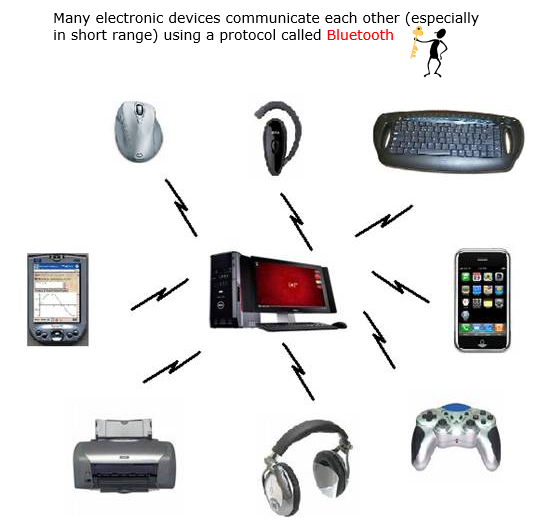
Figure 5. The shape short range produces. Eight different devices reach one computer and none of them reaches another. That arrangement is what the protocol was designed around, rather than an accident of the drawing.
Eight devices and one hub : a mouse, a headset, a keyboard, a handheld, a phone, a printer, headphones and a game controller. All eight join the computer in the middle.No link runs between two peripherals : the star is the topology. A protocol built for it can keep one device in charge of timing rather than negotiating between equals.The devices have almost nothing else in common : different data rates, different power budgets and different lifetimes. A short range protocol has to carry a keyboard press and an audio stream over the same rules.
GPIB
The last example is the oldest and the least like the others. It joins instruments rather than computers, and it runs over a thick cable rather than through the air. It survives in laboratories because of that age rather than despite it.
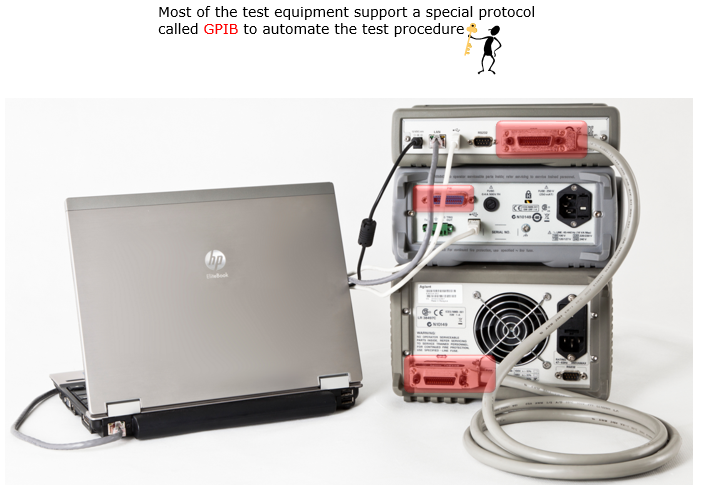
Figure 6. A protocol old enough to specify its own connector. One laptop controls two instruments over the same cable run, which is what makes an automated measurement sequence possible at all.
The connectors identify it at a glance : the wide red blocks at the back of each instrument dwarf anything on a modern interface. The standard specifies that connector as well as the messages.One controller, several instruments : GPIB is a bus rather than a point to point link. Instruments share the cable run, and each answers to its own address.The traffic is commands and readings : set a voltage, take a measurement, report a number. That is a different job from moving a file, and it is why a separate protocol exists for it.
What do these examples have in common ?
A web page, a Wi-Fi link, a phone call, a wireless mouse and a bench voltmeter have almost nothing to do with each other. The five protocols behind them share three properties, and recognising those three is what lets you read a protocol you have never met before.
The first is layering, and Figure 1 shows it without saying so. Each line there is labelled TCP, and four of them are labelled TCP : FTP. Two protocols are running in the same message, with one carried inside the other. Figure 7 draws what that looks like as bytes.
Figure 7. The labels in Figure 1 unpacked. The same FTP bytes travel in every row, and each layer below adds a header without looking at what it was given.
The payload never changes : the top row and the blue block in the bottom row hold the same bytes. Only what is wrapped around them differs from one row to the next.Each header is what a layer costs : the bottom row is much longer than the top one, and that difference is the overhead. It buys the freedom to change any one layer without touching the others.The receiver runs the picture upwards : each layer removes its own header and passes the rest up without reading it. The same FTP code therefore works over Ethernet, Wi-Fi or a cellular link.
The second shared property is the header and payload split drawn in Figure 7. Every one of the five protocols above puts its own control information in front of whatever it was asked to carry, and treats that cargo as opaque. An Ethernet frame does not know it contains a web request, and 802.11 does not know whether the frame it carries holds a video or a keystroke.
The third is the state machine from the section above. Each end tracks where it is in the conversation, accepts only the messages that fit, and runs a timer in case nothing arrives. GPIB does it with a handful of states and LTE does it with a great many, and the shape of the idea is the same in both.
Those three give you a way to approach an unfamiliar protocol. Find the header format, find the state machine, and find the timers. A specification that covers all three is complete. One that covers only the first produces implementations that fail to talk to each other in ways nobody can reproduce.
One warning is worth carrying away from the five examples. The name of a protocol usually covers one layer and not the whole path. 802.11 covers the last wireless hop and nothing beyond the access point, LTE covers the link between a phone and a tower, and FTP covers neither. Asking which layer a name belongs to is the first question to ask about any protocol.
Layering, headers and state machines : three properties shared by every protocol on this page, and by most of the ones that are not.A protocol name names a layer, not a path : the Wi-Fi picture makes that concrete. It labels three hops and leaves the rest of the route unmarked.Read an unfamiliar specification in three passes : formats first, then the state machine, then the timers. The last pass is the one most readers skip and most bugs come from.