Docker - Application Install
When you install (pull) a linux into a docker, you may realize the installed Linux is missing with so many basic commands you use everyday. So you need to install all those command (utilities) manually as per your needs. In my case, I am installing most of the tools listed in this note whenever I install Linux in a docker.
NOTE: The installation command in this note is mostly for Debian/Ubuntu, you may need to figure out another method of installation if you use other Linux distribution.
- Get Into the Container
- apt update
- Install net-tools
- Install ping
- Install nano
- Install ssh
- Install sudo
- Install service
- install nslookup
- Install tcpdump
- Install kmod
In order to install application software within a container, you need to get into the container first as shown below.
|
docker exec -it [container name or id] [command line processor name] |
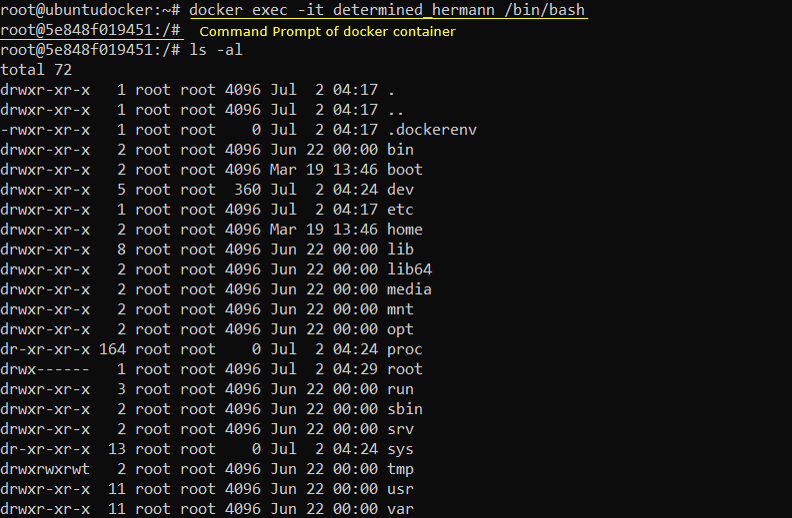
|
apt update |
|
apt install net-tools |
NOTE : this provides verious network related commands like ifconfig.
|
apt-get install iputils-ping |
|
apt update -y && apt install -y nano |
|
apt install openssh-server |
NOTE : After the installation of the ssh server, you may need to do some extra procedures to make it work for you more conviniently. For the extra procedure, refer to this(Root Login) and this (troubleshoot) and this (IPv4 and IPv6) note.
|
apt-get update && apt-get -y install sudo |
|
apt-get install sysvinit-utils |
NOTE : In regular Linux distribution, we tend to use systemctl command for various operations of services, but I didn't manage to make systemctl in docker. So I wanted to use 'service' command which is not installed in docker linux.
|
apt install dnsutils |
|
apt-get install tcpdump |
|
apt-get install kmod |
NOTE : This installs 'lsmod' command
Reference :