IoT(Internet Of Things)
MQTT stands for Message Queuing Telemetry Transport. or MQ Telemetry Transport. It is extremly simple and lightweight messaging protocol based on publish / subscribe mechanism.
In case of current high bandwidth connection (like ordinary internet, WiFi, Cellular), we already have so wide varieties of protocols like http, ftp, sip etc. Most of these protocols is generating relatively large traffic even though it can be considered as almost nothing with recent broadband communication technology and it would not be a big issue even with IoT devices if the devices is based on celluar network (e.g, WCDMA or LTE). However, this kind of protocol can cause untolerable amount of traffic for the devices that is based on very low throughput and small sized packet system like 6LoWPAN. For this kind of low throughput/small packet based system, we would need very light , simple and small sized application layer protocol. MQTT is one of the most popular protocol that meets this requirement.
For learning any kind of protocol, my personal approach is almost always same. To understand the packet (or frame) structure and then following through a couple of example protol sequences line by line. Sometimes I practice decoding the captured hex stream by hand based on Packet Structure specification. I will do the same thing here.
Followings are the topics that will be covered in this post.
- Protocol Overview
- Packet Structure
- Protocol Sequence
- Can I give it a quick try ?
Protocol Overview
Protocol Sequence of MQTT is very simple as illustrated below. First, Client (IoT End Device) request connection to a Broker (a kind of server). If the connection accepted, the device (client) would send 'SUBSRIBE' message saying "I want to get this and this kind of data. So please send me the data whenever those data is upadated on your side (Broker)". If this request is accepted by Broker, the broker would send the data to the device whenever any new data comes into the database. For more details on profocol sequence, see 'Protocol Sequence' section. For more details on the structure and contents of each message, refer to Packet structure section.
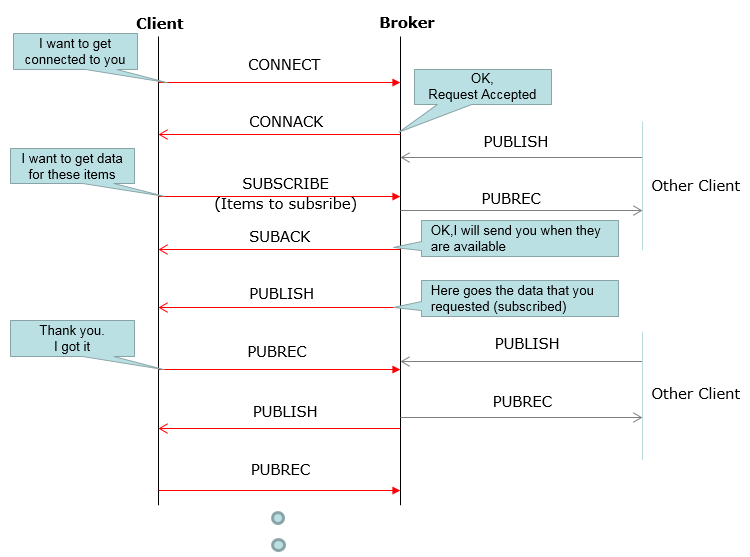
Figure 1. MQTT protocol overview. The clients never talk to each other directly, and the Broker relays every PUBLISH to the clients that subscribed to its topic.
CONNECT and CONNACK open the session : the client asks to connect, and the Broker answers "OK, Request Accepted".SUBSCRIBE lists the items the client wants : the Broker confirms with SUBACK and promises to send the data when it is available.Other Client publishes, and the Broker forwards : the PUBLISH messages on the right come from other clients, and the Broker passes each one to the subscribed client on the left.PUBREC acknowledges each PUBLISH : the diagram shows only this first reply. At QoS 2 the exchange continues with PUBREL and PUBCOMP, and at QoS 1 the reply is PUBACK instead.
Two ideas carry this whole model. The first is the topic. A topic is a text string with levels separated by '/', such as testtopic/2 in the examples below. A subscriber can use wildcards. '+' matches exactly one level, and '#' matches all the remaining levels. So a subscription to testtopic/# receives both testtopic/1 and testtopic/2.
The second idea is decoupling. The publisher does not know who the subscribers are, and the subscribers do not know who published. Only the Broker knows both sides. This is why a small sensor can publish one value and let the Broker deliver it to any number of dashboards.
MQTT runs over TCP, on port 1883 without TLS and on port 8883 with TLS. It can also run inside WebSocket. That is how a browser client, such as the HiveMQ Websocket Client used on this page, reaches the Broker.
Clients never talk to each other directly : every message goes through the Broker.Topics route the data : a subscription with a wildcard, such as testtopic/#, covers a whole branch of topics.MQTT needs a reliable byte stream : TCP, TLS or WebSocket carries it, and MQTT adds its own acknowledgements on top.
Packet Structure
Even though the description and examples came from myself, the packet structure shown here is based on MQTT V3.1 Protocol Specification by International Business Machines Corporation (IBM) Eurotech. Format representation is modified a little bit for easier understanding for myself.
Keep the version in mind while you read this section. The tables follow MQTT V3.1, and so do the captures, because their CONNECT carries the protocol name MQIsdp with version 3. OASIS later published MQTT 3.1.1, which uses the protocol name MQTT with level 4, and then MQTT 5.0 with level 5. The fixed header works the same way in all of them, but a few fields changed their meaning. I'll point out those changes where they appear.
Message Header : Fixed length
Every MQTT packet starts with this fixed header, so it is always the first thing to decode. Byte 1 carries the Message Type and three flags. From Byte 2 on, the Remaining Length gives the number of bytes that follow the fixed header.
Bits |
7 |
6 |
5 |
4 |
3 |
2 |
1 |
0 |
Byte 1 |
||||||||
Byte 2 |
Remaining Length |
|||||||
|
Mnemonic |
Enumeration |
Description |
Reserved |
0000 (0) |
Reserved |
CONNECT |
0001 (1) |
Client request to connect to Server |
CONNACK |
0010 (2) |
Connect Acknowledgement |
PUBLISH |
0011 (3) |
Publish message |
PUBACK |
0100 (4) |
Publish Acknowlegement |
PUBREC |
0101 (5) |
Publish Recieved (assured delivery part 1) |
PUBREL |
0110 (6) |
Publish Release (assured delivery part 2) |
PUBCOMP |
0111 (7) |
Publish Complete (assured delivery part 3) |
SUBSCRIBE |
1000 (8) |
Client Subscribe Request |
SUBACK |
1001 (9) |
Subscribe Acknowlegement |
UNSUBSCRIBE |
1010 (10) |
Client Unsubscribe Request |
UNSUBACK |
1011 (11) |
Unsubscribe Acknowlegement |
PINGREQ |
1100 (12) |
PING Request |
PINGRESP |
1101 (13) |
PING Response |
DISCONNECT |
1110 (14) |
Client is disconnecting |
Reserved |
1111 (15) |
Reserved |
DUP Flag (Duplicate Flag) - 1 bit :
|
Value |
Description |
|
0 |
This is not a duplicate message |
|
1 |
This is a duplicate message, meaning 'I am trying to send the same message again' |
QoS Level - 2 bits :
|
Value |
Description |
|
00 (0) |
At most once. Fire and forget. (Just send and no request for Ack) |
|
01 (1) |
At least once. (Require Ack from the reciever) |
|
10 (2) |
Exactly once. (Assured delivered. No duplication allowed) |
|
11 (3) |
Reserved |
RETAIN - 1 bit : Applies only to PUBLISH message
|
Value |
Meaning |
|
0 |
|
|
1 |
The Server should hold on to the message after it has beed delivered to the current subscribers. |
The first table shows the Remaining Length as a single byte, and that is enough for every example on this page. In general it takes 1 to 4 bytes. Each byte carries 7 bits of the length, and bit 7 tells whether another byte follows. So one byte covers lengths up to 127, and four bytes cover up to 268,435,455.
In MQTT 3.1.1 the three flags keep their meaning only in PUBLISH. The other packets carry fixed values there. SUBSCRIBE, for example, must carry 0010, and this matches the QoS Level of 01 in the SUBSCRIBE example below.
Two bytes are the minimum packet : PINGREQ, PINGRESP and DISCONNECT consist of the fixed header alone.The Remaining Length grows with the packet : 1 byte up to 127 bytes, and at most 4 bytes.
CONNECT
CONNECT is the first packet a client sends after the TCP connection opens. It tells the Broker which protocol version the client speaks, who the client is, and how long the connection may stay silent. The Broker replies with CONNACK.
Bits |
7 |
6 |
5 |
4 |
3 |
2 |
1 |
0 |
Byte 1 |
0 |
0 |
0 |
1 |
X |
X |
X |
X |
Byte 2 |
Remaining Length |
|||||||
Bits |
7 |
6 |
5 |
4 |
3 |
2 |
1 |
0 |
Byte 1 |
Protocol Name Length MSB |
|||||||
Byte 2 |
Protocol Name Length LSB |
|||||||
Byte 3 |
'M' |
|||||||
Byte 4 |
'Q' |
|||||||
Byte 5 |
'I' |
|||||||
Byte 6 |
's' |
|||||||
Byte 7 |
'd' |
|||||||
Byte 8 |
'p' |
|||||||
Byte 9 |
Protocol Version |
|||||||
Byte 10 |
Connect Flag |
|||||||
Byte 11 |
Keep Alive Timer MSB |
|||||||
Byte 12 |
Keep Alive Timer MSB |
|||||||
Byte 13 ... |
Payload |
|||||||
Example :
Captured MQTT packet,
0000  10 21 00 06 4d 51 49 73 64 70 03 02 00 3c 00 13   .!..MQIsdp...<..
0010  63 6c 69 65 6e 74 49 64 2d 75 56 78 53 6a 43 41   clientId-uVxSjCA
0020  4b 71 41                                          KqA

10 21 (hex) - 00010000 00100001 (bin) : Header
    0001 - Message Type - CONNECT
    0 - DUP Flag
    00 - QoS Level
    0 - RETAIN
     00100001 - Remaing Length : 33 Bytes

00 06 4d 51 49 73 64 70 03 02 00 3c 00 13 (hex) : Header of CONNECT message
     00 - Protocol Name Length MSB
     06 - Protocol Name Length LSB
     4d - 'M'
     51 - 'Q'
     49 - 'I'
     73 - 's'
     64 - 'd'
     70 - 'p'
     03 - Protocol Version
     02 - 00000010 - Connect Flag
       0            : User Name Flag
        0           : Password Flag
         0          : WILL Retain
          00        : WILL QoS
            0       : WILL Flag
              1     : Clean Session
     00 - Keep Alive MSB
     3c - Keep Alive LSB
Two values in this capture are worth checking by hand. Keep Alive is 0x003c, which is 60 seconds. So the client must send some packet, at least a PINGREQ, within every 60 seconds. The last two bytes of the first dump line, 00 13, are the length of the Client Identifier that follows, which is 19 bytes. Those 19 bytes spell clientId-uVxSjCAKqA in the ASCII column.
The protocol name identifies the version : MQIsdp with version 3 is MQTT V3.1, and MQTT with level 4 is MQTT 3.1.1.Clean Session 1 starts a fresh session : the Broker keeps no subscriptions from an earlier connection of this client.
CONNECT ACK
CONNACK is the Broker's answer to CONNECT. It is always 4 bytes long, and the value that matters most is the Return Code in the last byte. A Return Code of 0 means the Broker accepted the connection.
Bits |
7 |
6 |
5 |
4 |
3 |
2 |
1 |
0 |
Byte 1 |
0 |
0 |
1 |
0 |
X |
X |
X |
X |
Byte 2 |
0 |
0 |
0 |
0 |
0 |
0 |
1 |
0 |
Bits |
7 |
6 |
5 |
4 |
3 |
2 |
1 |
0 |
Byte 1 |
Topic Name Compression Response |
|||||||
Byte 2 |
||||||||
|
Enumeration |
Hex |
Meaning |
0 |
0x00 |
Connection Accepted |
1 |
0x01 |
Connection Refused : Unacceptable Protocol Version |
2 |
0x02 |
Connection Refused : Identifier Rejected |
3 |
0x03 |
Connection Refused : Server Unavailable |
4 |
0x04 |
Connection Refused : Bad User Name or password |
5 |
0x05 |
Connection Refused : Not Authorized |
6-255 |
Example :
Captured MQTT packet,
0000  20 02 00 00

20 02 (hex) - 00100000 00000010 (bin) : Header
    0010 - Message Type - CONNACK
    0 - DUP Flag
    00 - QoS Level
    0 - RETAIN
     00000010 - Remaing Length : 2 Bytes

00 00 (hex) : Header of CONNACK message
     00 - Topic Name Compression Response (Not used)
     00 - Return Code - Connection Accepted
In MQTT 3.1.1 the first byte of the variable header is no longer the unused Topic Name Compression Response. It became the Connect Acknowledge Flags, and its bit 0 is Session Present. This bit tells the client whether the Broker still holds a session from an earlier connection.
PUBLISH
PUBLISH carries the actual data. The same packet type goes in both directions, from a publisher to the Broker and from the Broker to each subscriber. In the example below, the Broker forwards a message on testtopic/2 to our client.
Bits |
7 |
6 |
5 |
4 |
3 |
2 |
1 |
0 |
Byte 1 |
0 |
0 |
1 |
1 |
0 |
* |
* |
0 |
Byte 2 |
Remaining Length |
|||||||
Bits |
7 |
6 |
5 |
4 |
3 |
2 |
1 |
0 |
Byte 1 |
Topic Name Length MSB |
|||||||
Byte 2 |
Topic Name Length LSB |
|||||||
Byte 3 |
First Ascii Character of Topic Name |
|||||||
Byte 4 |
Topic Name Length LSB |
|||||||
Byte 5 |
First Ascii Character of Topic Name |
|||||||
Byte 6 |
|
|||||||
Byte ... |
|
|||||||
Byte N-1 |
|
|||||||
Byte N |
Last Ascii Character of Topic Name |
|||||||
Byte N+1 |
Message ID MSB |
|||||||
Byte N+2 |
Message ID LSB |
|||||||
Byte ... |
Message Data |
|||||||
Example :
Captured MQTT packet,
0000  35 17 00 0b 74 65 73 74 74 6f 70 69 63 2f 32 00   5...testtopic/2.
0010  01 73 61 64 73 64 61 73 64                        .sadsdasd

35 17 (hex) - 00111001 00011011 (bin) : Header
    0011 - Message Type - PUBLISH
    1 - DUP Flag
    00 - QoS Level
    1 - RETAIN
    00011011 - Remaing Length : 23 Bytes
00 (hex) - Topic Name MSB
0b (hex) - Topic Name LSB : 11 bytes
00 (hex) - Topic Name Length MSB
0b (hex) - Topic Name Length LSB : 11 Bytes
74 65 73 74 74 6f 70 69 63 2f 32 (hex) - testtopic/2
00 (hex) - Message ID MSB
01 (hex) - Message ID LSB
Please check the fixed header of this example against the bit table. 0x35 is 0011 0101 in binary, not 00111001. So the DUP Flag is 0, the QoS Level is 10, which is QoS 2, and RETAIN is 1. The second byte, 0x17, is 0001 0111 in binary, which is the 23 bytes that the decode gives. QoS 2 also explains why the packet carries a Message ID, because only QoS 1 and QoS 2 packets have one. The hand decode lists the topic length twice, and the payload starts right after the Message ID. The last 8 bytes, 73 61 64 73 64 61 73 64, are the ASCII text sadsdasd. The count adds up, because 2 + 11 + 2 + 8 is 23, the Remaining Length.
The topic is sent as text in every PUBLISH : a long topic name costs bytes in every message.A Message ID appears only at QoS 1 and QoS 2 : the acknowledgements refer to the message by this ID.
SUBSCRIBE
SUBSCRIBE tells the Broker which topics the client wants to receive. One packet can carry several topic filters, and each filter comes with the QoS that the client asks for. The example below subscribes to testtopic/# with QoS 2.
Bits |
7 |
6 |
5 |
4 |
3 |
2 |
1 |
0 |
Byte 1 |
1 |
0 |
0 |
0 |
0 |
0 |
1 |
X |
Byte 2 |
Remaining Length |
|||||||
Message Header and Payload
Bits |
7 |
6 |
5 |
4 |
3 |
2 |
1 |
0 |
Byte 1 |
Message ID MSB |
|||||||
Byte 2 |
Message ID LSB |
|||||||
Byte 3 |
Topic Name Length MSB |
|||||||
Byte 4 |
Topic Name Length LSB |
|||||||
Byte 5 |
First Ascii Character of Topic Name |
|||||||
Byte 6 |
|
|||||||
Byte 7 |
|
|||||||
Byte 8 |
|
|||||||
Byte 9 |
|
|||||||
Byte ... |
|
|||||||
Byte N-1 |
|
|||||||
Byte N |
Last Ascii Character of Topic Name |
|||||||
Last Byte |
X |
X |
X |
X |
X |
X |
* |
* |
Example :
Captured MQTT packet,
0000  82 10 00 01 00 0b 74 65 73 74 74 6f 70 69 63 2f   ......testtopic/
0010  23 02                                             #.

82 10 (hex) - 10000010 00010000 (bin) : Header
    1000 - Message Type - SUBSCRIBE
    0 - DUP Flag
    01 - QoS Level
    0 - RETAIN
    00010000 - Remaing Length : 16 Bytes
00 (hex) - Message ID MSB
01 (hex) - Message ID LSB
00 (hex) - Topic Name Length MSB
0b (hex) - Topic Name Length LSB : 11 Bytes
74 65 73 74 74 6f 70 69 63 2f 23 (hex) - testtopic/#
02 (hex) - 00000010 (bin) - Requested QoS : 2
The Message ID in SUBSCRIBE lets the client match the SUBACK that answers it. In this capture the ID is 1, and the SUBACK below carries the same ID. The Remaining Length also checks out, because 2 + 2 + 11 + 1 is 16.
SUBACK
SUBACK completes the subscription. It repeats the Message ID of the SUBSCRIBE, and then it lists one Granted QoS for each topic filter, in the same order. The Broker may grant a lower QoS than the client requested.
Bits |
7 |
6 |
5 |
4 |
3 |
2 |
1 |
0 |
Byte 1 |
1 |
0 |
0 |
1 |
X |
X |
X |
X |
Byte 2 |
Remaining Length Header |
|||||||
Bits |
7 |
6 |
5 |
4 |
3 |
2 |
1 |
0 |
Byte 1 |
Message ID MSB |
|||||||
Byte 2 |
Message ID LSB |
|||||||
Byte 3 |
Granted QoS |
|||||||
Byte 4 |
Granted QoS |
|||||||
Example :
Captured MQTT packet,
0000  90 03 00 01 02

09 03 (hex) - 10010000 00000011 (bin) : Header
    1001 - Message Type - SUBACK
    0 - DUP Flag
    00 - QoS Level
    0 - RETAIN
     00000011 - Remaing Length : 3 Bytes

00 01 02 (hex) : Header of SUBACK message
     00 - Message ID MSB
     01 - Message ID LSB
     02 - Granted QoS : 2
The decode line starts with 09 03, but the captured byte is 0x90, which is 1001 0000 in binary. The binary value and the rest of the decode are correct, so only the hex in that line is a typo. Here the Broker granted QoS 2, exactly what the SUBSCRIBE requested. In MQTT 3.1.1 a Granted QoS of 0x80 means that the subscription failed.
SUBACK answers topic by topic : it carries one Granted QoS per topic filter, in the order of the SUBSCRIBE.The Message ID pairs request and answer : SUBSCRIBE and SUBACK both carry Message ID 1 here.
Protocol Sequence
Following is one example protocol sequence that I captured from my trial with HiveMQ Websocket Client. You may get a little bit different variations if you try on your own, but overall procedure and message structure would be similar to the example shown here. Give it a try on your own and you will get used to it very quickly. MQTT is one of the simplest protocol you can see in wireless communication area and I think this would be the biggest reason why MQTT is adopted as one of the dominant protocols in IoT.
|
Step |
Direction |
Message |
Memo |
|
1 |
Client --> Broker |
ex > Connect with Client id = -uVxSjCAKqA |
|
|
2 |
Client <-- Broker |
Connection Acknowledged |
|
|
3 |
Client --> Broker |
ex > Subscribe testtopic/# |
|
|
4 |
Client <-- Broker |
Subscription Acknowledged |
|
|
5 |
Client <-- Broker |
ex > Publish testtopic/2 value |
|
|
6 |
Client <-- Broker |
PUBLISH |
ex > Publish testtopic/1 value |
|
7 |
Client --> Broker |
PUBREC |
Publish Recieved |
|
8 |
Client <-- Broker |
PUBREL |
Publish Release |
|
9 |
Client --> Broker |
PUBREC |
Publish Recieved |
|
10 |
Client --> Broker |
PUBREL |
Publish Release |
|
11 |
Client --> Broker |
PUBCOM |
Publish Complete |
|
12 |
Client --> Broker |
PUBCOM |
Publish Complete |
|
13 |
Client --> Broker |
PUBLISH |
ex > Publish testtopic/1 value |
|
14 |
Client <-- Broker |
PUBLISH |
ex > Publish testtopic/1 value |
|
15 |
Client --> Broker |
PINGREQ |
Ping Request |
|
16 |
Client <-- Broker |
PINGRESP |
Ping Response |
|
17 |
Client --> Broker |
DISCONNECT |
Let's read the table in four parts. Steps 1 to 4 set up the session and the subscription. Steps 5 to 12 deliver two messages from the Broker at QoS 2. For each PUBLISH, the receiver answers with PUBREC, the sender answers with PUBREL, and the receiver closes with PUBCOMP. This four-step exchange gives QoS 2 its exactly once delivery. The two exchanges overlap in time, so the table interleaves their packets.
The PUBREL always comes from the side that sent the PUBLISH, which is the Broker in steps 5 to 12. So step 10 would normally read Client <-- Broker, like step 8. The table lists it as Client --> Broker, and the captured bytes of that step are not on this page, so it cannot be checked here.
Steps 13 and 14 show the Broker at work. The client publishes on testtopic/1. The same client is also subscribed to testtopic/#, so the Broker sends the message straight back to it. Neither PUBLISH has an acknowledgement in the table, which suggests QoS 0. Steps 15 to 17 end the session. PINGREQ and PINGRESP keep the connection alive when no data flows within the Keep Alive time of 60 seconds from the CONNECT. DISCONNECT has no reply, and the client closes the TCP connection after sending it.
QoS 2 costs four packets per message : PUBLISH, PUBREC, PUBREL and PUBCOMP.A subscriber can receive its own messages : the Broker forwards every PUBLISH that matches a subscription, including one from the same client.PINGREQ keeps an idle session open : the Keep Alive time in CONNECT sets how long the client may stay silent.
Can I give it a quick try ?
Yes, Try with HiveMQ Websocket Client. This is what I used to capture the most of sample log for this page. The client runs in a browser and reaches a public Broker over WebSocket, so you do not need to install anything. Connect, subscribe to a topic with a wildcard, and publish a few messages to it. Then compare what you see with the sequence above.
If you want to see the raw bytes, run a command line client instead. Mosquitto, for example, comes with mosquitto_sub and mosquitto_pub. The command mosquitto_sub -h test.mosquitto.org -t "testtopic/#" -v subscribes to the whole testtopic branch. The command mosquitto_pub -h test.mosquitto.org -t testtopic/1 -m hello -q 2 publishes one message at QoS 2. These tools use plain TCP on port 1883, so Wireshark decodes every MQTT packet directly.
Two more experiments show features that the sequence above does not use. First, publish a message with the RETAIN flag set, for example with the -r option of mosquitto_pub, and only then subscribe to its topic. The Broker delivers the message at once, because it keeps the last retained message of every topic. Second, connect a client with a Will message and then cut its network connection without a DISCONNECT. The Broker then publishes the Will message to the subscribers on behalf of that client.
The empty table below is the fixed header from the Packet Structure section. Take the first two bytes of any packet you capture, write the bits into it, and decode them by hand, as in the examples above.
Bits |
7 |
6 |
5 |
4 |
3 |
2 |
1 |
0 |
Byte 1 |
||||||||
Byte 2 |
A browser client is the quickest start : it needs no installation and shows every message it sends and receives.A TCP client shows the raw packets : Wireshark can then decode them on port 1883.