netsh
This is just an appedix of this section. You already noticed that I often used special command 'netsh'. This is a command supported by Windows by defaul and following is the dump of help for this command. This would give you overall capability of this command but you would never get the real meaning unless you try yourself..
- Assigning a new IP address
- Command Format : netsh int ipv6 set address <interface Number> IPv6_address
- netsh int ipv6 set address 7 2001::2
- Removing the existing IPv6 address
- Reseting TCP/IP Config
- Getting IP Address from DHCP server
- Getting DNS from DHCP Server
- Setting DNS Server Manually
- Setting the Default Gateway Address
- Command Format : netsh interface ipv6 add route ::/0 <Interface Number> <Default Gateway address >
- Command Format : netsh interface ipv6 add route <Interface Name> Default_GateWay_Address
- Setting/Showing the Subnet Mask
- Getting/Showing the MTU Size
- Setting the MTU Size
- Getting/Showing Interface Information
- Showing Information - IPv6 - show neighbors
- Showing Information - IPv6 - show joins
- Enabling Router Advertise
- Setting/Modifying Router Advertisement Properties
You can get the general help for the netshel command as follows. But you would need to do a lot of practice with real situation to get familiar with the details.
C:\>netsh -?
Usage: netsh [-a AliasFile] [-c Context] [-r RemoteMachine] [Command | -f ScriptFile]
The following commands are available:
Commands in this context:
? - Displays a list of commands.
add - Adds a configuration entry to a list of entries.
bridge - Changes to the `netsh bridge' context.
delete - Deletes a configuration entry from a list of entries.
diag - Changes to the `netsh diag' context.
dump - Displays a configuration script.
exec - Runs a script file.
firewall - Changes to the `netsh firewall' context.
help - Displays a list of commands.
interface - Changes to the `netsh interface' context.
lan - Changes to the `netsh lan' context.
ras - Changes to the `netsh ras' context.
routing - Changes to the `netsh routing' context.
set - Updates configuration settings.
show - Displays information.
winsock - Changes to the `netsh winsock' context.
C:\>netsh
netsh>help
The following commands are available:
Commands in this context:
.. - Goes up one context level.
? - Displays a list of commands.
abort - Discards changes made while in offline mode.
add - Adds a configuration entry to a list of entries.
alias - Adds an alias.
bridge - Changes to the `netsh bridge' context.
bye - Exits the program.
commit - Commits changes made while in offline mode.
delete - Deletes a configuration entry from a list of entries.
diag - Changes to the `netsh diag' context.
dump - Displays a configuration script.
exec - Runs a script file.
exit - Exits the program.
firewall - Changes to the `netsh firewall' context.
help - Displays a list of commands.
interface - Changes to the `netsh interface' context.
lan - Changes to the `netsh lan' context.
nap - Changes to the `netsh nap' context.
offline - Sets the current mode to offline.
online - Sets the current mode to online.
popd - Pops a context from the stack.
pushd - Pushes current context on stack.
quit - Exits the program.
ras - Changes to the `netsh ras' context.
routing - Changes to the `netsh routing' context.
set - Updates configuration settings.
show - Displays information.
unalias - Deletes an alias.
winsock - Changes to the `netsh winsock' context.
The following sub-contexts are available:
bridge diag firewall interface lan nap ras routing winsock
To view help for a command, type the command, followed by a space, and then
type ?.
netsh>
There would be some cases you want to allocate an arbitrary IPv6 IP to your network interface (LAN card). You can change the existing IP address or you can add a new IP for the interface (one of important difference in IPv6 in comparison to IPv4 would be that you can allocate more than one IP to the single interface card).
Why you want to change the IP ? Why you want to add a new address ? The answer would vary. For me, I wanted to change it to a simple address since my brain is not good enough to memorize such a long random number-like digits -:). Of course, there will be more technical reasons for this which may different for everybody.
One example I will go through in this section is to change the IPv6 address to a specific address to the two PCs directly connected each other and try ping if the change works as expected.
In Windows system (Windows XP Professional in my case), a special command called 'netsh' is provided and you can configure almost every details of your interface using this command.
The command format to add a new IPv6 address is as follows :
Command Format : netsh int ipv6 set address <interface Number> IPv6_address
Do you know how to get the inferface number for your network card ? If you don't remember, read PC to PC Connection Test part again.
Example 1 :
c:\> netsh int ipv6 set address 7 2001::2
One example of this command is as follows. If the command has no problem, it will return 'OK' when you press Enter as follows.

Confirm if the IP address is properly set to your network interface by using ipconfig.
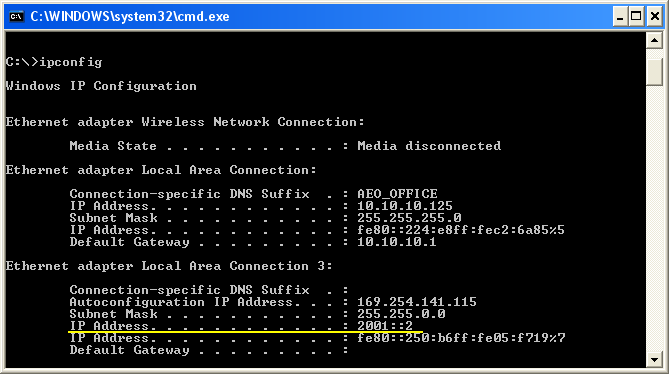
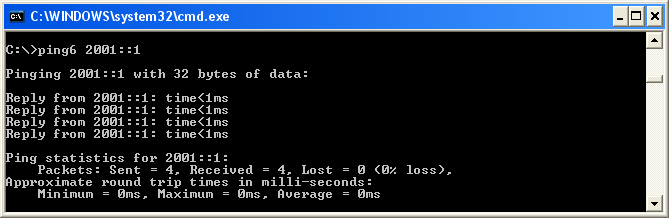
Now add a new IP address to the other PC as well. In my example case, I set the IP address 2001::1 for the other PC.
And then try ping if it is working as expected.
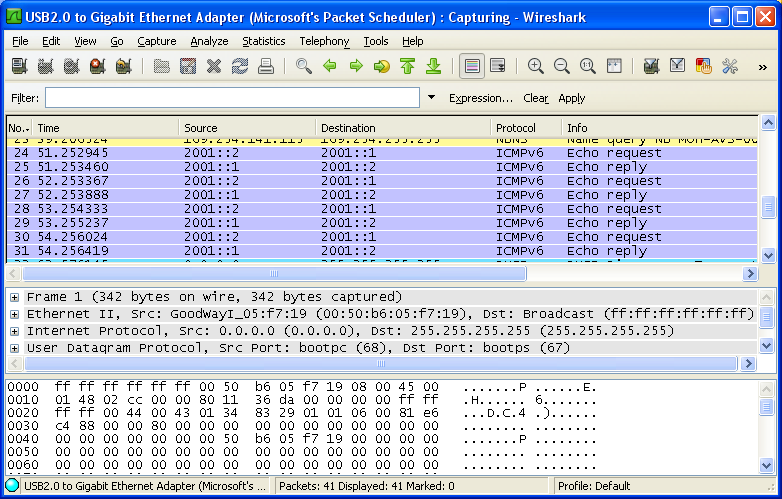
Until you are very familiar with this kind of testing and have strong confidence about the operation, try always to confirm the result with Wireshark on both source and destination site. This is wireshark log captured on source PC.
Removing the existing IPv6 address
You can remove an existing IP if you want by using the following command.
Command Format : netsh int ipv6 delete address <interface Number> IPv6_address
Example >
c:\> netsh int ipv6 delete address 7 2001::2
Confirm the result with ipconfig.
Sometimes you may come across with the error message saying "A device attached to the system is not functioning.". In this case, you can reset the IP settings for the all network interface on your PC by the following command.
And reboot the PC and then try check with IP config. (All the details which happened during the resetting process are stored in c:\resetlog.txt for your reference and for any possible recovery)
Getting IP Address from DHCP server
Command Format : netsh interface ip set address <Interface Name> dhcp
Example 1 :
c:\> netsh interface ip set address "Local Area Connection" dhcp
Command Format : netsh interface ip set dns <Interface Name > dhcp
Example 1 :
c:\> netsh interface ip set dns "Local Area Connection" dhcp
Command Format : netsh interface ipv6 add dnsserver <Interface Name> DNS_Server_address
Example >
c:\> netsh interface ipv6 add dnsserver "Local Area Connection" 2001:db8:99:4acd::8
Setting the Default Gateway Address
Command Format : netsh interface ipv6 add route ::/0 <Interface Number> <Default Gateway address >
Example >
c:\> netsh int ipv6 add route ::/0 4 FE80::2
Note : Don't copy the number "4" from this example. Your <interface Number> may be different. So make it sure you specified the correct interface number.
Or you can use "Interface Name" in stead of < Interface Number > as follows.
Command Format : netsh interface ipv6 add route "Interface Name" Default_GateWay_Address
Example >
c:\> netsh interface ipv6 add route ::/0 "Local Area Connection" fe80::2aa:ff:fe9a:21b8
Command Format : netsh int ipv6 add route <subnet mask> <interface number>
Example >
c:\> netsh int ipv6 add route FD00:0:0:1::/64 4
Command Format : netsh interface < ip type> show subinterfaces
Example >
C:\>netsh interface ipv4 show subinterfaces
MTU MediaSenseState Bytes In Bytes Out Interface
------ --------------- --------- --------- -------------
4294967295 1 0 47970 Loopback Pseudo-Interface 1
1300 1 121284117 8873122 Wireless Network Connection
1356 1 0 52458 Local Area Connection 3
1300 5 0 0 Local Area Connection
Example >
C:\>netsh interface ipv6 show subinterfaces
MTU MediaSenseState Bytes In Bytes Out Interface
------ --------------- --------- --------- -------------
4294967295 1 0 38596 Loopback Pseudo-Interface 1
1500 1 0 79953 Wireless Network Connection
1356 1 0 28975 Local Area Connection 3
1500 5 0 152 Local Area Connection
1280 5 0 0 6TO4 Adapter
1280 5 0 0 isatap.{165CA1A7-06B9-4C18-9735-DC26332CC696}
1280 5 0 0 isatap.{C945F0CB-43BD-45F4-A127-950532B63EFE}
1280 5 0 0 isatap.us.anritsu.com
Example >
C:\>netsh interface ipv4 set subinterface "Local Area Connection" mtu=1458 store=persistent
Note 1: Check if MTU size has been changed using 'netsh interface ipv4 show subinterfaces'
Note 2 : This one changes only IPv4 MTU size, does not change IPv6 even though the interface name is same
Example >
C:\>netsh interface ipv6 set subinterface "Local Area Connection" mtu=1458 store=persistent
Note 1: Check if MTU size has been changed using 'netsh interface ipv6 show subinterfaces'
Note 2 : This one changes only IPv6 MTU size, does not change IPv4 even though the interface name is same
Getting Interface Information/Showing Interface Information
Command Format : netsh interface <ipType> show interface <Interface Name>
Example >
C:\>netsh interface ipv4 show interface "Local Area Connection"
Interface Local Area Connection Parameters
----------------------------------------------
IfLuid : ethernet_6
IfIndex : 11
State : disconnected
Metric : 10
Link MTU : 1458 bytes
Reachable Time : 38000 ms
Base Reachable Time : 30000 ms
Retransmission Interval : 1000 ms
DAD Transmits : 3
Site Prefix Length : 64
Site Id : 1
Forwarding : disabled
Advertising : disabled
Neighbor Discovery : enabled
Neighbor Unreachability Detection : enabled
Router Discovery : dhcp
Managed Address Configuration : enabled
Other Stateful Configuration : enabled
Weak Host Sends : disabled
Weak Host Receives : disabled
Use Automatic Metric : enabled
Ignore Default Routes : disabled
Advertised Router Lifetime : 1800 seconds
Advertise Default Route : disabled
Current Hop Limit : 0
Force ARPND Wake up patterns : disabled
Directed MAC Wake up patterns : disabled
Example >
C:\>netsh interface ipv6 show interface "Local Area Connection"
Interface Local Area Connection Parameters
----------------------------------------------
IfLuid : ethernet_6
IfIndex : 11
State : disconnected
Metric : 10
Link MTU : 1458 bytes
Reachable Time : 20500 ms
Base Reachable Time : 30000 ms
Retransmission Interval : 1000 ms
DAD Transmits : 1
Site Prefix Length : 64
Site Id : 1
Forwarding : disabled
Advertising : disabled
Neighbor Discovery : enabled
Neighbor Unreachability Detection : enabled
Router Discovery : enabled
Managed Address Configuration : disabled
Other Stateful Configuration : disabled
Weak Host Sends : disabled
Weak Host Receives : disabled
Use Automatic Metric : enabled
Ignore Default Routes : disabled
Advertised Router Lifetime : 1800 seconds
Advertise Default Route : disabled
Current Hop Limit : 0
Force ARPND Wake up patterns : disabled
Directed MAC Wake up patterns : disabled
Example >
C:\>netsh interface ipv4 show interface "Wireless Network Connection"
Interface Wireless Network Connection Parameters
----------------------------------------------
IfLuid : wireless_0
IfIndex : 12
State : connected
Metric : 20
Link MTU : 1300 bytes
Reachable Time : 21500 ms
Base Reachable Time : 30000 ms
Retransmission Interval : 1000 ms
DAD Transmits : 3
Site Prefix Length : 64
Site Id : 1
Forwarding : disabled
Advertising : disabled
Neighbor Discovery : enabled
Neighbor Unreachability Detection : enabled
Router Discovery : dhcp
Managed Address Configuration : enabled
Other Stateful Configuration : enabled
Weak Host Sends : disabled
Weak Host Receives : disabled
Use Automatic Metric : enabled
Ignore Default Routes : disabled
Advertised Router Lifetime : 1800 seconds
Advertise Default Route : disabled
Current Hop Limit : 0
Force ARPND Wake up patterns : disabled
Directed MAC Wake up patterns : disabled
Showing Information - IPv6 - show neighbors
: This shows IPv6 address and Link Layer Address (MAC Address) mapping table. (like ARP table in IPv4)
Command Format : netsh int ipv6 show neighbors
Example >
C:\>netsh int ipv6 show neighbors
Interface 1: Loopback Pseudo-Interface 1
Internet Address Physical Address Type
-------------------------------------------- ----------------- -----------
ff02::16 Permanent
ff02::fb Permanent
ff02::1:2 Permanent
ff02::1:3 Permanent
Interface 14: Wireless Network Connection
Internet Address Physical Address Type
-------------------------------------------- ----------------- -----------
ff02::1 33-33-00-00-00-01 Permanent
ff02::2 33-33-00-00-00-02 Permanent
ff02::16 33-33-00-00-00-16 Permanent
ff02::fb 33-33-00-00-00-fb Permanent
ff02::1:2 33-33-00-01-00-02 Permanent
ff02::1:3 33-33-00-01-00-03 Permanent
ff02::1:ff0e:33cb 33-33-ff-0e-33-cb Permanent
Interface 19: Local Area Connection 2
Internet Address Physical Address Type
-------------------------------------------- ----------------- -----------
ff02::1 33-33-00-00-00-01 Permanent
ff02::2 33-33-00-00-00-02 Permanent
ff02::16 33-33-00-00-00-16 Permanent
ff02::1:2 33-33-00-01-00-02 Permanent
ff02::1:3 33-33-00-01-00-03 Permanent
ff02::1:fffa:3243 33-33-ff-fa-32-43 Permanent
ff02::1:fffc:fd93 33-33-ff-fc-fd-93 Permanent
Showing Information - IPv6 - show joins
: This is helpful to get multicast group address for an interface.
Command Format : netsh int ipv6 show joins
Example >
Interface 1: Loopback Pseudo-Interface 1
Scope References Last Address
---------- ---------- ---- ---------------------------------
0 1 Yes ff02::c
Interface 14: Wireless Network Connection
Scope References Last Address
---------- ---------- ---- ---------------------------------
0 0 Yes ff01::1
0 0 Yes ff02::1
0 1 Yes ff02::c
0 1 Yes ff02::fb
0 1 Yes ff02::1:3
0 1 Yes ff02::1:ff0e:33cb
Interface 13: Local Area Connection
Scope References Last Address
---------- ---------- ---- ---------------------------------
0 0 Yes ff01::1
0 0 Yes ff02::1
0 1 Yes ff02::1:ff66:5416
Setting/Enabling Router Advertise
Command Format : this process would require a couple of steps in sequence.
- netsh interface ipv6 show interface
- netsh interface ipv6 set route
- netsh interface ipv6 add route
First check the current setting using "netsh interface ipv6 show interface"
c:\> netsh interface ipv6 show interface "Local Area Connection"
Interface Local Area Connection Parameters
----------------------------------------------
....
Site Prefix Length : 64
Site Id : 1
Forwarding : disabled
Advertising : disabled
Neighbor Discovery : enabled
Neighbor Unreachability Detection : enabled
Router Discovery : enabled
Managed Address Configuration : disabled
Other Stateful Configuration : disabled
Weak Host Sends : disabled
Weak Host Receives : disabled
Use Automatic Metric : enabled
Ignore Default Routes : disabled
Advertised Router Lifetime : 1800 seconds
Advertise Default Route : disabled
Current Hop Limit : 0
Force ARPND Wake up patterns : disabled
Directed MAC Wake up patterns : disabled
And try 'ipconfig -all' and check out the network adaptor IPv6 address. You see only Link-local address and no other IPv6 address.
Ethernet adapter Local Area Connection:
Connection-specific DNS Suffix . :
Description . . . . . . . . . . . : Intel(R) 82579LM Gigabit Network Connection
Physical Address. . . . . . . . . : F0-1F-AF-28-8D-92
DHCP Enabled. . . . . . . . . . . : No
Autoconfiguration Enabled . . . . : Yes
Link-local IPv6 Address . . . . . : fe80::206c:68b4:2d2a:2f00%11(Preferred)
IPv4 Address. . . . . . . . . . . : 1.1.1.2(Preferred)
Subnet Mask . . . . . . . . . . . : 255.0.0.0
Default Gateway . . . . . . . . . :
DNS Servers . . . . . . . . . . . : fec0:0:0:ffff::1%1
fec0:0:0:ffff::2%1
fec0:0:0:ffff::3%1
NetBIOS over Tcpip. . . . . . . . : Enabled
Then enable 'Advertising' as follows. (Note : To run this command, you need to execute windows cmd window in Administrator mode). If Advertise = disabled
Try this first
C:\>netsh interface ipv6 set route 2001:0:0:1::/64 "Local Area Connection" publish=yes
If you get any error saying invalid ip address as follows.
Invalid prefix parameter (2001::1::/64). Prefix should be of the form <IPv6 address>/[0-128].
you may try following.
C:\>netsh interface ipv6 add route 2001:0:0:1::/64 "Local Area Connection" publish=yes
Now this network interface will send Router Advertisement with Prefix Address = 2001:0:0:1::/64 when it recieves Router Solicitation.
Setting/Modifying Router Advertisement Properties
Even after you enabled Router Advertisement, you can change each of the parameters as described here.
Following is to enable or disable the AdvertiseDefaultRoute property (highlighted below) -------------------
Site Prefix Length : 64
Site Id : 1
Forwarding : disabled
Advertising : disabled
Neighbor Discovery : enabled
Neighbor Unreachability Detection : enabled
Router Discovery : enabled
Managed Address Configuration : disabled
Other Stateful Configuration : disabled
Weak Host Sends : disabled
Weak Host Receives : disabled
Use Automatic Metric : enabled
Ignore Default Routes : disabled
Advertised Router Lifetime : 1800 seconds
Advertise Default Route : disabled
Current Hop Limit : 0
Force ARPND Wake up patterns : disabled
Directed MAC Wake up patterns : disabled
Command Format : netsh int ipv6 set interface <InterfaceName> advertisedefaultroute=<enable/disable>
Example 1 >
C:\>netsh int ipv6 set interface "Ethernet 0" advertisedefaultroute=enable
After this, verify the result of the command using Getting IPv6 Interface Property in this example.
Following is to enable or disable the AdvertiseRouterLifetime property (highlighted below) -------------------
Site Prefix Length : 64
Site Id : 1
Forwarding : disabled
Advertising : disabled
Neighbor Discovery : enabled
Neighbor Unreachability Detection : enabled
Router Discovery : enabled
Managed Address Configuration : disabled
Other Stateful Configuration : disabled
Weak Host Sends : disabled
Weak Host Receives : disabled
Use Automatic Metric : enabled
Ignore Default Routes : disabled
Advertised Router Lifetime : 1800 seconds
Advertise Default Route : disabled
Current Hop Limit : 0
Force ARPND Wake up patterns : disabled
Directed MAC Wake up patterns : disabled
Command Format : netsh int ipv6 set interface <interfaceName> advertisedrouterlifetime=<value>
Example 1 >
C:\>netsh int ipv6 set interface "Ethernet 0" advertisedrouterlifetime=180
After this, verify the result of the command using Getting IPv6 Interface Property in this example.