Timer T300 is used during the RRC Connection Establishment procedure to supervise the time between the UE initiating an RRCConnectionRequest or RRCConnectionResumeRequest and receiving a response from the network, such as an RRCConnectionSetup, RRCConnectionReject, or other acknowledgment messages. It ensures timely handling of connection establishment and avoids indefinite waiting in case of network unresponsiveness.
Importance of T300 are :
- Supervising Connection Setup: T300 ensures that the UE does not wait indefinitely during RRC connection setup.
- Efficient Resource Management: By resetting MAC and RLC configurations upon expiry, T300 prevents resource wastage.
- Supporting Fallback Mechanisms: In case of failures, T300 facilitates fallback to alternative procedures or cells.
- Optimizing Network Interaction: By incorporating mechanisms like connection establishment failure offsets, T300 helps optimize the UE’s behavior in challenging network conditions.
The two sequences below show the normal ways T300 ends. In both of them the UE starts T300 when it sends RRC Connection Request. In the first one the network answers with RRC Connection Setup, and in the second one it answers with RRC Connection Reject. Either answer stops T300 before it reaches its configured value.
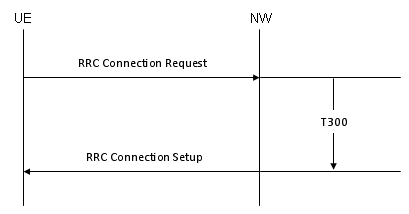
T300 stopped by RRC Connection Setup. The bracket at the right only marks the supervised interval, because T300 runs in the UE, not in the network.
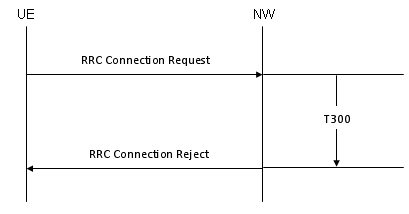
T300 stopped by RRC Connection Reject. A reject is still an answer, so the UE does not wait for T300 to expire.
Followings are the topics to be covered in this page.
- Key Scenarios Involving T300
- What values can T300 take?
- How does a T300 expiry change the next attempt?
- Reference
Key Scenarios Involving T300
T300 has one job. It limits how long the UE waits for an answer to its connection request, and it decides what happens when no answer comes. Let's follow the timer through its life in order: what starts it, what the UE does when it expires, what stops it, and how a failure shapes the next attempt.
Starting T300:
The UE starts T300 when it initiates the procedure and hands its first message to lower layers on SRB0. From that moment the UE has committed to one cell and waits for that cell to answer. In 36.331 v19.3.0 three messages start the timer, and the third one belongs to EDT and PUR only.
- When the UE sends an RRCConnectionRequest or RRCConnectionResumeRequest, Timer T300 is started to supervise the connection setup process.
- If the UE falls back from EDT (Early Data Transmission) to standard RRC connection establishment, Timer T300 is restarted.
- RRCEarlyDataRequest also starts T300. The UE sends it for control plane EDT and for control plane transmission using PUR (Preconfigured Uplink Resource).
Actions on T300 Expiry:
Expiry means that no RRCConnectionSetup, RRCConnectionReject or RRCConnectionResume arrived in time. The UE then cleans up its lower layers, so that the next attempt starts from a known state. The exact clean-up depends on whether the UE was setting up a new connection or resuming a suspended one.
- If Timer T300 expires without receiving an RRCConnectionSetup or RRCConnectionReject:
- The UE resets its MAC configuration.
- Re-establishes the RLC for all existing radio bearers (RBs).
- Informs upper layers about the failure to establish or resume the connection with a suspend indication.
- May apply a connection establishment failure offset (e.g., connEstFailOffset) to deprioritize the current cell during reselection attempts.
- For NB-IoT or configurations supporting connection establishment failure offsets, the UE adjusts reselection parameters for the failed cell temporarily.
Let's be precise about the MAC clean-up, because the two cases differ. For a new connection, 36.331 clause 5.3.3.6 resets MAC, releases the MAC configuration and re-establishes RLC for all established RBs. For a resume, the UE resets MAC, re-establishes RLC and suspends SRB1, but it keeps the MAC configuration. In both cases RRC only reports the failure. NAS in the upper layers decides whether and when to try again.
Stopping T300:
T300 stops as soon as the network gives any answer, even a negative one. A reject is still a response, so the UE stops T300 and follows the reject instead. For example, the waitTime in RRCConnectionReject starts T302, which keeps the UE from trying again at once.
- Timer T300 is stopped upon successful reception of:
- RRCConnectionSetup
- RRCConnectionResume
- RRCConnectionReject
- RRCEarlyDataComplete, for EDT and PUR
- It is also stopped if the upper layers abort the connection establishment procedure or in response to a RRCConnectionRelease message for UP-EDT.
Impact on Cell Reselection:
The UE keeps evaluating cell reselection while it waits for the answer. If it moves to another cell, the pending request in the old cell has no value any more. So 36.331 clause 5.3.3.5 stops T300 and ends the attempt in the old cell.
- If the UE performs cell reselection while T300 is running:
- T300 is stopped, and the UE restarts the connection establishment process in the newly selected cell.
Note who restarts the attempt. RRC does not send a new request by itself. It resets MAC, re-establishes RLC and tells upper layers that the establishment failed, exactly as on expiry. NAS then triggers a new request, and the UE sends it in the new cell. A UE in RRC_INACTIVE that is connected to 5GC leaves RRC_INACTIVE instead, with release cause 'RRC Resume failure'.
Handling Connection Failures:
One failed attempt tells the network little. A series of failures in one cell, however, points to a coverage or RACH problem. So the UE keeps a record of each failure, and it can also avoid the failing cell for a while. The section on the next attempt below covers both mechanisms in detail.
- After T300 expiry, the UE stores details about the failed connection attempt (e.g., failedCellId, signal measurements, and other metrics) in a variable for future reporting or debugging purposes.
- The UE may also apply predefined offsets to deprioritize the failed cell and improve the likelihood of success in subsequent attempts.
Emergency and Special Cases:
Some features change the normal T300 picture. EDT and transmission using PUR put user data into the first message, and CE mode B and NB-IoT UEs work at very low signal levels. All of them need longer waiting times, and the value table in the next section shows how the network provides them.
- For emergency services or scenarios like Early Data Transmission (EDT), Timer T300 supervises fallback mechanisms, ensuring efficient handling of time-critical communications.
What values can T300 take?
T300 is not a fixed number. The network broadcasts its value in SystemInformationBlockType2, inside ue-TimersAndConstants, and every UE in the cell uses the same value. The choice is a trade-off. A short T300 lets a UE give up quickly on a cell that does not answer. A UE in poor coverage, however, needs time for preamble retransmissions and Msg3 HARQ retransmissions before the answer can arrive.
The listing below shows the LTE IE and the NB-IoT IE together, because they carry different T300 ranges.
Following is based on
UE-TimersAndConstants ::=           SEQUENCE {
    t300                                ENUMERATED {
                                            ms100, ms200, ms300, ms400, ms600, ms1000, ms1500,
                                            ms2000},
    t301                                ENUMERATED {
                                            ms100, ms200, ms300, ms400, ms600, ms1000, ms1500,
                                            ms2000},
    t310                                ENUMERATED {
                                            ms0, ms50, ms100, ms200, ms500, ms1000, ms2000},
    n310                                ENUMERATED {
                                            n1, n2, n3, n4, n6, n8, n10, n20},
    t311                                ENUMERATED {
                                            ms1000, ms3000, ms5000, ms10000, ms15000,
                                            ms20000, ms30000},
    n311                                ENUMERATED {
                                            n1, n2, n3, n4, n5, n6, n8, n10},
    ...,
    [[  t300-v1310                      ENUMERATED {
                                            ms2500, ms3000, ms3500, ms4000, ms5000, ms6000, ms8000,
                                            ms10000}        OPTIONAL,   -- Need OR
        t301-v1310                      ENUMERATED {
                                            ms2500, ms3000, ms3500, ms4000, ms5000, ms6000, ms8000,
                                            ms10000}        OPTIONAL    -- Need OR
    ]],
    [[  t310-v1330                          ENUMERATED {ms4000, ms6000}
                                                            OPTIONAL    -- Need OR
    ]],
    [[  t300-r15                        ENUMERATED {ms4000, ms6000, ms8000, ms10000, ms15000,
                                            ms25000, ms40000, ms60000}  OPTIONAL        -- Cond EDTorPUR
    ]]
}

UE-TimersAndConstants-NB-r13 ::=    SEQUENCE {
    t300-r13                            ENUMERATED {
                                            ms2500, ms4000, ms6000, ms10000,
                                            ms15000, ms25000, ms40000, ms60000},
    t301-r13                            ENUMERATED {
                                            ms2500, ms4000, ms6000, ms10000,
                                            ms15000, ms25000, ms40000, ms60000},
    t310-r13                            ENUMERATED {
                                            ms0, ms200, ms500, ms1000, ms2000, ms4000, ms8000},
    n310-r13                            ENUMERATED {
                                            n1, n2, n3, n4, n6, n8, n10, n20},
    t311-r13                            ENUMERATED {
                                            ms1000, ms3000, ms5000, ms10000, ms15000,
                                            ms20000, ms30000},
    n311-r13                            ENUMERATED {
                                            n1, n2, n3, n4, n5, n6, n8, n10},
    ...,
    [[ t311-v1350                       ENUMERATED {
                                            ms40000, ms60000, ms90000, ms120000}
                                                        OPTIONAL    -- Need OR
    ]],
    [[  t300-v1530                      ENUMERATED {
                                            ms80000, ms100000, ms120000}    OPTIONAL,   -- Cond TDD
        t301-v1530                      ENUMERATED {
                                            ms80000, ms100000, ms120000}    OPTIONAL,   -- Cond TDD
        t311-v1530                      ENUMERATED {
                                            ms160000, ms200000}             OPTIONAL,   -- Cond TDD
        t300-r15                        ENUMERATED {ms6000, ms10000, ms15000, ms25000, ms40000,
                                            ms60000, ms80000, ms120000} OPTIONAL        -- Cond EDTorPUR
    ]]
}
The LTE IE has three T300 fields, and the UE picks one of them by its situation.
- t300 is the base value, from ms100 to ms2000. Every UE reads it.
- t300-v1310 was added in Release 13 and runs from ms2500 to ms10000. The network includes it only in the BR version of the SIB. A UE that supports CE mode B uses it when present and ignores t300.
- t300-r15 was added in Release 15 and runs from ms4000 to ms60000. It applies only to EDT for mobile originating calls and to UL data transmission using PUR. Its condition EDTorPUR makes it present only when edt-Parameters is in SIB2 or the UE has a pur-Config.
NB-IoT uses its own IE, UE-TimersAndConstants-NB-r13, in SystemInformationBlockType2-NB. There t300-r13 starts at ms2500, which is already above the LTE maximum, and reaches ms60000. Release 15 adds t300-v1530 for TDD, up to ms120000, and a separate t300-r15 for EDT and PUR.
One more rule keeps T300 apart from the other timers in the IE. In RRC_CONNECTED a UE can receive rlf-TimersAndConstants, which replace T301, T310, N310, T311 and N311 from SIB2. 36.331 clause 5.2.2.9 still makes the UE keep the T300 value from SIB2 in that case. T300 supervises connection establishment from RRC_IDLE, so a dedicated RLF configuration has nothing to say about it.
T300 comes from system information only : SIB2, or SIB2-NB for NB-IoT, sets one value for the whole cell.CE mode B, EDT and PUR get longer ranges : up to 10 s with t300-v1310 and up to 60 s with t300-r15.NB-IoT starts where LTE stops : t300-r13 begins at 2.5 s and TDD NB-IoT can reach 120 s.rlf-TimersAndConstants never replace T300 : the UE keeps the SIB2 value even when its RLF timers are dedicated.
How does a T300 expiry change the next attempt?
A T300 expiry does not end with the failed attempt. The UE uses the failure in two ways. It can make the failing cell look worse for a while, and it can keep a record for the network to collect later. Let's take them one at a time.
The temporary offset is configured by txFailParams-r12 in RACH-ConfigCommon-v1250, which the network broadcasts in SIB2. The UE counts consecutive T300 expiries on the same cell. When the count reaches connEstFailCount, the UE applies connEstFailOffset as Qoffsettemp for that cell. It keeps the offset for the time given by connEstFailOffsetValidity, from 30 s to 900 s. The feature is optional, so only a UE that supports RRC Connection Establishment failure temporary Qoffset does this.
Following is based on
RACH-ConfigCommon-v1250 ::=     SEQUENCE {
    txFailParams-r12                SEQUENCE {
        connEstFailCount-r12                    ENUMERATED {n1, n2, n3, n4},
        connEstFailOffsetValidity-r12           ENUMERATED {s30, s60, s120, s240,
                                                        s300, s420, s600, s900},
        connEstFailOffset-r12                   INTEGER (0..15)     OPTIONAL    -- Need OP
    }
}
36.304 subtracts Qoffsettemp in the cell selection criterion S, in both the level term and the quality term:
Srxlev = Qrxlevmeas - (Qrxlevmin + Qrxlevminoffset) - Pcompensation - Qoffsettemp
Squal = Qqualmeas - (Qqualmin + Qqualminoffset) - Qoffsettemp
So with connEstFailOffset set to 15, the failing cell looks 15 dB worse in both terms, and a neighbour cell can win the ranking. If the network leaves connEstFailOffset out, the UE uses infinity, and the cell cannot pass the S criterion during the validity time. NB-IoT uses a simpler form of the same rule. The NB-IoT UE applies connEstFailOffset from SystemInformationBlockType2-NB, or infinity when it is absent, and the count and duration are left to UE implementation.
The second use is a record. Except for NB-IoT, the UE stores the failure in VarConnEstFailReport. The record holds the failedCellId, the RSRP and RSRQ of the failed cell, neighbour cell results and location when available. It also carries the number of preambles MAC sent, whether contention was detected, and whether the last preamble used maximum power. The network asks for it later with connEstFailReportReq in UEInformationRequest, and the UE returns it as connEstFailReport-r11 in UEInformationResponse.
Following is based on
ConnEstFailReport-r11 ::=               SEQUENCE {
    failedCellId-r11                    CellGlobalIdEUTRA,
    locationInfo-r11                    LocationInfo-r10                    OPTIONAL,
    measResultFailedCell-r11            SEQUENCE {
        rsrpResult-r11                      RSRP-Range,
        rsrqResult-r11                      RSRQ-Range                      OPTIONAL
    },
    measResultNeighCells-r11            SEQUENCE {
        measResultListEUTRA-r11             MeasResultList2EUTRA-r9         OPTIONAL,
        measResultListUTRA-r11              MeasResultList2UTRA-r9          OPTIONAL,
        measResultListGERAN-r11             MeasResultListGERAN             OPTIONAL,
        measResultsCDMA2000-r11             MeasResultList2CDMA2000-r9      OPTIONAL
    }   OPTIONAL,
    numberOfPreamblesSent-r11           NumberOfPreamblesSent-r11,
    contentionDetected-r11              BOOLEAN,
    maxTxPowerReached-r11               BOOLEAN,
    timeSinceFailure-r11                TimeSinceFailure-r11,
    measResultListEUTRA-v1130           MeasResultList2EUTRA-v9e0           OPTIONAL,
    ...,
    [[  measResultFailedCell-v1250      RSRQ-Range-v1250                    OPTIONAL,
        failedCellRSRQ-Type-r12         RSRQ-Type-r12                       OPTIONAL,
        measResultListEUTRA-v1250       MeasResultList2EUTRA-v1250          OPTIONAL
    ]],
    [[  measResultFailedCell-v1360      RSRP-Range-v1360                    OPTIONAL
    ]],
    [[  logMeasResultListBT-r15         LogMeasResultListBT-r15             OPTIONAL,
        logMeasResultListWLAN-r15       LogMeasResultListWLAN-r15           OPTIONAL
    ]],
    [[  measResultListNR-r16            MeasResultCellListNR-r15            OPTIONAL
    ]],
    [[  measResultListNR-v1640          SEQUENCE {
            carrierFreqNR-r16               ARFCN-ValueNR-r15
        }                                                                   OPTIONAL,
        measResultListExtNR-r16         MeasResultFreqListNR-r16        OPTIONAL
    ]]
}
This report shows the operator access failures that the eNB may never have seen. The RRC Connection Request may not have reached the eNB at all, so the eNB has no log of it. The UE is the only node that knows the attempt happened.
Repeated expiry makes a cell look worse : after connEstFailCount expiries, Qoffsettemp lowers Srxlev and Squal for up to 900 s.An absent offset means infinity : the cell is then excluded from selection for the validity time.The UE keeps evidence of the failure : VarConnEstFailReport holds the cell, the radio conditions and the RACH statistics.The network collects the report later : through UEInformationRequest and UEInformationResponse, after a connection succeeds.
Reference
[1] 3GPP TS 36.331 v19.3.0 - clause 5.3.3, RRC connection establishment, clause 5.2.2.9, Actions upon reception of SystemInformationBlockType2, clause 6.3.6, UE-TimersAndConstants, and clause 7.3, Timers
[2] 3GPP TS 36.304 v19.2.0 - clause 5.2.3.2, Cell selection criterion