This is an example of rotating a 3D object (a Cube) using a Rotation Matrix in the form as shown below. The transformation matrix is applied (multiplied) to each vertex of the cube.
A rotation changes the orientation of an object and keeps everything else. Its size and its shape stay the same, and the point on the axis stays where it is. I'll start with the matrix and what each entry does, then read the result off the plots and walk through the code. We'll finish with the properties that make a rotation matrix easy to undo.
- Which matrix rotates the cube around the x axis ?
- What does the rotated cube look like ?
- How does the Matlab code rotate the cube ?
- What does a rotation matrix keep, and how is it undone ?
Which matrix rotates the cube around the x axis ?
A rotation in 3D needs an axis as well as an angle. This example uses the x axis, so the x coordinate of every vertex must stay the same. Only y and z change. The matrix below has exactly that structure.
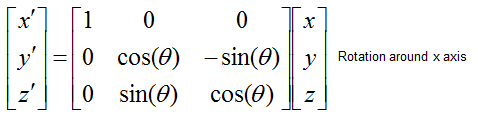
Figure 1. Rotation around the x axis. The first row and column keep x unchanged, and the lower right 2 x 2 block is the 2D rotation of y and z.
First row : x' = x. The rotation axis is fixed.Second row : y' = y cos(θ) - z sin(θ).Third row : z' = y sin(θ) + z cos(θ).Direction : a positive θ turns the y axis toward the z axis. This is the right-hand rule, with the thumb along +x.
The code uses θ = π/6, which is 30 degrees, so cos(θ) = 0.866 and sin(θ) = 0.5. Take the corner vertex (0.5, 0.5, 0.5). Then y' = 0.5 x 0.866 - 0.5 x 0.5 = 0.183, and z' = 0.5 x 0.5 + 0.5 x 0.866 = 0.683. The x coordinate stays 0.5, so the vertex moves to (0.5, 0.183, 0.683).
The columns of the matrix give a quick way to remember it. Each column is the place where one axis lands. The first column [1, 0, 0]T says the x axis stays put. The second column [0, cos(θ), sin(θ)]T is where the y axis goes, which is [0, 0.866, 0.5]T for 30 degrees. The third column [0, -sin(θ), cos(θ)]T is where the z axis goes, which is [0, -0.5, 0.866]T. Both moved axes stay in the y-z plane and stay perpendicular to each other.
What does the rotated cube look like ?
A rotation around x is easiest to see in the view along the x axis. There the square simply turns. In the other two views, the turn shows up only as a change of height or width, so read those views for the numbers.
The result of this example is as shown below. (Note : If you want to see this transformation in more intuitive way, check this page in www.slide4math.com)
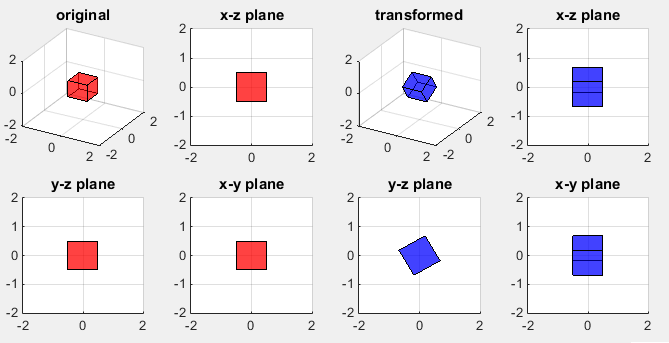
Figure 2. The cube before and after a rotation of π/6 around the x axis. The square turns in the y-z plane and grows taller in the other two views.
y-z plane : the blue square is the red square turned by 30 degrees. Its corners now reach +/-0.683 instead of +/-0.5.x-z plane : the width along x is still -0.5 to 0.5, because x never changes. The height grows to +/-0.683. The line across the blue square is a cube edge seen from the side. The edges of the turned cube sit at z = +/-0.183 and z = +/-0.683.x-y plane : the same effect appears along y. The width along x stays 1, and the y range grows to +/-0.683.3D view : the blue cube is the same size as the red one, only tilted.
How does the Matlab code rotate the cube ?
The listing is the same as in the translation example, except for the red lines. Those lines build the matrix of Figure 1 and apply it to all eight vertices in one product. So let's look at that product and at the shape of the arrays it works on.
Following is the MatLab code for this example. For now, don't pay too much about the code itself, just focus on number marked in red and try to undertand the mathematical meaning intuitively. You can just copy the code here into your Matlab and change the numbers in red part until you develop the intuitive understanding.
Note : When copy and paste this code, '...' may cause some error. In that case, erase '...' and retry '...' in your matlab editor.
clear all;

vert = [-0.5 -0.5 -0.5;  ...
        -0.5 0.5 -0.5;  ...
         0.5 0.5 -0.5;  ...
         0.5 -0.5 -0.5; ...
        -0.5 -0.5 0.5; ...
         -0.5 0.5 0.5;  ...
          0.5 0.5 0.5; ...
          0.5 -0.5 0.5];

fac = [1 2 3 4; ...
    2 6 7 3; ...
    4 3 7 8; ...
    1 5 8 4; ...
    1 2 6 5; ...
    5 6 7 8];

% original object
subplot(2,4,1);
patch('Faces',fac,'Vertices',vert,'FaceColor','r');
axis([-2 2 -2 2 -2 2]);
grid();
material shiny;
alpha('color');
alphamap('rampdown');
view(30,30);
title('original');

% view along y-axis (x-z plane)
subplot(2,4,2);
patch('Faces',fac,'Vertices',vert,'FaceColor','r');
axis([-2 2 -2 2 -2 2]);
grid();
material shiny;
alpha('color');
alphamap('rampdown');
view(0,0);
title('x-z plane');

% view along x-axis (y-z plane)
subplot(2,4,5);
patch('Faces',fac,'Vertices',vert,'FaceColor','r');
axis([-2 2 -2 2 -2 2]);
grid();
material shiny;
alpha('color');
alphamap('rampdown');
view(90,0);
title('y-z plane');

% view along z-axis (x-y plane)
subplot(2,4,6);
patch('Faces',fac,'Vertices',vert,'FaceColor','r');
axis([-2 2 -2 2 -2 2]);
grid();
material shiny;
alpha('color');
alphamap('rampdown');
view(0,90);
title('x-z plane');

% transformed object
phi = pi/6;
TxMatrix = [1     0        0    ; ...
            0 cos(phi) -sin(phi); ...
            0 sin(phi) cos(phi)];
TxVertices = TxMatrix * vert';
TxVertices = TxVertices';

% transformed object
subplot(2,4,3);
patch('Faces',fac,'Vertices',TxVertices,'FaceColor','b');
axis([-2 2 -2 2 -2 2]);
grid();
material shiny;
alpha('color');
alphamap('rampdown');
view(30,30);
title('transformed');

% view along y-axis (x-z plane)
subplot(2,4,4);
patch('Faces',fac,'Vertices',TxVertices,'FaceColor','b');
axis([-2 2 -2 2 -2 2]);
grid();
material shiny;
alpha('color');
alphamap('rampdown');
view(0,0);
title('x-z plane');

% view along x-axis (y-z plane)
subplot(2,4,7);
patch('Faces',fac,'Vertices',TxVertices,'FaceColor','b');
axis([-2 2 -2 2 -2 2]);
grid();
material shiny;
alpha('color');
alphamap('rampdown');
view(90,0);
title('y-z plane');

% view along z-axis (x-y plane)
subplot(2,4,8);
patch('Faces',fac,'Vertices',TxVertices,'FaceColor','b');
axis([-2 2 -2 2 -2 2]);
grid();
material shiny;
alpha('color');
alphamap('rampdown');
view(0,90);
title('x-z plane');
The red lines set phi = pi/6 and write TxMatrix, which is the matrix of Figure 1 with θ = phi. Each row of vert is one vertex, so vert is 8 x 3. The matrix expects column vectors, however. So the code transposes vert to a 3 x 8 matrix, multiplies it by the 3 x 3 TxMatrix, and transposes the 3 x 8 result back to 8 x 3. One product rotates all eight vertices at once. The array fac does not change, because a rotation keeps the same vertices on the same faces.
As in the translation example, subplots 6 and 8 call view(0,90) but carry the title 'x-z plane'. The figure shows 'x-y plane' for these two plots, which is the correct label for a view along the z axis.
Change phi to change the angle : phi = pi/2 turns the cube a quarter turn, which maps the cube onto itself. A negative phi turns it the other way.The two transposes can be avoided : vert * TxMatrix' gives the same 8 x 3 result, because (R VT)T = V RT.Other axes use other matrices : to rotate around y or z, replace TxMatrix with the matching matrix on the Affine Mapping page. The y axis matrix there uses the opposite sign convention, so a positive angle turns z toward -x.
What does a rotation matrix keep, and how is it undone ?
The rotation moves every vertex, yet the blue cube in Figure 2 is still a unit cube with square corners. That is not a coincidence. The rotation matrix has a special structure, and the same structure gives its inverse without any calculation.
The columns of TxMatrix are unit vectors, and they are perpendicular to each other. Such a matrix is orthogonal, so RTR = I. Two things follow. First, lengths and angles do not change, so the cube keeps its size and its right angles. Second, the inverse is the transpose, R-1 = RT. For a rotation around x, the transpose only changes the signs of the two sine terms, and that is a rotation by -φ. The determinant is cos2φ + sin2φ = 1, so the volume is unchanged and the cube is not mirrored.
Two rotations around the same axis add their angles, R(φ1)R(φ2) = R(φ1 + φ2). So applying TxMatrix twice turns the cube by π/3. Rotations around different axes behave differently. They do not commute, so a rotation around x followed by a rotation around z gives a different result from the reverse order.
The inverse is the transpose : TxMatrix' undoes TxMatrix, so no matrix inversion is needed.The determinant is +1 : a determinant of -1 would mean a reflection, which also keeps lengths but mirrors the object.Rotation keeps the origin fixed : this cube is centered at the origin, so it turns in place. To turn an object around another point, translate it to the origin, rotate, and translate it back. The Rotation and Translation example combines the two steps, and Translation in 3D shows the translation on its own.The order of rotations matters : for different axes, RxRz and RzRx are different matrices.