Web Simulation 


Transformer Scaled Dot-Product Attention Tutorial 

This interactive tutorial visualizes the core mechanism of Transformers: Scaled Dot-Product Attention. Attention is the "heart" of the Transformer architecture - it's what allows the model to focus on relevant parts of the input when processing each position. Understanding attention is crucial for understanding how Transformers work (GPT, BERT, etc.).

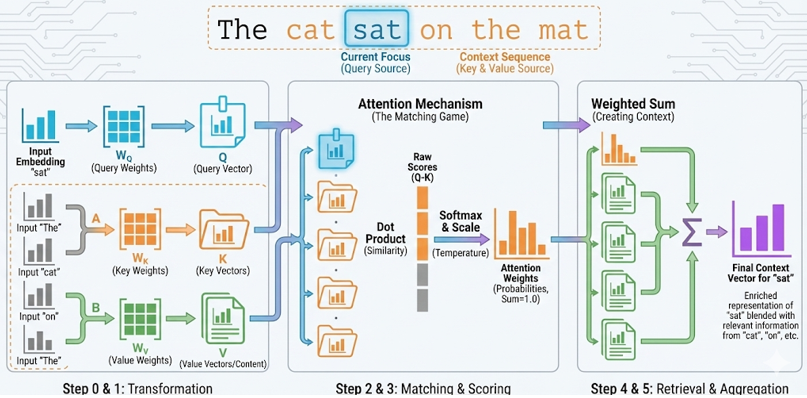
The tutorial demonstrates the complete pipeline from input embeddings to attention output: (0) Current Token & Context Sequence - the current token embedding (generates Q) and context token embeddings (generate K and V), (1) Weight Matrices (W_Q, W_K, W_V) - learned transformation matrices, (2) Transformation to Q, K, V - Q = Current Token × W_Q, K = Context Tokens × W_K, V = Context Tokens × W_V (self-attention), (3) Compute Dot Products (Q · K) - measuring similarity between Query and each Key, (4) Apply Softmax - converting raw scores into attention weights (probabilities that sum to 1.0), (5) Value Vectors (V) - transformed from context tokens, representing content to retrieve, and (6) Weighted Sum - combining Values according to attention weights to produce the final Context Vector.

The tutorial demonstrates Self-Attention: all Q, K, V come from the input sequence. The current token generates Q (what you're looking for), while context tokens generate K (what to match against) and V (what content to retrieve). This is the standard mechanism used in Transformer encoder/decoder layers. The attention mechanism computes how well each Key matches the Query, then uses those scores to create a weighted combination of the Values. This Context Vector is what the Transformer uses to decide what information to focus on.

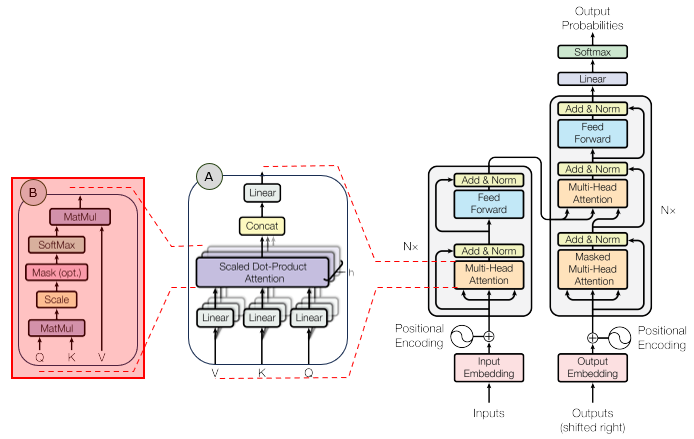
In the overall transformer architecture, this tutorial will cover the blocks highligned in the red box as shown below.

The detailed infographics of this tutorial is as follows.

NOTE : This tutorial uses 3D vectors for visualization clarity. Real Transformers use much higher dimensions (typically d_model = 512 or 768). The tutorial demonstrates self-attention where Q, K, and V all come from the input sequence via learned weight matrices: Q = Current Token × W_Q, K = Context Tokens × W_K, V = Context Tokens × W_V. This is the standard mechanism in Transformer layers (GPT, BERT, etc.). The temperature parameter controls how "sharp" the Softmax distribution is - lower temperature creates more focused attention (one Key dominates), higher temperature creates more uniform attention (more Keys contribute). The scaled dot-product attention formula is: Attention(Q, K, V) = softmax(QKT / √dk)V, where dk is the dimension of Keys.


Usage Example

Follow these steps to explore how Scaled Dot-Product Attention works using the "Filing System" analogy:

  1. Initial State: When you first load the simulation, you'll see the default word "sat" from the sentence "The cat sat on the mat" already processed. The visualization shows seven main steps: (0) Current Word & Context Sequence, (1) Weight Matrices (W_Q, W_K, W_V), (2) Transformation to Q, K, V, (3) Dot Products (raw similarity scores), (4) Softmax (attention weights), (5) Value Vectors (content), and (6) Context Vector (weighted sum output). Notice how Q is computed from the current word via W_Q, while K and V are computed from other words in the same sentence via W_K and W_V. This demonstrates self-attention: the sentence looks at itself to understand context.
  2. Step 0: Current Token & Context Sequence: The first visualization shows two types of input embeddings:
    • Current Token (white): The token that generates the Query (Q). This is what you're currently "looking at" or "processing".
    • Context Tokens (gray): Other tokens in the sequence that generate Keys (K) and Values (V). These represent the "memory" or "context" you're attending to.
    • All embeddings are X = Word Embedding (E) + Positional Encoding (P)
    • In real Transformers, the current token would be one position in the sequence, and context tokens would be all other positions
    • This demonstrates self-attention: Q, K, V all come from the same input sequence, just different positions
    This demonstrates the starting point: the current token (generates Q) and context tokens (generate K and V) in a self-attention mechanism.
  3. Step 1: Weight Matrices (W_Q, W_K, W_V): The second visualization shows the three weight matrices:
    • W_Q (cyan): Query weight matrix - transforms input to Query vectors
    • W_K (orange): Key weight matrix - transforms input to Key vectors
    • W_V (green): Value weight matrix - transforms input to Value vectors
    • Each matrix has shape [d_model, d_k] = [3, 3] in this tutorial
    • These matrices are learned during training in real Transformers
    This demonstrates how Transformers transform input embeddings into Q, K, V via learned weight matrices.
  4. Step 2: Transformation to Q, K, V: The third visualization shows the transformed vectors:
    • Query (Q) = Current Word × W_Q (cyan) - computed from current word embedding, labeled with the actual word (e.g., "sat (Q)")
    • Keys (K) = Context Words × W_K (orange) - computed from context word embeddings, labeled with actual words (e.g., "cat", "mat")
    • Values (V) = Context Words × W_V (green) - computed from context word embeddings, labeled with actual words (e.g., "cat", "mat")
    • Notice how all three (Q, K, V) are transformed from input embeddings via matrix multiplication
    • This is self-attention: all vectors come from the same input sequence, just different positions
    This demonstrates the transformation step: Q = Current Word × W_Q, K = Context Words × W_K, V = Context Words × W_V. All three are computed from input embeddings. The visualization labels show the actual words being processed (e.g., "sat (Q)") to make it clear which word generates each vector.
  5. Understand the Analogy: The tutorial uses a "Filing System/Database" metaphor:
    • Query (Q): The current word you're processing (e.g., "sat" from "The cat sat on the mat")
    • Keys (K): Like folder labels (Action, Romance, Sci-Fi) that you compare against your request
    • Values (V): Like the actual content in those folders (Explosions & Chase, Love & Heartbreak, Aliens & Space)
    This demonstrates how attention works: you compare what you want (Query) against available options (Keys), then retrieve the relevant content (Values).
  6. Observe Dot Products: Step 3 shows the raw similarity scores (Q · K):
    • Each bar shows the dot product between Query and each Key
    • Higher score = better match between Query and Key
    • Positive values (green) indicate similarity, negative values (red) indicate dissimilarity
    • Notice which Key has the highest score (this will dominate attention)
    This demonstrates how similarity is computed: dot product measures how aligned two vectors are.
  7. Observe Softmax: Step 4 shows the attention weights after Softmax:
    • Softmax converts raw scores into probabilities (weights sum to 1.0)
    • The highest dot product becomes the dominant weight (approaches 1.0)
    • Other weights get squashed towards 0
    • Notice how the sum indicator shows the weights always sum to 1.0
    This demonstrates how attention becomes focused: Softmax makes the best match dominate while suppressing others.
  8. Observe Values: Step 5 shows the Value vectors and their weights:
    • Each Value (green vector) = Context Token × W_V - transformed from context tokens
    • Values represent the actual content to retrieve (different from Keys which are for matching)
    • The weight next to each Value shows how much it will contribute to the output
    • High weight (e.g., 0.9) means that Value will strongly influence the Context Vector
    • Low weight (e.g., 0.05) means that Value will barely contribute
    This demonstrates the content retrieval step: Values are transformed from context tokens via W_V, then weighted by attention weights.
  9. Observe Context Vector: Step 6 shows the final Context Vector (purple):
    • This is the weighted sum: Σ (Attention Weight × Value)
    • The Context Vector combines information from all Values, but dominated by high-weight Values
    • If "Romance" has weight 0.9, the Context Vector looks 90% like the "Love & Heartbreak" Value
    • This is what gets passed to the next layer of the Transformer
    This is the final output: a context vector that focuses on relevant information based on the Query.
  10. Experiment with Different Queries: Try selecting different Queries from the dropdown:
    • When processing "sat" - Should attend to "cat" and "mat" (high weights) as they're semantically related
    • When processing "The" - Should attend to "cat" and "mat" (the nouns it modifies)
    • "I want everything" - Should distribute weights more evenly
    • "I want sci-fi adventure" - Should match "Sci-Fi" (high weight)
    Observe how changing the Query changes which Key gets high attention and how the Context Vector shifts accordingly.
  11. Adjust Temperature: Use the Temperature slider to control Softmax sharpness:
    • Low temperature (0.1-0.5): Very sharp - one weight dominates (e.g., 0.95, 0.03, 0.02)
    • Medium temperature (1.0): Balanced - best match dominates but others contribute
    • High temperature (3.0-5.0): Soft - weights are more uniform (e.g., 0.4, 0.35, 0.25)
    This demonstrates how temperature affects attention focus: lower temperature creates more focused attention, higher temperature creates more uniform attention.
  12. Understand the Math: The attention mechanism uses:
    • Dot Product: Q · K = Σ(Qi × Ki) - measures similarity
    • Scaling: Q · K / √dk - prevents dot products from becoming too large
    • Softmax: ex / Σex - converts scores to probabilities
    • Weighted Sum: Σ(Attention Weight × Value) - combines Values by importance
    The full formula is: Attention(Q, K, V) = softmax(QKT / √dk)V

Tip: The key insight is that self-attention allows the Transformer to understand context by looking at other words in the same sentence. When processing "sat", the model generates a Query from "sat", compares it against Keys from all other words ("The", "cat", "on", "the", "mat"), finds which words are most relevant, and then retrieves a weighted combination of their Values. This is exactly how Transformers process sequences: each word generates a Query, compares it against all other words' Keys, and then retrieves a weighted combination of all words' Values. The temperature parameter controls how "decisive" the attention is - lower temperature means more focused, higher temperature means more exploratory. Try different words first to see how attention shifts, then experiment with temperature to see how it affects the focus.

Parameters

Followings are short descriptions on each parameter
  • Current Word (Query Source): A dropdown menu to select the current word from the sentence "The cat sat on the mat". The default is "sat". This represents the word that generates the Query (Q). In real Transformers, this would be one position in the input sequence. The embedding is computed as X = Word Embedding (E) + Positional Encoding (P). The current word is displayed as a white vector. Changing the current word updates all visualizations to show how it transforms through W_Q to produce Q, and how attention shifts to different words in the sentence.
  • Context Words (K & V Source): Other words from the same sentence "The cat sat on the mat". These generate Keys (K) and Values (V) via W_K and W_V. In real Transformers, these would be all other positions in the input sequence. The context words are displayed as gray vectors. Each context word is transformed into both a Key (for matching) and a Value (for content retrieval). This demonstrates self-attention: the sentence looks at itself to understand context.
  • Weight Matrices (W_Q, W_K, W_V): Fixed 3×3 matrices representing the learned transformation weights. W_Q (cyan) transforms input embeddings to Query vectors, W_K (orange) transforms to Key vectors, W_V (green) transforms to Value vectors. In real Transformers, these are learned during training via backpropagation. The tutorial uses fixed matrices for visualization. Each matrix is displayed as a 3×3 grid showing the weight values.
  • Query (Q): Computed as Q = X × W_Q, where X is the input embedding and W_Q is the Query weight matrix. Q is displayed as a cyan vector. Q represents "what you're looking for" - transformed from the input embedding via W_Q. In self-attention, Q comes from the same input as K and V. In cross-attention (as shown here), Q comes from one source (decoder) while K and V come from another (encoder/knowledge base).
  • Keys (K): Vectors computed from context tokens via K = Context Tokens × W_K. Each context token (Action, Romance, Sci-Fi) is transformed into a Key vector. These are displayed as orange vectors. Keys represent "what to match against" - they are compared with the Query using dot product to compute similarity. In self-attention, Keys come from all other positions in the input sequence (context tokens), transformed via W_K. The Keys act like "search indices" - the Query is compared against each Key to determine relevance.
  • Values (V): Vectors computed from context tokens via V = Context Tokens × W_V. Each context token is transformed into a Value vector. These are displayed as green vectors. Values represent "what content to retrieve" - they are the actual information that gets weighted and combined into the Context Vector. Values are distinct from Keys: Keys are for matching (finding relevance), Values are for content (what to retrieve). In self-attention, Values come from all other positions in the input sequence (context tokens), transformed via W_V. The Values are what actually get retrieved and combined into the Context Vector.
  • Temperature (Slider): A slider (range: 0.1 to 5.0, default: 1.0) that controls the "sharpness" of the Softmax distribution. Lower temperature (0.1-0.5) creates very focused attention - one Key dominates with weight close to 1.0, others are close to 0. Higher temperature (3.0-5.0) creates more uniform attention - weights are more evenly distributed. Temperature is applied to the scaled dot products before Softmax: softmax(Q · K / (√dk × temperature)). This parameter allows you to experiment with different attention behaviors - focused vs. exploratory.
  • Dot Product (Q · K): The raw similarity score between Query and each Key. Computed as the sum of element-wise products: Q · K = Σ(Qi × Ki). Higher dot product means the Query vector and Key vector are more aligned (pointing in similar directions). These raw scores are displayed as green (positive) or red (negative) bars. The dot product is then scaled by √dk (where dk is the dimension of Keys, 3 in this tutorial) to prevent values from becoming too large, which can cause Softmax to saturate.
  • Attention Weights (Softmax Output): The normalized probabilities computed from the scaled dot products. After scaling (Q · K / √dk / temperature), Softmax converts the scores into weights that sum to 1.0. The formula is: weighti = escorei / Σjescorej. The highest score becomes the dominant weight (approaches 1.0), while others get squashed towards 0. These weights determine how much each Value contributes to the final Context Vector. Displayed as orange bars, always summing to 1.0.
  • Context Vector (Output): The final weighted sum of Values. Computed as: Context = Σi(Attention Weighti × Valuei). This is what gets passed to the next layer of the Transformer. If one attention weight is 0.9, the Context Vector will be 90% similar to that Value. The Context Vector combines information from all Values, but is dominated by Values with high attention weights. Displayed as a purple vector. This is the "answer" to your Query - a combination of relevant content based on what you asked for.
  • Matrix Multiplication (X × W): The transformation from input embedding to Q, K, V is done via matrix multiplication. For Q: Q = X × W_Q, where X is a row vector [1, d_model] and W_Q is [d_model, d_k], resulting in Q of shape [1, d_k]. In this tutorial, X = [x₁, x₂, x₃], W_Q = [[w₁₁, w₁₂, w₁₃], [w₂₁, w₂₂, w₂₃], [w₃₁, w₃₂, w₃₃]], and Q = [x₁w₁₁+x₂w₂₁+x₃w₃₁, x₁w₁₂+x₂w₂₂+x₃w₃₂, x₁w₁₃+x₂w₂₃+x₃w₃₃]. The same applies for K = X × W_K and V = X × W_V.
  • Scaled Dot-Product Attention: The full attention mechanism formula: Attention(Q, K, V) = softmax(QKT / √dk)V. The scaling by √dk prevents dot products from becoming too large as the dimension grows, which would cause Softmax gradients to vanish. The scaling ensures stable gradients during training. In this tutorial, dk = 3 (the embedding dimension), so scaling is by √3 ≈ 1.73. Real Transformers use dk = 64 or 128, so scaling is more significant.
  • Embedding Dimension (d_model): The dimension of the input embeddings and transformed vectors (3 in this tutorial for visualization, but 512+ in real Transformers). All vectors (X, Q, K, V) have dimension d_model = 3. The weight matrices W_Q, W_K, W_V have shape [d_model, d_k] where d_k = d_model for simplicity. Larger dimensions allow for richer representations but are harder to visualize. The dimension affects the scaling factor (√dk) in the attention formula.

Controls and Visualizations

Followings are short descriptions on each control and visualization
  • Current Word Dropdown: A dropdown menu to select the current word from the sentence "The cat sat on the mat". Options include: "The", "cat", "sat" (default), "on", "the", and "mat". This represents the word that generates the Query (Q). Selecting a different word updates all visualizations immediately to show how it transforms through W_Q to produce Q, and how attention shifts to different words in the sentence. The sentence context is displayed below the dropdown to remind you that all words come from the same sentence.
  • Temperature Slider: An adjustable slider (range: 0.1 to 5.0, default: 1.0) that controls the Softmax sharpness. Lower values create more focused attention (one weight dominates), higher values create more uniform attention (weights are more balanced). The current value is displayed next to the slider. Changing the slider immediately updates the attention weights and Context Vector. This parameter allows you to experiment with different attention behaviors without changing the input embedding.
  • Current Token & Context Tokens Canvas: Canvas-based vertical bar charts showing the current token embedding (white) and context token embeddings (gray). The current token generates Q, while context tokens generate K and V. Each embedding is displayed as a vector with three bars (one for each dimension). Each bar shows the value at that dimension, with dimension labels at the bottom. All embeddings are X = Word Embedding (E) + Positional Encoding (P). The current token is transformed via W_Q to produce the Query vector, while context tokens are transformed via W_K and W_V to produce Keys and Values.
  • Weight Matrices Canvas: Three Canvas-based 3×3 grid displays showing the weight matrices W_Q (cyan), W_K (orange), and W_V (green). Each matrix shows the learned transformation weights. W_Q transforms input embeddings to Query vectors, W_K transforms to Key vectors, W_V transforms to Value vectors. In real Transformers, these are learned during training. The matrices are displayed as colored grids with weight values in each cell.
  • Query Vector Canvas: A Canvas-based vertical bar chart showing the Query vector (Q = Current Word × W_Q). The Query is displayed as a cyan vector with three bars, labeled with the actual word being processed (e.g., "sat (Q)" or "The (Q)"). This shows the result of transforming the current word's embedding via W_Q. The Query vector represents "what you're looking for" and determines which Key it will match best. The label dynamically updates to show which word from the sentence is generating the Query.
  • Key Vectors Canvas: Canvas-based vertical bar charts showing all Key vectors. Each Key is displayed as an orange vector with three bars, labeled with the actual context word (e.g., "cat", "mat"). The Key vectors are computed from context words via K = Context Words × W_K (self-attention). The Query is compared against each Key using dot product to compute similarity.
  • Dot Products Bar Chart: A Canvas-based horizontal bar chart showing the raw similarity scores (Q · K) between Query and each Key. Each bar shows the dot product for one Key. Green bars indicate positive scores (similarity), red bars indicate negative scores (dissimilarity). Higher bars mean better match. The bars are scaled so the maximum absolute value fills the chart height. This shows the "raw match scores" before Softmax normalization.
  • Attention Weights Bar Chart: A Canvas-based horizontal bar chart showing the attention weights after Softmax. Each bar shows the attention weight for one Key. Orange bars indicate the weights (always positive, sum to 1.0). The sum is displayed at the top right (should always be 1.0). The highest dot product becomes the dominant weight (approaches 1.0), while others get squashed towards 0. This demonstrates how Softmax focuses attention on the best match.
  • Value Vectors Canvas: Canvas-based vertical bar charts showing all Value vectors. Each Value is displayed as a green vector with three bars, labeled with the actual context word (e.g., "cat", "mat"). The Value vectors are computed from context words via V = Context Words × W_V (self-attention). The weight next to each Value label shows how much that Value contributes to the Context Vector. High weight (e.g., 0.9) means that Value strongly influences the output. Low weight (e.g., 0.05) means that Value barely contributes. This shows the "content" that gets retrieved based on attention weights.
  • Context Vector Canvas: A Canvas-based vertical bar chart showing the final Context Vector (weighted sum output). The Context Vector is displayed as a purple vector with three bars. This is the final output of attention: a combination of all Values, weighted by their attention weights. If a context word (e.g., "cat") has weight 0.9, the Context Vector looks very similar to that word's Value vector. This is what gets passed to the next layer of the Transformer.

Key Concepts and Implementation

This tutorial demonstrates how Scaled Dot-Product Attention works, which is the core mechanism of Transformers. Here are the key concepts:

  • Why Attention is Needed: Traditional sequence models (RNNs) process tokens sequentially, which is slow and struggles with long-range dependencies. Attention allows Transformers to process all tokens in parallel and directly relate any two positions. The Query-Key-Value mechanism allows each position to "look at" all other positions and retrieve relevant information. This is crucial for understanding context in language, where word meaning depends on surrounding words.
  • Self-Attention Mechanism: In self-attention, all Q, K, V come from the same input sequence:
    • Current Word: The word you're currently processing (e.g., "sat" from "The cat sat on the mat")
    • Context Words: All other words in the sentence (e.g., "The", "cat", "on", "the", "mat" when processing "sat")
    • Query (Q): Transformed from current token via W_Q - "what you're looking for"
    • Keys (K): Transformed from context tokens via W_K - "what to match against"
    • Values (V): Transformed from context tokens via W_V - "what content to retrieve"
    You compare your Query against all Keys (dot product), find which Key matches best (Softmax), then retrieve the corresponding Value content. The attention weights determine how much each Value contributes to the final output. This is self-attention: the current token attends to all other tokens in the sequence.
  • Scaled Dot-Product Attention Formula: The attention mechanism uses:
    • Step 1: Compute dot products: Q · K (similarity scores)
    • Step 2: Scale: Q · K / √dk (prevents large values)
    • Step 3: Softmax: ex / Σex (converts to probabilities)
    • Step 4: Weighted sum: Σ(Attention Weight × Value) (combines Values)
    Full formula: Attention(Q, K, V) = softmax(QKT / √dk)V where dk is the dimension of Keys. The scaling prevents dot products from becoming too large, which would cause Softmax to saturate and gradients to vanish during training.
  • Why Scaling (√dk): As the dimension dk grows, dot products can become very large (since you're summing dk products). Large dot products push Softmax into regions with very small gradients, making training difficult. Scaling by √dk keeps dot products in a reasonable range, maintaining stable gradients. This is why it's called "Scaled" Dot-Product Attention. In this tutorial, dk = 3, so scaling is by √3 ≈ 1.73.
  • Why Softmax: Softmax converts raw similarity scores into probabilities (weights that sum to 1.0). This ensures that: (1) All weights are positive, (2) Weights sum to 1.0 (can be interpreted as probabilities), (3) The best match dominates while others are suppressed. The exponential in Softmax amplifies differences - a score of 2.0 becomes much larger after exp() than a score of 1.0. This creates the "winner-take-all" behavior where the best match gets most of the attention.
  • Temperature Scaling: Temperature is applied to the scaled dot products before Softmax: softmax(Q · K / (√dk × temperature)). Lower temperature makes Softmax sharper (more focused on one Key), higher temperature makes it softer (more uniform). Temperature is a hyperparameter that controls the "exploration vs. exploitation" trade-off - lower temperature exploits the best match, higher temperature explores more options. In practice, Transformers don't use temperature in attention (temperature = 1.0), but it's useful for visualization and understanding how Softmax works.
  • Query, Key, Value in Real Transformers: In real Transformers, Q, K, V are computed from input embeddings via learned linear transformations: Q = XWQ, K = XWK, V = XWV, where X is the input embeddings matrix (all positions in the sequence) and WQ, WK, WV are learned weight matrices. In self-attention, all three come from the same input sequence - the current position generates Q, while all positions (including the current one) generate K and V. This allows the model to learn what to query for, what to use as keys, and what values to retrieve. This tutorial demonstrates self-attention where Q, K, V are all computed from input embeddings via their respective weight matrices.
  • Multi-Head Attention: Real Transformers use "Multi-Head Attention" where attention is computed multiple times in parallel with different learned weight matrices. Each "head" learns to focus on different aspects (e.g., one head focuses on syntax, another on semantics). The outputs of all heads are concatenated and passed through a linear layer. This tutorial shows single-head attention for clarity, but the same principles apply to multi-head attention.
  • What to Look For: When exploring the tutorial, observe: (1) How the Query vector pattern determines which Key gets high attention, (2) How dot products measure similarity (higher = better match), (3) How Softmax converts scores to probabilities (best match dominates), (4) How attention weights determine Value contributions (high weight = high influence), (5) How the Context Vector reflects the dominant Value when one weight is high, (6) How temperature affects attention focus (lower = more focused, higher = more uniform), (7) How different Queries shift attention to different Keys. This demonstrates the fundamental mechanism that allows Transformers to focus on relevant information when processing sequences.

NOTE : This tutorial provides a visual, interactive exploration of Scaled Dot-Product Attention, the core mechanism of Transformers. The key insight is that attention allows the model to focus on relevant parts of the input by comparing Queries against Keys and retrieving weighted combinations of Values. The "Filing System" analogy helps explain: Query = what you want, Keys = folder labels, Values = content in folders. The tutorial demonstrates the step-by-step process: (1) Compute dot products (Q · K) to measure similarity, (2) Apply Softmax to convert scores to attention weights (probabilities), (3) Compute weighted sum of Values to produce the Context Vector. The formula Attention(Q, K, V) = softmax(QKT / √dk)V shows how scaling prevents large dot products and Softmax converts scores to probabilities. The temperature parameter allows experimentation with attention focus (lower = more focused, higher = more uniform). This tutorial uses 3D vectors for visualization clarity (real Transformers use 512+ dimensions) and fixed Q, K, V vectors (real Transformers learn these via linear transformations). The core concept remains the same: attention enables Transformers to process sequences in parallel while maintaining awareness of context by allowing each position to attend to all other positions. This is what makes Transformers powerful for language understanding tasks.