Web Simulation 


Transformer Encoder vs Decoder Tutorial 

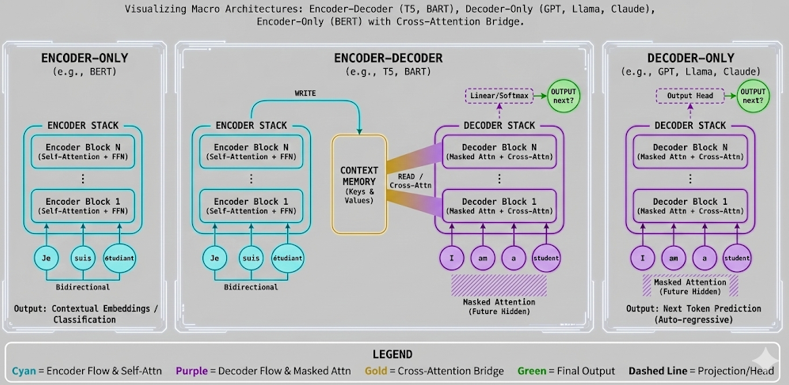
This interactive tutorial visualizes the Macro Architecture of Transformers, showing how Encoder and Decoder stacks work together. Conceptual Link: Modules 1-5 built the internal components (the "Engine Parts" - Attention, FFN, Residuals). Module 6 assembles these parts to form the full architecture. This explains how different Transformer families work: Translation models (Encoder-Decoder), Chatbots (Decoder-Only), and Classification models (Encoder-Only).

The tutorial demonstrates three main Transformer architectures: Encoder-Decoder (The Original) - Shows both Encoder and Decoder stacks with Cross-Attention bridge, used for translation (T5, BART), Decoder-Only (The GPT Style) - Shows only the Decoder stack, where the model predicts the next word based on past words, used for chatbots (GPT, Llama, Claude), and Encoder-Only (The BERT Style) - Shows only the Encoder stack with bidirectional attention, used for search and analysis (BERT). The visualization uses a split-screen layout: Encoder stack on the left (Cyan/Blue theme) and Decoder stack on the right (Purple/Pink theme), with Cross-Attention lines (Yellow/Gold) connecting them when both are visible.

The tutorial visualizes the key architectural differences: The Encoder uses bidirectional attention (every word can attend to every other word), while the Decoder uses masked attention (future words are hidden). The critical "Cross-Attention" bridge allows the Decoder to look back at the Encoder's context memory (Keys & Values) through the central "Context Memory" block. The Decoder output flows through a Linear/Softmax layer to predict the next word. This macro view provides closure to the Transformer course, showing how all the components (Attention, FFN, Residuals) come together to form complete architectures.

NOTE : This tutorial uses simplified 3D embeddings for visualization clarity. Real Transformers use much higher dimensions (typically d_model = 512 or 768). The tutorial demonstrates the macro architecture of Transformers: how Encoder and Decoder stacks are assembled, the difference between bidirectional and masked attention, and the critical Cross-Attention mechanism that bridges Encoder and Decoder. The source sentence "Je suis étudiant" (French) is processed by the Encoder, which writes its output to the Context Memory (Keys & Values). The target sentence "I am a student" (English) is processed by the Decoder, which reads from the Context Memory via Cross-Attention. The Decoder output flows through Linear/Softmax to predict the next word. This tutorial zooms out from the "vector math" of previous modules to the "system design" view, providing the big picture of how Transformers work. The visualization shows Block 1 (bottom) and Block N (top) with dots (⋮) indicating multiple intermediate blocks between them.


Usage Example

Follow these steps to explore how Encoder and Decoder architectures work:

  1. Initial State: When you first load the simulation, you'll see the Encoder-Decoder architecture by default. The visualization shows a split-screen layout: Encoder stack on the left (Cyan/Blue) processing the source sentence "Je suis étudiant" (French), and Decoder stack on the right (Purple/Pink) processing the target sentence "I am a student" (English). Both stacks contain 2 blocks each, and glowing yellow/gold lines (Cross-Attention) connect the Encoder output to the Decoder blocks.
  2. The Encoder Stack (Left Side - Cyan/Blue): The Encoder processes the source sentence "Je suis étudiant" (French):
    • Input Tokens: Three tokens displayed as cyan circles at the bottom: "Je", "suis", "étudiant"
    • Encoder Blocks: Two blocks stacked vertically: "Encoder Block 1" (bottom) and "Encoder Block N" (top), with dots (⋮) between them indicating multiple intermediate blocks. Each block contains Self-Attention + FFN (from previous modules). In real Transformers, N typically ranges from 6-12 (or more for large models)
    • Bidirectional Attention: Lines connect every word to every other word (full attention). This allows "Je" to attend to "suis" and "étudiant", and vice versa. The label "Bidirectional" appears below the tokens
    • Data Flow: Vectors flow straight up from input tokens through the blocks (parallel vertical lines). An upward arrow connects Block 1 to Block N
    • WRITE Operation: A cyan arrow labeled "WRITE" flows from the top of Encoder Block N to the Context Memory block. This represents the Encoder writing its output (Keys & Values) to the Context Memory
    • Color Theme: Cyan (#00FFFF) for Encoder elements
    The Encoder creates a rich representation of the source sentence where every word can attend to every other word, building context that is written to the Context Memory for the Decoder to use.
  3. The Decoder Stack (Right Side - Purple/Pink): The Decoder processes the target sentence "I am a student" (English):
    • Input Tokens: Four tokens displayed as purple circles at the bottom: "I", "am", "a", "student"
    • Decoder Blocks: Two blocks stacked vertically: "Decoder Block 1" (bottom) and "Decoder Block N" (top), with dots (⋮) between them indicating multiple intermediate blocks. Each block contains Masked Attention + Cross-Attention + FFN
    • Masked Attention: Future tokens are hidden. "I" can only see itself, "am" can see "I" and itself, "a" can see "I", "am", and itself, etc. A visual mask (purple overlay) shows which tokens are masked. The label "Masked Attention (Future Hidden)" appears below the tokens
    • Data Flow: Vectors flow up from input tokens through the blocks (parallel vertical lines), but with the masking constraint. An upward arrow connects Block 1 to Block N
    • Output Head: At the top of the Decoder stack, a dashed purple line connects to a "Linear/Softmax" box. This box outputs probability distributions over the vocabulary. The output flows to a green token labeled "next?" representing the predicted next word. This is labeled "OUTPUT" above
    • Color Theme: Purple/Pink (#CC33FF) for Decoder elements, Green (#4CAF50) for output
    The Decoder generates the target sentence one word at a time, using only past words (masked attention) and the Encoder's context (cross-attention), then predicts the next word through Linear/Softmax.
  4. Context Memory (Central Hub - Yellow/Gold): The shared memory block that bridges Encoder and Decoder:
    • Visual: A prominent yellow/gold rounded rectangle block positioned centrally between the Encoder and Decoder stacks, labeled "Context Memory (Keys & Values)"
    • WRITE Operation: A cyan "WRITE" arrow flows from the top of Encoder Block N into the Context Memory block. The Encoder writes its output (Keys & Values) to this memory
    • READ Operation: Yellow/gold gradient "Data Beams" labeled "READ / Cross-Attn" flow from the Context Memory block to the middle of each Decoder block. The Decoder reads from this memory via Cross-Attention
    • Purpose: The Context Memory acts as a central hub storing the Encoder's rich representation of the source sentence. The Decoder "looks back" at this memory to understand what to translate. This is how "Je suis étudiant" becomes "I am a student"
    • Mechanism: The Decoder uses the Encoder's Keys and Values stored in Context Memory in its Cross-Attention layer, allowing it to attend to the source sentence while generating the target
    • Color: Yellow/Gold (#FFD700) for Context Memory block and READ/Cross-Attention lines
    Context Memory is the translation hub - it stores what the Encoder learned (WRITE) and provides it to the Decoder (READ) via Cross-Attention, enabling translation.
  5. Switch to "Decoder-Only" Mode: Click the "Decoder-Only" button to see how GPT-style models work:
    • What Changes: The Encoder stack disappears (hidden). Only the Decoder stack is visible
    • Cross-Attention: The yellow/gold Cross-Attention lines disappear (no Encoder to connect to)
    • How It Works: The Decoder predicts the next word based only on past words. "I" → "am" → "a" → "student" (autoregressive generation)
    • Use Case: Chatbots (GPT, Llama, Claude) - they generate text by predicting the next word given previous words
    • Key Insight: Without an Encoder, there's no source sentence to translate. The model generates text from scratch based on the prompt
    Decoder-Only models are simpler (no Encoder needed) but can't perform translation - they can only generate text based on what they've seen so far.
  6. Switch to "Encoder-Only" Mode: Click the "Encoder-Only" button to see how BERT-style models work:
    • What Changes: The Decoder stack disappears (hidden). Only the Encoder stack is visible
    • Bidirectional Attention: The Encoder's bidirectional attention is still visible - every word can attend to every other word
    • How It Works: The Encoder creates rich representations of the input sentence, useful for classification, search, and analysis tasks
    • Use Case: Search/Analysis (BERT) - understanding text, finding similar documents, sentiment analysis
    • Key Insight: Without a Decoder, there's no text generation. The model only understands and represents the input, it doesn't generate output
    Encoder-Only models are great for understanding text but can't generate new text - they create representations for downstream tasks.
  7. Compare the Three Architectures: Use the architecture mode buttons to switch between the three types:
    • Encoder-Decoder: Both stacks visible + Cross-Attention. Best for translation, summarization, question answering where you need to map input to output
    • Decoder-Only: Only Decoder visible. Best for text generation, chatbots, where you generate text from a prompt
    • Encoder-Only: Only Encoder visible. Best for classification, search, understanding tasks where you analyze input text
    • Key Difference: The presence or absence of Cross-Attention determines whether the model can translate (Encoder-Decoder) or only generate (Decoder-Only)
    This comparison clarifies the confusing difference between BERT, GPT, and T5 - they're all Transformers, but with different architectures for different tasks.
  8. Understand the Macro View: This module zooms out from the "vector math" of previous modules to the "system design" view:
    • Previous Modules: We built the "Engine Parts" - Attention (Module 3), FFN (Module 4), Add & Norm (Module 5)
    • This Module: We assemble the parts into complete architectures - Encoder-Decoder, Decoder-Only, Encoder-Only
    • The Big Picture: Each block in the stacks contains Self-Attention + FFN + Add & Norm (from previous modules). The stacks are just multiple blocks stacked on top of each other
    • Cross-Attention: This is the new component that bridges Encoder and Decoder - it's like Attention, but the Decoder's Query attends to the Encoder's Keys and Values
    This macro view provides closure to the Transformer course, showing how all the components come together to form complete, working architectures.

Tip: The key insight is understanding the three main Transformer families and when to use each. Encoder-Decoder (T5, BART) is for translation and tasks that map input to output - both stacks work together with Cross-Attention. Decoder-Only (GPT, Llama, Claude) is for text generation and chatbots - only the Decoder stack generates text autoregressively. Encoder-Only (BERT) is for understanding and classification - only the Encoder stack creates rich representations. Use the architecture mode buttons to switch between the three types and see how the visualization changes. Notice how Cross-Attention (yellow/gold lines) only appears in Encoder-Decoder mode - this is the critical bridge that enables translation. The Encoder uses bidirectional attention (every word sees every other word), while the Decoder uses masked attention (only past words are visible). This macro view shows how all the components from previous modules (Attention, FFN, Residuals) come together to form complete architectures.

Description on Architecture Modes

This section provides detailed descriptions of the three main Transformer architecture families:

  • Mode A: Encoder-Decoder (The Original): This is the original Transformer architecture used for translation tasks. Visual Elements:
    • Encoder Stack (Left - Cyan/Blue): Two Encoder blocks stacked vertically, processing the source sentence "Je suis étudiant" (French). Each block contains Self-Attention + FFN + Add & Norm (from previous modules). The Encoder uses bidirectional attention - every word can attend to every other word. The label "Bidirectional" appears below each block.
    • Decoder Stack (Right - Purple/Pink): Two Decoder blocks stacked vertically, processing the target sentence "I am a student" (English). Each block contains Masked Attention + Cross-Attention + FFN + Add & Norm. The Decoder uses masked attention - future tokens are hidden, only past tokens are visible.
    • Cross-Attention Bridge (Yellow/Gold): Glowing lines connect the Encoder's "Context Memory" output (top left) to the middle of each Decoder block (right side). This is the critical translation mechanism - the Decoder "looks back" at the Encoder's understanding of the source sentence while generating the target sentence.
    • Input Tokens: Source tokens (French) at the bottom left as cyan circles, target tokens (English) at the bottom right as purple circles.
    • Data Flow: Vectors flow straight up through the Encoder blocks, and up through the Decoder blocks (with masking constraint). Cross-Attention flows from Encoder output to Decoder middle.
    • Use Case: Translation (T5, BART), summarization, question answering - any task that maps input to output.
    Purpose: This architecture enables translation by allowing the Decoder to access the Encoder's rich representation of the source sentence through Cross-Attention. The Encoder creates context memory (Keys & Values), and the Decoder uses this context to generate the target sentence.
  • Mode B: Decoder-Only (The GPT Style): This architecture is used for text generation and chatbots. Visual Elements:
    • Encoder Stack: Hidden (not visible). The Encoder is removed from the architecture.
    • Decoder Stack (Right - Purple/Pink): Only the Decoder stack is visible. Two Decoder blocks stacked vertically, processing the target sentence "I am a student" (English). Each block contains Masked Attention + FFN + Add & Norm (no Cross-Attention since there's no Encoder).
    • Cross-Attention: Removed (no yellow/gold lines). There's no Encoder to connect to.
    • Masked Attention: Still present - future tokens are hidden, only past tokens are visible. The Decoder predicts the next word based only on previous words.
    • Autoregressive Generation: The model generates text one word at a time: "I" → "am" → "a" → "student". Each new word is predicted based on all previous words.
    • Use Case: Chatbots (GPT, Llama, Claude), text generation, language modeling - any task that generates text from a prompt.
    Purpose: This architecture is simpler (no Encoder needed) and is optimized for text generation. The Decoder generates text autoregressively by predicting the next word given all previous words. Without an Encoder, there's no source sentence to translate - the model generates text from scratch based on the prompt.
  • Mode C: Encoder-Only (The BERT Style): This architecture is used for understanding and classification tasks. Visual Elements:
    • Encoder Stack (Left - Cyan/Blue): Only the Encoder stack is visible. Two Encoder blocks stacked vertically, processing the source sentence "Je suis étudiant" (French). Each block contains Self-Attention + FFN + Add & Norm. The Encoder uses bidirectional attention - every word can attend to every other word.
    • Decoder Stack: Hidden (not visible). The Decoder is removed from the architecture.
    • Bidirectional Attention: Still present - all words can attend to all other words. This creates rich representations of the input sentence.
    • No Text Generation: Without a Decoder, there's no text generation. The Encoder only creates representations for downstream tasks.
    • Use Case: Search/Analysis (BERT), sentiment analysis, named entity recognition, question answering (understanding) - any task that analyzes or classifies input text.
    Purpose: This architecture is optimized for understanding text. The Encoder creates rich bidirectional representations that capture the meaning of the input sentence. These representations can then be used for classification, search, or other understanding tasks. Without a Decoder, there's no text generation - the model only understands and represents the input.

Parameters

Followings are short descriptions on each parameter
  • Source Sentence (Encoder Input): The input to the Encoder stack. In this tutorial: "Je suis étudiant" (French) - three tokens. In real Transformers, sentences can be much longer (up to 512 or 1024 tokens). The source sentence is tokenized and embedded into vectors of dimension d_model. Each token is displayed as a cyan circle at the bottom of the Encoder stack. The Encoder processes this sentence bidirectionally, creating a rich representation that is written to the Context Memory.
  • Target Sentence (Decoder Input): The input to the Decoder stack. In this tutorial: "I am a student" (English) - four tokens. In real Transformers, the target sentence is generated autoregressively (one token at a time). Each token is displayed as a purple circle at the bottom of the Decoder stack. The Decoder processes this sentence with masked attention (only past tokens visible), generating the next word based on previous words and the Context Memory read via Cross-Attention.
  • Embedding Dimension (d_model): The dimension of token embeddings (3 in this tutorial for visualization, but 512+ in real Transformers). This is the "standard" dimension used throughout the Transformer. All vectors (embeddings, attention outputs, FFN outputs) have this dimension. Shape: [seq_len, d_model] for a sequence of tokens.
  • Encoder Blocks: The building blocks of the Encoder stack. Each block contains: (1) Self-Attention (bidirectional - every word attends to every word), (2) Add & Norm (residual connection + layer normalization), (3) FFN (feed-forward network), (4) Add & Norm (residual connection + layer normalization). In this tutorial, "Block 1" (bottom) and "Block N" (top) are shown with dots (⋮) indicating multiple intermediate blocks. Real Transformers use N = 6-12 blocks (or more for large models like GPT-3 with N=96). The blocks are stacked vertically, with data flowing straight up. An upward arrow connects Block 1 to Block N.
  • Decoder Blocks: The building blocks of the Decoder stack. Each block contains: (1) Masked Self-Attention (only past tokens visible), (2) Add & Norm, (3) Cross-Attention (reads from Context Memory via READ operation), (4) Add & Norm, (5) FFN, (6) Add & Norm. In this tutorial, "Block 1" (bottom) and "Block N" (top) are shown with dots (⋮) indicating multiple intermediate blocks. Real Transformers use N = 6-12 blocks (or more). The blocks are stacked vertically, with data flowing up (with masking constraint). An upward arrow connects Block 1 to Block N.
  • Bidirectional Attention (Encoder): The attention mechanism in the Encoder where every word can attend to every other word (including future words). This allows "Je" to see "suis" and "étudiant", and vice versa. Visual: Lines connect every word to every other word. This creates rich context representations where each word understands the full sentence.
  • Masked Attention (Decoder): The attention mechanism in the Decoder where future tokens are hidden. "I" can only see itself, "am" can see "I" and itself, "a" can see "I", "am", and itself, etc. Visual: A purple overlay mask shows which tokens are masked. This ensures the Decoder generates text autoregressively (can't cheat by looking at future words).
  • Cross-Attention: The critical bridge between Encoder and Decoder. The Decoder's Query attends to the Encoder's Keys and Values. This allows the Decoder to "look back" at the Encoder's understanding of the source sentence while generating the target sentence. Visual: Glowing yellow/gold lines connect Encoder output to Decoder middle. Formula: CrossAttn(Q_decoder, K_encoder, V_encoder) = softmax(Q_decoder · K_encoder^T / √d_k) · V_encoder.
  • Context Memory (Keys & Values): A central hub block that stores the Encoder's output. This is a rich representation of the source sentence that the Decoder uses for Cross-Attention. The Encoder produces Keys and Values that encode the meaning and context of the source sentence. Visual: A prominent yellow/gold rounded rectangle block positioned centrally between Encoder and Decoder stacks, labeled "Context Memory (Keys & Values)". The Encoder writes to it via a cyan "WRITE" arrow, and the Decoder reads from it via yellow/gold "READ / Cross-Attn" beams. This is the translation bridge that enables the Decoder to access the Encoder's understanding of the source sentence.
  • Output Head (Linear + Softmax): The final layer of the Decoder stack that produces the next word prediction. This consists of: (1) Linear layer - projects the Decoder output to vocabulary size dimensions, (2) Softmax - converts logits to probability distribution over the vocabulary. Visual: A dashed purple line connects from the top of Decoder Block N to a "Linear/Softmax" box (dark background, purple border). The output flows to a green token labeled "next?" representing the predicted next word. This is labeled "OUTPUT" above. The Output Head only appears in Encoder-Decoder and Decoder-Only modes (not Encoder-Only). This is where the Decoder predicts the next token in the sequence.
  • Architecture Mode: The type of Transformer architecture being visualized. Three modes: (1) Encoder-Decoder - both stacks visible with Cross-Attention (translation), (2) Decoder-Only - only Decoder visible (text generation), (3) Encoder-Only - only Encoder visible (understanding/classification). The mode determines which components are shown/hidden in the visualization.
  • Number of Blocks: The number of Encoder/Decoder blocks in each stack. In this tutorial, "Block 1" (bottom) and "Block N" (top) are shown with dots (⋮) between them indicating multiple intermediate blocks. This represents the typical structure where Block 1 is closest to the input and Block N is the final layer. Real Transformers use N = 6-12 blocks (original Transformer, BERT-base), with larger models using up to 96+ blocks (GPT-3). More blocks = deeper network = more capacity, but also more computation and training difficulty. The dots (⋮) between Block 1 and Block N visually indicate "there are many blocks here" without showing all of them.

Controls and Visualizations

Followings are short descriptions on each control and visualization
  • Architecture Mode Buttons: Three buttons that toggle between the three main Transformer architectures: (1) "Encoder-Decoder" - shows both stacks with Cross-Attention (translation), (2) "Decoder-Only" - shows only Decoder stack (text generation), (3) "Encoder-Only" - shows only Encoder stack (understanding). The active button is highlighted in green. Clicking a button updates the visualization to show/hide the relevant components.
  • Mode Description: A text display below the mode buttons that explains what each architecture is used for. Updates dynamically when you switch modes: "Translation models (T5, BART)" for Encoder-Decoder, "Chatbots (GPT, Llama, Claude)" for Decoder-Only, "Search/Analysis (BERT)" for Encoder-Only.
  • Architecture Canvas: A single unified canvas (800px × 650px) that displays the macro architecture visualization. The canvas shows: (1) Encoder stack (left, cyan/blue) when visible, (2) Decoder stack (right, purple/pink) when visible, (3) Context Memory block (center, yellow/gold) when Encoder is visible, (4) WRITE arrow (cyan) from Encoder to Context Memory, (5) READ/Cross-Attention beams (yellow/gold) from Context Memory to Decoder when both stacks are visible, (6) Output Head (Linear/Softmax + OUTPUT token) at the top of Decoder stack, (7) Input tokens as colored circles at the bottom, (8) Encoder/Decoder blocks as rounded rectangles (Block 1 and Block N with dots between), (9) Attention connections (bidirectional for Encoder, masked for Decoder), (10) Labels and annotations. The canvas updates in real-time when you switch architecture modes.
  • Encoder Stack Visualization: The left side of the canvas showing the Encoder architecture. Visual elements: (1) "Encoder Stack" label at the top, (2) Two Encoder blocks stacked vertically (cyan rounded rectangles): "Encoder Block 1" (bottom) and "Encoder Block N" (top) with dots (⋮) between them indicating multiple blocks, (3) Upward arrow on the right side connecting Block 1 to Block N, (4) "Bidirectional" label below the tokens, (5) Source tokens ("Je", "suis", "étudiant") as cyan circles at the bottom, (6) Parallel vertical data flow lines (cyan, semi-transparent) flowing straight up from tokens through blocks, (7) Bidirectional attention connections (cyan curved lines) connecting every word to every other word, (8) WRITE arrow (cyan) from top of Block N to Context Memory. Color theme: Cyan (#00FFFF).
  • Decoder Stack Visualization: The right side of the canvas showing the Decoder architecture. Visual elements: (1) "Decoder Stack" label at the top, (2) Two Decoder blocks stacked vertically (purple rounded rectangles): "Decoder Block 1" (bottom) and "Decoder Block N" (top) with dots (⋮) between them indicating multiple blocks, (3) Upward arrow on the left side connecting Block 1 to Block N, (4) Target tokens ("I", "am", "a", "student") as purple circles at the bottom, (5) Parallel vertical data flow lines (purple, semi-transparent) flowing up from tokens through blocks, (6) Masked attention indicator (purple overlay rectangles) showing which tokens are masked, (7) "Masked Attention (Future Hidden)" label, (8) Dashed purple line from top of Block N to Output Head (Linear/Softmax box), (9) OUTPUT token (green circle labeled "next?") with "OUTPUT" label above. Color theme: Purple/Pink (#CC33FF) for Decoder, Green (#4CAF50) for output.
  • Context Memory Visualization: The central hub block that bridges Encoder and Decoder. Visual elements: (1) Yellow/gold rounded rectangle block positioned centrally above the stacks, labeled "Context Memory (Keys & Values)", (2) WRITE arrow (cyan) flowing from Encoder Block N into the bottom of Context Memory block, labeled "WRITE", (3) READ/Cross-Attention beams (yellow/gold gradient) flowing from the bottom of Context Memory block to the middle of each Decoder block, labeled "READ / Cross-Attn". Color: Yellow/Gold (#FFD700). This block only appears in Encoder-Decoder and Encoder-Only modes. It uses cubic Bezier curves for smooth S-curves showing the information flow.
  • Token Visualization: Colored circles representing input tokens. Source tokens (Encoder input) are cyan circles labeled "Je", "suis", "étudiant". Target tokens (Decoder input) are purple circles labeled "I", "am", "a", "student". Each circle has a white border and black text. Tokens are positioned at the bottom of their respective stacks, with spacing between them.
  • Block Visualization: Rounded rectangular blocks representing Encoder/Decoder layers. Each block is a rounded rectangle with: (1) Semi-transparent fill (cyan for Encoder, purple for Decoder, gold for Context Memory), (2) Colored border (cyan #00FFFF for Encoder, purple #CC33FF for Decoder, gold #FFD700 for Context Memory), (3) Block label showing "Block 1" (bottom) and "Block N" (top) with dots (⋮) between them indicating multiple intermediate blocks, (4) Sub-label describing contents ("Self-Attention + FFN" for Encoder, "Masked Attn + Cross-Attn" for Decoder, "Keys & Values" for Context Memory). Blocks are stacked vertically with spacing between them. In real Transformers, N typically ranges from 6-12 (original Transformer) to 96+ (GPT-3).
  • Output Head Visualization: The final prediction layer at the top of the Decoder stack. Visual elements: (1) Dashed purple line connecting from the top of Decoder Block N to a "Linear/Softmax" box, (2) "Linear/Softmax" box (dark background #222, purple border, white text) positioned above the Decoder stack, (3) Green connection line from the Linear/Softmax box to the OUTPUT token, (4) OUTPUT token (green circle labeled "next?" representing the predicted next word), (5) "OUTPUT" label (green text) above the token. The Output Head aligns with the last token position. Color: Purple (#CC33FF) for connection, Green (#4CAF50) for output. This only appears in Encoder-Decoder and Decoder-Only modes.
  • Attention Connection Visualization: Lines showing attention connections. For Encoder: Bidirectional attention - lines connect every word to every other word (all-to-all connections). For Decoder: Masked attention - a purple overlay shows which tokens are masked (future tokens are hidden). The attention connections use semi-transparent lines to show the information flow between tokens.

Key Concepts and Implementation

This tutorial demonstrates the macro architecture of Transformers, showing how Encoder and Decoder stacks work together. Here are the key concepts:

  • The Conceptual Link to Previous Modules: This module assembles the components built in previous modules:
    • Modules 1-5: We built the "Engine Parts" - Embedding (Module 1), QKV (Module 2), Attention (Module 3), FFN (Module 4), Add & Norm (Module 5)
    • Module 6 (This Module): We assemble the parts into complete architectures - Encoder-Decoder, Decoder-Only, Encoder-Only
    • Purpose: This module zooms out from "vector math" to "system design", providing the big picture of how Transformers work
    • Each block in the stacks contains Self-Attention + FFN + Add & Norm (from previous modules)
    This module provides closure to the Transformer course, showing how all components come together to form complete architectures.
  • The Three Transformer Families: Understanding the difference between BERT, GPT, and T5:
    • Encoder-Decoder (T5, BART): Both stacks + Cross-Attention. Best for translation, summarization, question answering (input → output mapping)
    • Decoder-Only (GPT, Llama, Claude): Only Decoder stack. Best for text generation, chatbots (autoregressive generation from prompt)
    • Encoder-Only (BERT): Only Encoder stack. Best for classification, search, understanding (analyze input text)
    • Key Difference: The presence or absence of Cross-Attention determines whether the model can translate (Encoder-Decoder) or only generate (Decoder-Only)
    This comparison clarifies the confusing difference between the three main Transformer families - they're all Transformers, but with different architectures for different tasks.
  • Why Encoder-Decoder (Translation)? The original Transformer architecture for translation:
    • Problem: Need to map input sentence (source language) to output sentence (target language)
    • Solution: Encoder creates rich representation of source, Decoder generates target using Encoder's context via Cross-Attention
    • Cross-Attention: The critical bridge - Decoder's Query attends to Encoder's Keys and Values, allowing Decoder to "look back" at source while generating target
    • Visual Proof: In Encoder-Decoder mode, yellow/gold lines connect Encoder output to Decoder blocks, showing the translation mechanism
    Encoder-Decoder enables translation by allowing the Decoder to access the Encoder's understanding of the source sentence.
  • Why Decoder-Only (Text Generation)? Simplified architecture for chatbots:
    • Problem: Need to generate text from a prompt (no source sentence to translate)
    • Solution: Remove Encoder, keep only Decoder. Model generates text autoregressively (one word at a time based on previous words)
    • Masked Attention: Future tokens are hidden, ensuring autoregressive generation (can't cheat by looking at future words)
    • Visual Proof: In Decoder-Only mode, Encoder disappears, Cross-Attention disappears, only Decoder stack remains
    Decoder-Only is simpler and optimized for text generation - no Encoder needed, just generate text from scratch based on the prompt.
  • Why Encoder-Only (Understanding)? Architecture for classification and search:
    • Problem: Need to understand and classify input text (no text generation needed)
    • Solution: Remove Decoder, keep only Encoder. Encoder creates rich bidirectional representations for downstream tasks
    • Bidirectional Attention: Every word can attend to every other word, creating rich context representations
    • Visual Proof: In Encoder-Only mode, Decoder disappears, only Encoder stack remains with bidirectional attention
    Encoder-Only is optimized for understanding - no Decoder needed, just create rich representations of input text for classification or search.
  • Bidirectional vs Masked Attention: The key difference between Encoder and Decoder:
    • Encoder (Bidirectional): Every word can attend to every other word (including future words). "Je" can see "suis" and "étudiant". This creates rich context where each word understands the full sentence.
    • Decoder (Masked): Future tokens are hidden. "I" can only see itself, "am" can see "I" and itself, etc. This ensures autoregressive generation (can't cheat by looking at future words).
    • Why Different: Encoder needs to understand the full input (bidirectional), Decoder needs to generate one word at a time (masked)
    This distinction is crucial - bidirectional attention enables understanding, masked attention enables generation.
  • Cross-Attention (The Translation Bridge): The critical mechanism that enables translation:
    • What It Is: The Decoder's Query attends to the Encoder's Keys and Values. Formula: CrossAttn(Q_decoder, K_encoder, V_encoder) = softmax(Q_decoder · K_encoder^T / √d_k) · V_encoder
    • Purpose: Allows Decoder to "look back" at Encoder's understanding of source sentence while generating target sentence
    • Visual: Yellow/gold glowing lines connect Encoder "Context Memory" to Decoder blocks
    • When It Appears: Only in Encoder-Decoder mode. In Decoder-Only mode, there's no Encoder to connect to, so Cross-Attention is removed
    Cross-Attention is the translation mechanism - it bridges Encoder and Decoder, enabling the Decoder to use the Encoder's context.
  • The Macro View: This module zooms out from component-level to architecture-level:
    • Previous Modules: Focused on "how" individual components work (Attention math, FFN expansion, Normalization steps)
    • This Module: Focuses on "what" complete architectures look like and "when" to use each type
    • The Big Picture: Shows how blocks are stacked, how data flows through stacks, and how Encoder and Decoder interact
    • Closure: Provides the big picture that ties together all previous modules into complete, working architectures
    This macro view completes the Transformer course, showing how all the "engine parts" assemble into complete "cars" (architectures).
  • What to Look For: When exploring the tutorial, observe: (1) How Encoder and Decoder stacks are structured (blocks stacked vertically), (2) How bidirectional attention connects all words in Encoder, (3) How masked attention hides future tokens in Decoder, (4) How Cross-Attention bridges Encoder and Decoder (yellow/gold lines), (5) How switching modes shows/hides different components, (6) How the three architectures differ (Encoder-Decoder has both stacks, Decoder-Only has only Decoder, Encoder-Only has only Encoder). This demonstrates the three main Transformer families and when to use each: translation (Encoder-Decoder), text generation (Decoder-Only), understanding (Encoder-Only).

NOTE : This tutorial provides a visual, interactive exploration of the Macro Architecture of Transformers, showing how Encoder and Decoder stacks work together. The key conceptual link: Modules 1-5 built the internal components (the "Engine Parts" - Attention, FFN, Residuals). Module 6 assembles these parts to form the full architecture. This explains how Translation (Encoder-Decoder) vs. Chatbots (Decoder-Only) vs. Classification (Encoder-Only) work. The tutorial visualizes three main Transformer families: (1) Encoder-Decoder (T5, BART) - both stacks with Cross-Attention for translation, (2) Decoder-Only (GPT, Llama, Claude) - only Decoder stack for text generation, (3) Encoder-Only (BERT) - only Encoder stack for understanding/classification. The visualization uses a split-screen layout: Encoder stack on the left (Cyan/Blue theme) processing source sentence "Je suis étudiant" (French), Decoder stack on the right (Purple/Pink theme) processing target sentence "I am a student" (English), with a central Context Memory block (Yellow/Gold) bridging them. The Encoder writes its output (Keys & Values) to the Context Memory via a cyan "WRITE" arrow. The Decoder reads from the Context Memory via yellow/gold "READ / Cross-Attn" beams. The Decoder output flows through a Linear/Softmax layer to predict the next word (green OUTPUT token). The Encoder uses bidirectional attention (every word attends to every word), while the Decoder uses masked attention (future tokens are hidden). The visualization shows Block 1 (bottom) and Block N (top) with dots (⋮) between them, indicating multiple intermediate blocks (N typically ranges from 6-12 in real Transformers, up to 96+ for large models). Use the architecture mode buttons to switch between the three types and see how the visualization changes - Encoder-Decoder shows both stacks with Context Memory and Cross-Attention, Decoder-Only shows only Decoder with Output Head (no Encoder, no Context Memory), Encoder-Only shows only Encoder with Context Memory (no Decoder, no Output Head). This comparison clarifies the confusing difference between BERT, GPT, and T5 - they're all Transformers, but with different architectures for different tasks. This tutorial uses simplified 3D embeddings for visualization clarity (real Transformers use 512+ dimensions). The macro view zooms out from the "vector math" of previous modules to the "system design" view, providing closure to the Transformer course by showing how all components come together to form complete architectures, from inputs at the bottom to outputs at the top.