A floating-point number is a way to represent real numbers in computers, particularly those that are very large or very small. They're called "floating-point" because the decimal (or binary) point can "float" to different positions within the number. This allows for a wide range of values to be represented with a fixed number of digits.
How it works:
A floating-point number consists of three parts:
Sign : Indicates whether the number is positive or negative.Significand (or Mantissa) : Contains the significant digits of the number.Exponent : Specifies where the decimal point is placed relative to the significand.
Why use floating-point numbers?
Dynamic range : They can represent both very small (close to zero) and very large numbers efficiently.Efficiency : They use a fixed amount of memory, regardless of the magnitude of the number.
Limitations:
Approximation: Most real numbers cannot be represented exactly as floating-point numbers, leading to rounding errors. This is because computers have finite memory, and floating-point numbers are essentially approximations of real numbers.
Uneven distribution: The spacing between representable floating-point numbers is not uniform, meaning that the accuracy can vary depending on the magnitude of the number.
Important Note: When working with floating-point numbers in calculations, it's important to be aware of their limitations and potential for rounding errors.
Followings are the specialized topics on this note regarding Floating Point
Floating-Point Representation
In IEEE 754 single-precision floating-point representation, a number is represented as:
(-1)s × 1.m × 2e
- s: Sign bit (1 bit) : 1 -> Negative, 0 -> Positive
- e: Exponent (8 bits, with a bias of 127)
- m: Mantissa (23 bits, representing the fraction part)
How to calculate Exponent ?
The exponent in an IEEE 754 single-precision floating-point number is not directly stored. Instead, it's represented using a biased format. This means a fixed value, called the bias, is added to the actual exponent before storing it. For single-precision, this bias is 127.
To determine the actual exponent, you'll need to extract the 8-bit exponent field from the 32-bit floating-point representation. Convert this binary value to decimal, and then subtract the bias (127) to obtain the true exponent. This process effectively shifts the range of representable exponents to allow for both positive and negative values without needing an explicit sign bit for the exponent itself.
Remember that special cases exist for representing zero, infinity, and NaN (Not a Number), which have specific exponent field values. Understanding the bias and its role in exponent representation is crucial for interpreting and manipulating floating-point numbers accurately.
Steps to Calculate the Exponent
Identify the Bias :- For single-precision (32-bit) floating-point numbers, the exponent field is 8 bits.
- The bias for the exponent is
127(i.e.,2(8-1) - 1).
Calculate the Unbiased Exponent :- Determine the exponent
esuch that the number can be represented as(-1)s × 1.m × 2e, wheremis the mantissa.
- Determine the exponent
Calculate the Biased Exponent :- The biased exponent is calculated by adding the bias to the actual (unbiased) exponent:
Biased Exponent = e + 127
Convert the Biased Exponent to Binary :- Convert the biased exponent to an 8-bit binary number.
Example Calculation
Let's take an example to illustrate the calculation:
Example Number: 12.375
Convert to Binary :- The binary representation of 12.375 is
1100.011.
- The binary representation of 12.375 is
Normalize the Binary Representation :- Normalize the binary number so that it is in the form
1.m × 2e. - For 12.375, this becomes
1.100011 × 23.
- Normalize the binary number so that it is in the form
Identify the Components :- Sign bit
s: 0 (positive number) - Mantissa
m: 100011 (after the decimal point) - Unbiased Exponent
e: 3
- Sign bit
Calculate the Biased Exponent :- Biased Exponent = Unbiased Exponent + Bias =
3 + 127 = 130.
- Biased Exponent = Unbiased Exponent + Bias =
Convert the Biased Exponent to Binary :- 130 in binary is
10000010.
- 130 in binary is
IEEE 754 Representation of 12.375
Putting it all together, the IEEE 754 single-precision representation of 12.375 is:
0 10000010 10001100000000000000000
Explanation of Each Component
Sign Bit (1 bit) :0for positive numbers1for negative numbers
Exponent (8 bits) :- Stored as a biased exponent.
- For single-precision, the bias is
127.
Mantissa (23 bits) :- Represents the fractional part of the number after normalization.
- The leading 1 is implicit and not stored, saving space for additional precision.
Steps in Code (Python Example)
import struct

def float_to_ieee_754(num):
    # Pack the float into 4 bytes using IEEE 754 format
    packed = struct.pack('!f', num)
    # Unpack the bytes into a single integer
    unpacked = struct.unpack('!I', packed)[0]
    # Convert the integer to a 32-bit binary string
    binary_str = f'{unpacked:032b}'

    # Extract the sign, exponent, and mantissa
    sign = binary_str[0]
    exponent = binary_str[1:9]
    mantissa = binary_str[9:]

    return sign, exponent, mantissa

num = 12.375
sign, exponent, mantissa = float_to_ieee_754(num)
print(f'Number: {num}')
print(f'Sign: {sign}')
print(f'Exponent: {exponent}')
print(f'Mantissa: {mantissa}')
Output
Number: 12.375
Sign: 0
Exponent: 10000010
Mantissa: 10001100000000000000000
Summary
Exponent Calculation : Add the bias (127) to the actual exponent to get the biased exponent.Binary Conversion : Convert the biased exponent to an 8-bit binary number.IEEE 754 Representation : Combine the sign bit, the 8-bit biased exponent, and the 23-bit mantissa to form the 32-bit representation.
How to Calculate Mantissa ?
The mantissa, also known as the significand, in an IEEE 754 single-precision floating-point number represents the fractional part of the number. This 23-bit field, however, only stores the digits after the leading 1.
This leading 1 is implicit and not stored, which allows for an additional bit of precision. To obtain the full mantissa, you'll combine this hidden bit with the stored bits from the 23-bit field. Convert this combined binary value into decimal, and then divide it by 2 raised to the power of 23 to normalize it to a fraction between 1 and 2.
Remember, this process only applies to normal numbers, as special cases like zero, infinity, and NaN have specific mantissa values. Recognizing the role of the hidden bit and normalization in mantissa calculation is key to accurately interpreting the precision and magnitude of floating-point numbers.
Steps to Calculate the Mantissa
Convert the Number to Binary :- Convert the integer and fractional parts of the number to binary separately.
- Combine them to form the complete binary representation of the number.
Normalize the Binary Representation :- Normalize the binary number so that it is in the form
1.m × 2e, wheremis the mantissa. - The leading 1 before the binary point is implicit and not stored.
- Normalize the binary number so that it is in the form
Extract the Mantissa :- Take the fractional part (after the binary point) of the normalized binary number.
- Pad or truncate the fractional part to fit into 23 bits for single-precision.
Example Calculation
Let's take an example to illustrate the calculation:
Example Number: 12.375
Convert to Binary :- The integer part 12 in binary is
1100. - The fractional part 0.375 in binary is
.011. - Combine them to get
1100.011.
- The integer part 12 in binary is
Normalize the Binary Representation :- Normalize the binary number so that it is in the form
1.m × 2e. - For 12.375, this becomes
1.100011 × 23. - The exponent
eis 3.
- Normalize the binary number so that it is in the form
Extract the Mantissa :- The normalized form is
1.100011. - Remove the leading 1 and take the remaining part:
100011. - Pad with zeros to make it 23 bits:
10001100000000000000000.
- The normalized form is
IEEE 754 Representation of 12.375
Putting it all together, the IEEE 754 single-precision representation of 12.375 is:
0 10000010 10001100000000000000000
Explanation of Each Component
Sign Bit (1 bit) :0for positive numbers1for negative numbers
Exponent (8 bits) :- Stored as a biased exponent.
- For single-precision, the bias is
127.
Mantissa (23 bits) :- Represents the fractional part of the number after normalization.
- The leading 1 is implicit and not stored, saving space for additional precision.
Steps in Code (Python Example)
import struct

def float_to_ieee_754(num):
    # Pack the float into 4 bytes using IEEE 754 format
    packed = struct.pack('!f', num)
    # Unpack the bytes into a single integer
    unpacked = struct.unpack('!I', packed)[0]
    # Convert the integer to a 32-bit binary string
    binary_str = f'{unpacked:032b}'

    # Extract the sign, exponent, and mantissa
    sign = binary_str[0]
    exponent = binary_str[1:9]
    mantissa = binary_str[9:]

    return sign, exponent, mantissa

num = 12.375
sign, exponent, mantissa = float_to_ieee_754(num)
print(f'Number: {num}')
print(f'Sign: {sign}')
print(f'Exponent: {exponent}')
print(f'Mantissa: {mantissa}')
Output
Number: 12.375
Sign: 0
Exponent: 10000010
Mantissa: 10001100000000000000000
Summary
Mantissa Calculation : Convert the number to binary, normalize it, and extract the fractional part after the binary point. Pad or truncate it to fit 23 bits.Binary Conversion : Convert the biased exponent to an 8-bit binary number.IEEE 754 Representation : Combine the sign bit, the 8-bit biased exponent, and the 23-bit mantissa to form the 32-bit representation.
Floating-Point Compression - BF1(Block Floating Point Compression)
Block Floating Point (BFP) compression, specifically BF1, is a technique used to reduce the storage space required for a set of IEEE 754 single-precision floating-point numbers. The core idea is to find a common exponent that can represent the entire block of numbers with reasonable accuracy. This common exponent is stored once, and then only the mantissas of the individual numbers are stored, effectively saving the space that would have been used to store individual exponents for each number.
To compress a block of floating-point numbers using BF1, you first find the largest absolute value within the block. The exponent of this largest value becomes the shared exponent for the entire block. Next, each number's mantissa is adjusted by shifting it to match the shared exponent. Finally, only these adjusted mantissas and the shared exponent are stored.
Decompression involves reversing this process. The shared exponent is applied to each stored mantissa by shifting it back to its original position. This restores the original floating-point representation of each number within the block.
While BFP compression can significantly reduce storage requirements, it does introduce some loss of precision due to the shared exponent approximation. The effectiveness of BFP depends on the characteristics of the data being compressed, such as the range of values and the desired level of accuracy.
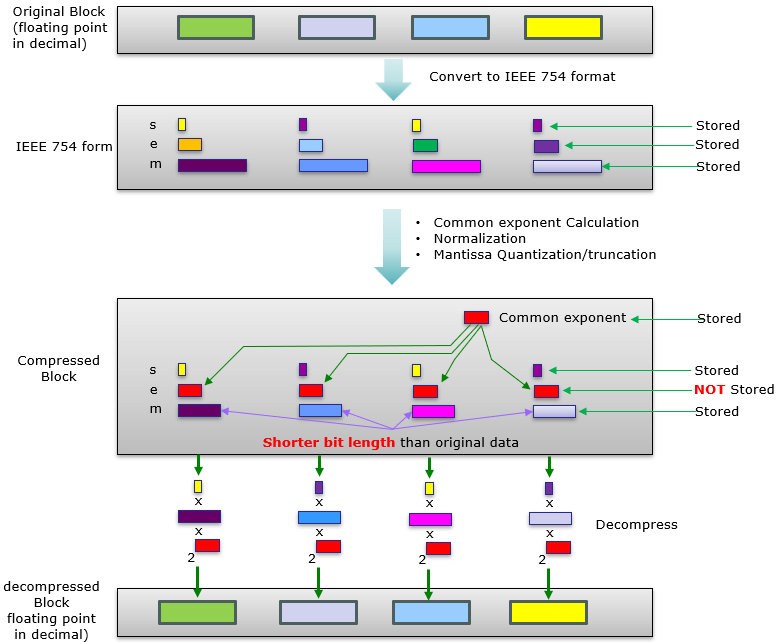
Following diagram depicts the overall process of BFP based on how I understand the process. In BFP, compression (i.e, reduced number of stored bits) happens at two level
- Level 1 : store only one e (exponent, common exponent in this case) and does not store the exponent for each individual number
- Level 2 : reduce the bit length of matissa by quantization and truncation
Introduction to BF1 Compression
Block Floating Point (BF1) compression is a technique used to compress a block of floating-point numbers by leveraging a common exponent for all the numbers in the block. This method is particularly effective in reducing the data size while maintaining a reasonable level of precision. The key steps in BF1 compression involve determining a common exponent, normalizing the numbers, quantizing the mantissas, and then storing the compressed data.
Steps in BF1 Compression
Determine the Common Exponent :- Calculate the exponents of all the floating-point numbers in the block.
- Select a common exponent that minimizes the total error when the numbers are normalized using this exponent.
- The common exponent is typically the minimum or average exponent from the block.
Normalize the Numbers :- Divide each number by
2common_exponentto normalize them. - This normalization step shifts the exponent so that all numbers have a similar scale.
- Divide each number by
Quantize the Mantissas :- Extract the mantissa (fractional part) of each normalized number.
- Quantize the mantissa to reduce its precision, typically by truncating or rounding to a fixed number of bits.
- This step reduces the number of bits needed to store each mantissa.
Store the Compressed Data :- Store the common exponent separately.
- Store the quantized mantissas for each number in the block.
In BF1 compression, we don't need to store the exponent part of each number separately because we use a common exponent for the entire block of numbers. It means the every number of the compressed data uses the same exponent(common exponent). So saving only one exponent(common exponent) and quantized mantissa for each number is enough to recover every individual value.
Yes, that's correct! The BF1 (Block Floating Point) compression technique achieves data compression primarily through two key steps:
Using a Common Exponent : By selecting a common exponent for all the floating-point numbers in a block, we eliminate the need to store individual exponents for each number. This significantly reduces the data size, especially when dealing with large blocks of numbers.Quantizing the Mantissa : After normalizing the numbers using the common exponent, the mantissas are extracted and quantized. Quantization involves reducing the precision of the mantissas, typically by truncating or rounding them to a fixed number of bits. This further reduces the amount of data that needs to be stored.
Example of BF1 Compression
Let's consider a block of floating-point numbers and compress them using BF1 compression.
Example Block: [0.015, 0.020, 0.018, 0.022, 0.016, 0.021, 0.017, 0.019]
Calculate Exponents :- Convert each number to its binary representation and determine the exponent.
- Example exponents: -7, -7, -7, -7, -7, -7, -7, -7
Determine Common Exponent :- Select the common exponent, which in this case is -7.
Normalize the Numbers :- Normalize each number by dividing by
2-7. - Normalized numbers: [1.92, 2.56, 2.3, 2.82, 2.05, 2.69, 2.18, 2.43]
- Normalize each number by dividing by
Quantize the Mantissas :- Extract and quantize the mantissa of each normalized number.
- Example quantized mantissas: [1.92, 2.56, 2.3, 2.82, 2.05, 2.69, 2.18, 2.43]
Store the Compressed Data :- Store the common exponent (-7) separately.
- Store the sign bit for each number.
- Store the quantized mantissas for each number.
BF1 Decompression
To decompress the data, the stored quantized mantissas are multiplied by 2common_exponent to restore the original scale of the numbers.
Example of Decompression
Retrieve the Common Exponent :- Retrieve the stored common exponent, which is -7.
Decompress the Mantissas :- Multiply each quantized mantissa by
2common_exponent. (decompressed data = quantized_mantissa * 2common_exponent) - Example decompressed numbers: [0.015, 0.020, 0.018, 0.022, 0.016, 0.021, 0.017, 0.019]
+/- error
- Multiply each quantized mantissa by
Python Code Example
Download from here (
The output of the python code are shown below.
###### Original Block ######
Original Block (Decimal): [0.015, 0.02, 0.018, 0.022, 0.016, 0.021, 0.017, 0.019]
Original Block (Binary Components):
Number: 0.015
s: 0
e: 01111000
mantissa: 11101011100001010001111
Number: 0.02
s: 0
e: 01111001
mantissa: 01000111101011100001010
Number: 0.018
s: 0
e: 01111001
mantissa: 00100110111010010111100
Number: 0.022
s: 0
e: 01111001
mantissa: 01101000011100101011000
Number: 0.016
s: 0
e: 01111001
mantissa: 00000110001001001101111
Number: 0.021
s: 0
e: 01111001
mantissa: 01011000000100000110001
Number: 0.017
s: 0
e: 01111001
mantissa: 00010110100001110010110
Number: 0.019
s: 0
e: 01111001
mantissa: 00110111010010111100011
###### Compressed Block ######
Common Exponent (Decimal): -7
Common Exponent (Binary): 01111000
Compressed Block (Decimal): [1.919921875, 2.5595703125, 2.3037109375, 2.8154296875, 2.0478515625, 2.6875, 2.17578125, 2.431640625]
Compression Percentage: 43.75%
Compressed Block (Binary Components):
Quantized Mantissa: 1.919921875
s: 0
e: 01111000 <== this individual exponent is not saved because this value for all elements in the block is same.
quantized mantissa: 11110101110 <== bit length of this mantissa is shorter than the mantissa of the original block.
Quantized Mantissa: 2.5595703125
s: 0
e: 01111000
quantized mantissa: 101000111101
Quantized Mantissa: 2.3037109375
s: 0
e: 01111000
quantized mantissa: 100100110111
Quantized Mantissa: 2.8154296875
s: 0
e: 01111000
quantized mantissa: 101101000011
Quantized Mantissa: 2.0478515625
s: 0
e: 01111000
quantized mantissa: 100000110001
Quantized Mantissa: 2.6875
s: 0
e: 01111000
quantized mantissa: 101011000000
Quantized Mantissa: 2.17578125
s: 0
e: 01111000
quantized mantissa: 100010110100
Quantized Mantissa: 2.431640625
s: 0
e: 01111000
quantized mantissa: 100110111010
###### Decompressed Block ######
Decompressed Block (Decimal): [0.0149993896484375, 0.01999664306640625, 0.01799774169921875, 0.02199554443359375, 0.01599884033203125, 0.02099609375, 0.016998291015625, 0.0189971923828125]
Decompressed Block (Binary Components):
Decompressed Number: 0.0149993896484375 = 'quantized_mantissa * (2 ^ common_exponent)' = 1.919921875 * (2 ^-7)
s: 0
e: 01111000
mantissa: 11101011100000000000000
Decompressed Number: 0.01999664306640625 = 'quantized_mantissa * (2 ^ common_exponent)' = 2.5595703125 * (2 ^-7)
s: 0
e: 01111001
mantissa: 01000111101000000000000
Decompressed Number: 0.01799774169921875 = 'quantized_mantissa * (2 ^ common_exponent)' = 2.3037109375 * (2 ^-7)
s: 0
e: 01111001
mantissa: 00100110111000000000000
Decompressed Number: 0.02199554443359375 = 'quantized_mantissa * (2 ^ common_exponent)' = 2.8154296875 * (2 ^-7)
s: 0
e: 01111001
mantissa: 01101000011000000000000
Decompressed Number: 0.01599884033203125 = 'quantized_mantissa * (2 ^ common_exponent)' = 2.0478515625 * (2 ^-7)
s: 0
e: 01111001
mantissa: 00000110001000000000000
Decompressed Number: 0.02099609375 = 'quantized_mantissa * (2 ^ common_exponent)' = 2.6875 * (2 ^-7)
s: 0
e: 01111001
mantissa: 01011000000000000000000
Decompressed Number: 0.016998291015625 = 'quantized_mantissa * (2 ^ common_exponent)' = 2.17578125 * (2 ^-7)
s: 0
e: 01111001
mantissa: 00010110100000000000000
Decompressed Number: 0.0189971923828125 = 'quantized_mantissa * (2 ^ common_exponent)' = 2.431640625 * (2 ^-7)
s: 0
e: 01111001
mantissa: 00110111010000000000000
###### Verification ######
Original: 0.015000, Decompressed: 0.014999, Error: 0.000001
Original: 0.020000, Decompressed: 0.019997, Error: 0.000003
Original: 0.018000, Decompressed: 0.017998, Error: 0.000002
Original: 0.022000, Decompressed: 0.021996, Error: 0.000004
Original: 0.016000, Decompressed: 0.015999, Error: 0.000001
Original: 0.021000, Decompressed: 0.020996, Error: 0.000004
Original: 0.017000, Decompressed: 0.016998, Error: 0.000002
Original: 0.019000, Decompressed: 0.018997, Error: 0.000003
Summary
BF1 compression works by determining a common exponent for a block of floating-point numbers, normalizing the numbers using this common exponent, quantizing the mantissas, and storing the compressed data. During decompression, the stored quantized mantissas are multiplied by 2common_exponent to restore the original scale of the numbers.
Reference
- Introduction of Floating Point Representation
- IEEE-754 Floating Point Converter
- Base Convert: IEEE 754 Floating Point
- Float Toy
YouTube
- Floating Point Numbers - Neso Academy
- Representations of Floating Point Numbers - Neso Academy
- IEEE Standard for Floating-Point Arithmetic (IEEE 754) - Neso Academy
- IEEE 754 - Single and Double Precision - Neso Academy
- IEEE 754 - Solved Problems (Set 1) - Neso Academy
- IEEE 754 - Solved Problems (Set 2) - Neso Academy