Panda - Data Reader
Pada Data Reader Package is the library to pull out the data directly from various web source (e.g, Yahoo Finance, Google Finance etc). However, both Data Reader package and the interface supported by the data source keep changing, the examples shown here may or may not work on your system. For example, Example 1 worked with no problem when I ran it with Python 3.5 on Windows 7 around Jan 2017, but it didn't work when I tried it with Python 3.62 on Windows 10 in Jan 2018 (See NOTE section in Example on how I fixed the problem).
What you can learn from this note ? As mentioned above, the example in this page may or may not work depending on
- the version of python and pandas
- the data sharing interface implementation by the data provider
Then what you can learn from the examples that are not working ? Since this area is not the field that I am working on day to day basis, I would not try to keep fixing the code and configuration so that it work all the time. Insead, I will try to write about something that I observe from trying with multiple different versions of python and pandas. As you know, one of the common way to learn things in engineering is learning from problems. For those who want to jump in this area, this may be a good example showing that this kind of thing would be a part of your daily work.
|
DataReader01.py |
|
import pandas as pd import pandas.io.data as pdr import matplotlib.pyplot as plt import datetime as dt
date_start = dt.datetime(2016,1,1) date_end = dt.datetime(2016,12,31) symbol = 'GOOGL' daily_data = pdr.DataReader(symbol,"google",date_start,date_end)
plt.plot(daily_data.ix[:,['High','Low']]) plt.show() |
Result :---------------------------------------------------------
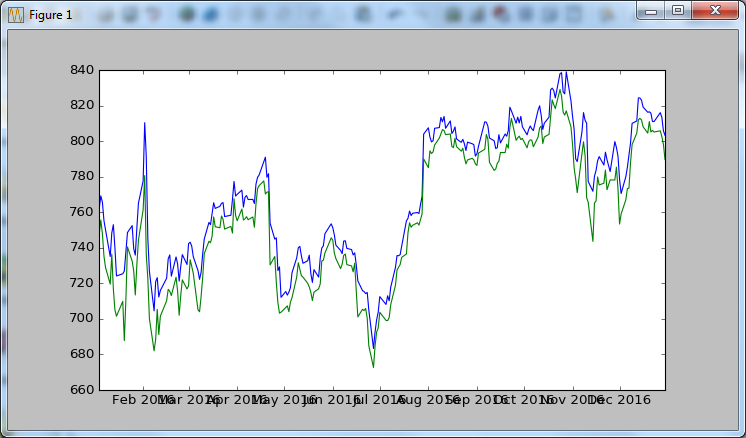
NOTE : Even thought the commands worked in Python 3.5, I got following warnings.
Warning (from warnings module):
File "C:\Python35\lib\site-packages\pandas\io\data.py", line 35
FutureWarning)
FutureWarning:
The pandas.io.data module is moved to a separate package (pandas-datareader) and will be removed from pandas in a future version.
After installing the pandas-datareader package (https://github.com/pydata/pandas-datareader), you can change the import ``from pandas.io import data, wb`` to ``from pandas_datareader import data, wb``.
NOTE : With the exactly same code on Python 3.62, I got following error and execution failed.
Traceback (most recent call last):
File "C:/RyuCloud/Python/panda_DataReader01.py", line 2, in <module>
import pandas.io.data as pdr
File "C:\....\Python\Python36-32\lib\site-packages\pandas\io\data.py", line 2, in <module>
"The pandas.io.data module is moved to a separate package "
ImportError: The pandas.io.data module is moved to a separate package (pandas-datareader). After installing the pandas-datareader package (https://github.com/pydata/pandas-datareader), you can change the import ``from pandas.io import data, wb`` to ``from pandas_datareader import data, wb``.
NOTE : To Fix this problem with Python 3.62,
First I tried as instructed here . However, the instruction command in the page didn't work on my system (Windows 10 and Python 3.62). So I manually downloaded the whl file pandas_datareader-0.5.0-py2.py3-none-any.whl from here and installed using pip as follows.
C:\Python36-32>pip install pandas_datareader-0.5.0-py2.py3-none-any.whl
NOTE : Observation with Python 3.75, pip version 20.0.2
On this version, I was able to install pandas_datareader by pip command as follows. And I ran the example, on Jul 2020 and got the following error.
Traceback (most recent call last):
File "C:\RyuCloud\Python\panda_DataReader01.py", line 8, in <module>
f = web.DataReader("GOOGL", 'google', start, end)
File "C:\Users\jaeku\AppData\Local\Programs\Python\Python37\lib\site-packages\pandas\util\_decorators.py", line 214, in wrapper
return func(*args, **kwargs)
File "C:\Users\jaeku\AppData\Local\Programs\Python\Python37\lib\site-packages\pandas_datareader\data.py", line 373, in DataReader
raise NotImplementedError(msg)
NotImplementedError: data_source='google' is not implemented
With some googling, I learned that the data sorce 'google' was discontinued and suggested to use 'yahoo' and it worked as shown below.
import pandas as pd
import pandas_datareader.data as web
import matplotlib.pyplot as plt
import datetime as dt
start = dt.datetime(2018, 1, 1)
end = dt.datetime(2018, 1, 27)
f = web.DataReader("GOOGL", 'yahoo', start, end)
print(f.head())
I got the result as below.
High Low ... Volume Adj Close
Date ...
2018-01-02 1075.979980 1053.020020 ... 1588300 1073.209961
2018-01-03 1096.099976 1073.430054 ... 1565900 1091.520020
2018-01-04 1104.079956 1094.260010 ... 1302600 1095.760010
2018-01-05 1113.579956 1101.800049 ... 1512500 1110.290039
2018-01-08 1119.160034 1110.000000 ... 1232200 1114.209961
[5 rows x 6 columns]
|
DataReader01.py |
|
from pandas_datareader.data import Options
aapl = Options('aapl', 'yahoo') data = aapl.get_all_data()
print(data.iloc[0:5, 0:5]) |
Last Bid Ask Chg \
Strike Expiry Type Symbol
2.5 2018-01-19 call AAPL180119C00002500 168.04 166.15 167.40 0.0
put AAPL180119P00002500 0.02 0.00 0.02 0.0
2018-02-16 call AAPL180216C00002500 170.91 172.20 172.85 0.0
2018-04-20 call AAPL180420C00002500 170.95 166.50 167.50 -1.0
put AAPL180420P00002500 0.01 0.00 0.01 0.0
PctChg
Strike Expiry Type Symbol
2.5 2018-01-19 call AAPL180119C00002500 0.000000
put AAPL180119P00002500 0.000000
2018-02-16 call AAPL180216C00002500 0.000000
2018-04-20 call AAPL180420C00002500 -0.581564
put AAPL180420P00002500 0.000000
NOTE : Observation with Python 3.7.5 and pandas 1.0.5
When I tried the example with this version, I got the following error. You may go to https://github.com/pydata/pandas-datareader/issues for the details.
Traceback (most recent call last):
File "C:/RyuCloud/Python/Python_pandas_dataReader_apple_01.py", line 3, in <module>
aapl = Options('aapl', 'yahoo')
File "C:\Users\jaeku\AppData\Local\Programs\Python\Python37\lib\site-packages\pandas_datareader\data.py", line 692, in Options
raise ImmediateDeprecationError(DEP_ERROR_MSG.format("Yahoo Options"))
pandas_datareader.exceptions.ImmediateDeprecationError:
Yahoo Options has been immediately deprecated due to large breaks in the API without the introduction of a stable replacement. Pull Requests to re-enable these data connectors are welcome.
See https://github.com/pydata/pandas-datareader/issues