Presence in RCS represents a user's service availability, communication capability, and willingness to communicate. The presence notification procedure lets a watcher learn another user's state through SIP SUBSCRIBE and NOTIFY signaling, with the actual presence state carried in an XML body such as PIDF.
Presence notification is important for RCS because a UE may need to know whether the other party supports a target RCS service before starting chat, file transfer, or other rich communication features. If the UE cannot obtain usable presence information, it may fall back to a non-RCS service or show a service failure to the user.
- Presence Notify Overview
- Presence Notification Flow
- SUBSCRIBE Message Clip
- NOTIFY Message Clip
- Presence XML Clip
- Failure and Fallback Cases
- Reference
Presence Notify Overview
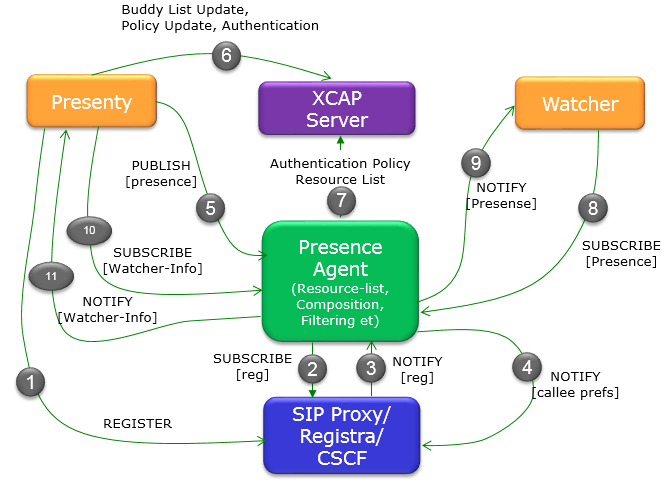
There are several components involved in presence subscription and notification. The watcher requests presence information, the presentity owns the state being watched, and the presence agent or server accepts the subscription and sends notifications. The following diagram shows the overall interaction between these entities, reillustrated from Reference [1].
Presence Notification Flow
The notification flow can be understood as three related procedures. First, the UE registers and may expose basic RCS capability. Second, an RCS-capable UE can publish its own capability or presence state to the presence agent. Third, another UE can subscribe to that presence state and receive NOTIFY messages when the state is available or changes.
Step 1 : Registration and Capability Availability
Even when a UE does not support full RCS presence, initial IMS registration normally still occurs. The REGISTER procedure can include RCS-related capability information so that the network can understand which services the UE may support. See the REGISTER capability example in UE Capability Information in REGISTER.
Step 2 : Capability Publication
If the UE supports RCS presence, it can publish its own service capability or presence state toward the presence agent. This allows the presence server to maintain current state for later watcher requests. See the PUBLISH capability example in UE Capability Information in PUBLISH.
Step 3 : Subscription and Notification
When a user starts an RCS action and the UE does not already have presence information for the other party, the UE subscribes to the presence event package. The presence server then sends NOTIFY with the current presence state. See the NOTIFY capability example in UE Capability Information in NOTIFY.
SUBSCRIBE Message Clip
The following clip shows a watcher subscribing to another user's RCS presence information.
Via: SIP/2.0/UDP ue1.example.com;branch=z9hG4bK-rcs-pres-001
From: <sip:user1@example.com>;tag=watcher01
To: <sip:user2@example.com>
Call-ID: rcs-pres-001@example.com
CSeq: 1 SUBSCRIBE
Contact: <sip:user1@ue1.example.com>
Event: presence
Accept: application/pidf+xml
Expires: 3600
In this SUBSCRIBE clip,
NOTIFY Message Clip
The following clip shows the presence server notifying the watcher with the current presence state.
Via: SIP/2.0/UDP presence.example.com;branch=z9hG4bK-rcs-pres-002
From: <sip:user2@example.com>;tag=presentity01
To: <sip:user1@example.com>;tag=watcher01
Call-ID: rcs-pres-001@example.com
CSeq: 1 NOTIFY
Event: presence
Subscription-State: active;expires=3580
Content-Type: application/pidf+xml
In this NOTIFY clip,
Presence XML Clip
The NOTIFY body carries the actual presence information. The following simplified PIDF clip shows the presentity, service tuple, availability state, contact URI, and timestamp.
<tuple id="rcs-presence">
<status><basic>open</basic></status>
<contact>sip:user2@device.example.com</contact>
<timestamp>2026-06-26T12:00:00Z</timestamp>
</tuple>
</presence>
In this PIDF clip,
Failure and Fallback Cases
If the UE cannot obtain valid presence information for the other party, it may fall back to a non-RCS service or display a failure indication. Typical failure points include missing NOTIFY, terminated subscription state, unsupported Content-Type, malformed PIDF XML, stale tuple data, or a presence document that does not include the service capability required by the attempted RCS operation.
For troubleshooting, check the SIP dialog first: SUBSCRIBE and NOTIFY should share the same Call-ID, Event should be presence, and Subscription-State should be active unless the service intentionally terminates the subscription. Then check the XML body and confirm that the reported presentity and tuple match the target service.
Reference
[1] Presence Tutorial - Columbia University
[2] RFC 3856 : A Presence Event Package for the Session Initiation Protocol (SIP)
[3] RFC 3265 : Session Initiation Protocol (SIP)-Specific Event Notification
[4] RFC 3857 : A Watcher Information Event Template-Package for the Session Initiation Protocol (SIP)