Presence is the mechanism that lets one user or application learn the service availability, device state, or communication capability of another user. In RCS, presence is commonly built from SIP subscription procedures and XML presence documents, so the important part is understanding both the SIP dialog and the presence document carried in the SIP body.
The basic terminology is based on the presence model described in RFC 2778. The same logical entities appear repeatedly in RCS presence procedures, especially when a user subscribes to another user's status or when a presence server distributes updates to watchers.
- Presence Model Overview
- Main Presence Entities
- SIP Presence Flow
- Presence Document
- Troubleshooting Points
Presence Model Overview
The following diagram summarizes the major presence-model entities and their relationship. The model separates the user or device that owns the presence state from the user or application that watches that state. This separation is useful because the presence server can aggregate and distribute updates without every watcher directly polling the presentity.
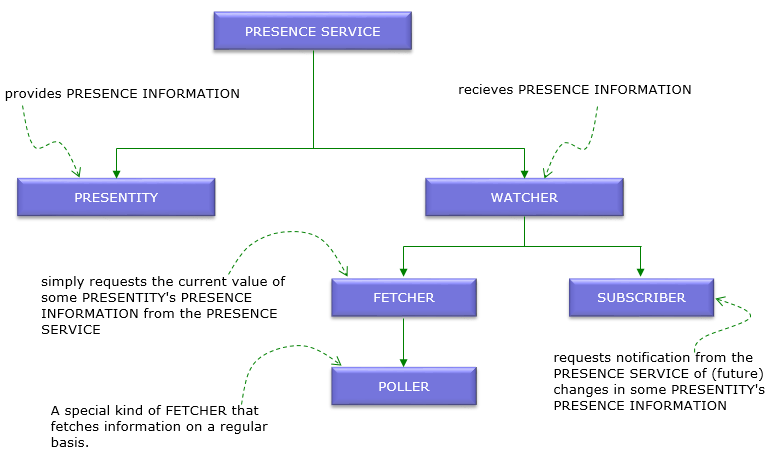
Main Presence Entities
SIP Presence Flow
Presence subscription is controlled by SIP. A watcher subscribes to the presence event package, and the presence agent confirms the subscription and sends NOTIFY requests whenever the subscribed presence state changes or when the subscription state itself changes.
SUBSCRIBE Clip
The following clip shows a watcher subscribing to presence information for a presentity.
Via: SIP/2.0/UDP ue1.example.com;branch=z9hG4bK-pres-001
From: <sip:user1@example.com>;tag=watcher01
To: <sip:user2@example.com>
Call-ID: pres-sub-001@example.com
CSeq: 1 SUBSCRIBE
Contact: <sip:user1@ue1.example.com>
Event: presence
Accept: application/pidf+xml
Expires: 3600
In this SUBSCRIBE clip,
NOTIFY Clip
The following clip shows a presence agent notifying the watcher with a PIDF presence document.
Via: SIP/2.0/UDP presence.example.com;branch=z9hG4bK-pres-002
From: <sip:user2@example.com>;tag=presentity01
To: <sip:user1@example.com>;tag=watcher01
Call-ID: pres-sub-001@example.com
CSeq: 1 NOTIFY
Event: presence
Subscription-State: active;expires=3580
Content-Type: application/pidf+xml
In this NOTIFY clip,
Presence Document
The actual presence state is normally described in an XML document such as PIDF. The SIP message delivers the document, but the XML body contains the presentity URI, service tuple, status, contact address, and timestamp that applications use to update the user interface or service state.
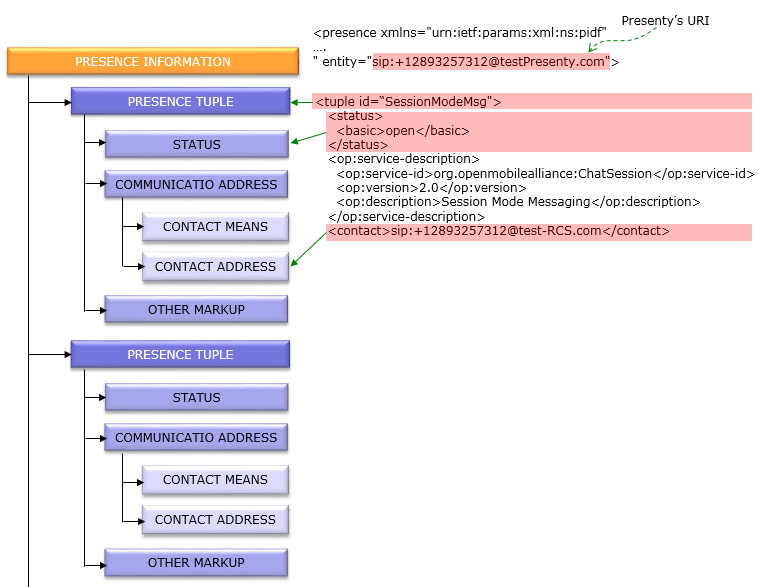
PIDF XML Clip
The following clip shows a simplified PIDF body carried inside the NOTIFY request.
<tuple id="rcs-service-1">
<status><basic>open</basic></status>
<contact>sip:user2@device.example.com</contact>
<timestamp>2026-06-26T12:00:00Z</timestamp>
</tuple>
</presence>
In this PIDF clip,
Troubleshooting Points
When RCS presence does not update correctly, first verify the SIP subscription dialog. The SUBSCRIBE and NOTIFY messages should use the same Call-ID, compatible From and To tags after dialog creation, the Event header should be presence, and the subscription state should remain active until expiry or termination.
After the SIP dialog is confirmed, inspect the XML body. A valid NOTIFY can still be unusable if the Content-Type does not match the body, the presence entity does not match the expected presentity, the tuple status is missing, or the contact and timestamp values are stale or malformed.